





































An AllProgs Arrow trick fix.
Merry Christmas skinners.
Friday, December 14, 2007 by I.R. Brainiac | Discussion: WindowBlinds
EDIT...what I thought was a sure fix isnt as effective as first thought...it does help but isnt foolproof...you can still learn about how the left negative content margin works tho. 
Almost all skinners(and many users)are aware of the problems with using the allprogs arrow to cover the allprogs text area.NonEnglish systems damn near always get it misaligned because those systems have more text there.
Even substyles can be a pain because even a normal setup for this spot can get pushed around a bit.
I think I have the solution.It,s only been tested on Slider XP,and only on Hungarian and French languages.(thank you Bilbo and Quentin)
It's SUPER easy.Just assign a standard windows system font(arial 8) and set the font angle to 900.This will point the font straight up...then it wont matter how long it gets.
Arrow graphic must cover the background precisely or you will see classic mouseover color in places.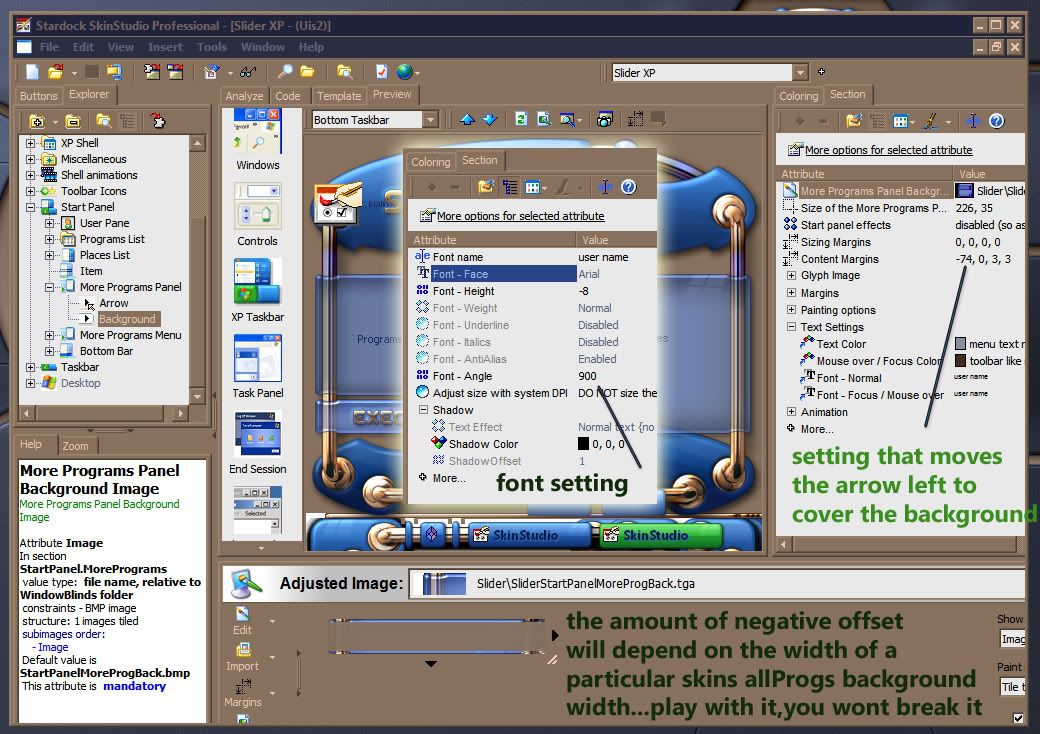
 |
|
Page 2 of 2 | |
|
|---|




Reply #25 Wednesday, March 26, 2008 6:11 PM
Couldnt find a sweet spot that satisfied French AND english.
-73 worked on English and hingarian...had to use -90 on French.
 (for NLL)
And I really thought I had it nailed with this.


Reply #27 Thursday, March 27, 2008 10:55 AM
Ruben

Reply #28 Thursday, March 27, 2008 11:45 AM

Reply #29 Thursday, March 27, 2008 12:34 PM
Nope, -99 for french

(it's usually -30 less that the original version for french ...)
Reply #30 Thursday, March 27, 2008 12:52 PM
Whatever works...Quentin said -90 worked on his system...its a lost cause to get one setting to work on all systems...dammit!
Reply #31 Thursday, March 27, 2008 1:14 PM


Reply #32 Thursday, March 27, 2008 1:21 PM
Maybe he has a different french accent... Bordeaux perhaps?

Reply #34 Thursday, March 27, 2008 2:38 PM
I was talking for Neutronium DM on XP SP2 home Edition (and not with a regional dialect  )
)I did that WWW Link a few years ago for french specificities
the -110 value i gave at this time was when toppanel where standardly width sized to 380 and both Program List and Places to 190 ... Reply #35 Thursday, March 27, 2008 11:49 PM
Makes me mad that its pretty much useless now...the 'fix' was supposed to work on ALL languages...


Reply #36 Monday, April 7, 2008 6:32 PM
Reply #37 Tuesday, April 8, 2008 1:25 AM
Font angle isnt really a sure fix that I had hoped it would be.(tho,at this time only french seems to be the exception)
Negative content margin for the background still aligns the arrow.(just remember to check large and small icons in the progs pane)
Reply #38 Saturday, July 5, 2008 12:59 PM
That one can get it to work at all is a local miracle it appears.The offset produces one effect which is annoying when using a right-edge vertical Taskbar, which happens to be my preference, of course.
Before I decided to clean up my All Programs menu (what a hash Windows default behavior makes of this - another story), the primary menu would fly open half way across the screen to the left of the Taskbar. I assumed this was because of the negative offset for the All Programs menu item button fooling the OS into thinking the left edge of the All Programs menu item button was out there & the menu was opening to the left of it (as you'd normally expect). Having let Windows Installer have its way with it, I also had such a huge primary menu that it took up 3 columns.
Once I cleaned up & categorized my All Programs menu & submenus, using short category names only for the primary menu folders and showing only those folders on the primary menu, the primary menu now opens off the right side of the All Programs menu item button where you'd expect it to, since it is narrower than the width of the Places pane of the Start Menu. If the folder names are long enough for the menu to end up wider than the Places pane, it will open off to the left, offset by the number of pixels designated in the All Programs menu item button attributes.
It appears this only affects right-edge vertical Taskbars (which makes sense), so if there are any other oddballs like me out there using a right-edge Taskbar, this information may prove useful.
Reply #40 Saturday, July 5, 2008 3:46 PM
Some of us are more I.M. Braindead than others.Once I had the button positioned where I wanted it, I long ago went off to other pursuits and didn't return to study the problem more until this lovely idle holiday weekend.
Please login to comment and/or vote for this skin.
Welcome Guest! Please take the time to register with us.
There are many great features available to you once you register, including:
- Richer content, access to many features that are disabled for guests like commenting on the forums and downloading skins.
- Access to a great community, with a massive database of many, many areas of interest.
- Access to contests & subscription offers like exclusive emails.
- It's simple, and FREE!
|
|
Page 2 of 2 | |
|
|---|
Reply #21 Wednesday, February 27, 2008 1:31 AM
I've seen it look fine with one size but not the other til I tweaked it some more...then it worked for both.