























Problems with 2.10a.014
Tuesday, October 16, 2007 by alpha-prime | Discussion:
Hi
I have been using the new ObjectBar but have found a few items that are causing me usability issues. Using the latest version 2.10a.014
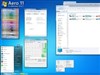
1) The bar does not properly take the color from the WindowBlind. E.g. I am using Ares by Mike Bryant in default color. The task bar is a black color but Objectbar takes on a gray color.
2) The folder item changes direction for sub-folders. E.g. open "My Documents" pick a folder with subfolders. Then depending on maximum size of folder name the sub-folder will open either to left or right, then open another level of sub-folder which will also open to either left or right. You can then end-up with the final folder going one way then the next and ending up covering over the original menu and there is no way to get out if you navigated down the wrong tree other than to click outside objectbar and start again.
3) Alternate text color does not apply to sub folders. E.g in Theme Editor, Skin tab, Text Color, select an alternate color. Color is only used on the bar, there does not appear to be an option to allow this to be used on the sub-folder menus.
4) Is there a way for folder items on the bar to auto open after hovering the mouse rather than having to click to select?
I have been using the new ObjectBar but have found a few items that are causing me usability issues. Using the latest version 2.10a.014
1) The bar does not properly take the color from the WindowBlind. E.g. I am using Ares by Mike Bryant in default color. The task bar is a black color but Objectbar takes on a gray color.
2) The folder item changes direction for sub-folders. E.g. open "My Documents" pick a folder with subfolders. Then depending on maximum size of folder name the sub-folder will open either to left or right, then open another level of sub-folder which will also open to either left or right. You can then end-up with the final folder going one way then the next and ending up covering over the original menu and there is no way to get out if you navigated down the wrong tree other than to click outside objectbar and start again.
3) Alternate text color does not apply to sub folders. E.g in Theme Editor, Skin tab, Text Color, select an alternate color. Color is only used on the bar, there does not appear to be an option to allow this to be used on the sub-folder menus.
4) Is there a way for folder items on the bar to auto open after hovering the mouse rather than having to click to select?
Philly0381
Reply #2 Tuesday, October 16, 2007 6:33 PM

Reply #2 Tuesday, October 16, 2007 6:33 PM
When I ran the update and tried ObjectBar, it was acting strange, so I uninstalled, rebooted and reinstalled and things were fine. Then it took me awhile to remember how to use it.  Way too many programs to play with here. Could we get some more!

Way too many programs to play with here. Could we get some more!
alpha-prime
Reply #3 Wednesday, October 17, 2007 2:06 PM
Reply #3 Wednesday, October 17, 2007 2:06 PM
Hi
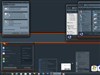
Re query 1) I have tried using the different Blind components. But ObjectBar does not produce a very good match. In the screen shot below it is no so obvious but on screen the Object bar is a gray color compared to the black of the Blind task bar.
Re query 2) A screen shot is available at WWW Link
The sub folders open on top of others making it very difficult to scroll if you wanted to navigate backwards. This happens if the bar is docked at the top or on the right. I have not tried docking it on the left.
Re query 1) I have tried using the different Blind components. But ObjectBar does not produce a very good match. In the screen shot below it is no so obvious but on screen the Object bar is a gray color compared to the black of the Blind task bar.
Re query 2) A screen shot is available at WWW Link
The sub folders open on top of others making it very difficult to scroll if you wanted to navigate backwards. This happens if the bar is docked at the top or on the right. I have not tried docking it on the left.
ZubaZ
Reply #4 Wednesday, October 17, 2007 2:27 PM


Reply #4 Wednesday, October 17, 2007 2:27 PM
What WB skin is that?
Does the same thing happen if the skin is on the left of the screen?
I'm having trouble applying the correct WB skin (any component) to OB. Very odd.
Does the same thing happen if the skin is on the left of the screen?
I'm having trouble applying the correct WB skin (any component) to OB. Very odd.
Vista Business 32 bit
Your computer has a Windows Experience Index base score of 4.1
Your Windows Graphics Experience score is 4.4
WindowBlinds version : WindowBlinds 6.0 (build 52 x86 - Vista Edition)
WindowBlinds is installed correctly on this PC
WindowBlinds appears to be activated on this PC
(Dell E773c) 1 is attached to Radeon X1650 Series
Wblind.dll 2007/10/08 18:07:20
Wbsrv.dll 2007/09/24 19:08:26
Wbconfig.exe 2007/10/01 17:35:33
Wbload.exe 2007/09/27 17:47:44
Wbhelp.dll 2007/08/27 11:54:07
Tray.dll 2007/09/12 17:58:21
Wbload.dll 2007/09/12 17:58:28
Screen.exe 2007/10/01 11:23:24
Your computer has a Windows Experience Index base score of 4.1
Your Windows Graphics Experience score is 4.4
WindowBlinds version : WindowBlinds 6.0 (build 52 x86 - Vista Edition)
WindowBlinds is installed correctly on this PC
WindowBlinds appears to be activated on this PC
(Dell E773c) 1 is attached to Radeon X1650 Series
Wblind.dll 2007/10/08 18:07:20
Wbsrv.dll 2007/09/24 19:08:26
Wbconfig.exe 2007/10/01 17:35:33
Wbload.exe 2007/09/27 17:47:44
Wbhelp.dll 2007/08/27 11:54:07
Tray.dll 2007/09/12 17:58:21
Wbload.dll 2007/09/12 17:58:28
Screen.exe 2007/10/01 11:23:24
alpha-prime
Reply #5 Wednesday, October 17, 2007 3:02 PM
Reply #5 Wednesday, October 17, 2007 3:02 PM
Hi
The Blind is Ares by Mike Bryant. The problem with the ObjectBar not being the same color as the Window Blind makes it unnatural and uncomfortable to use.
I tried an Object Bar created on the left and the sub-folders work ok, no overlapping sub-folders. It looks like an issue when an Object Bar is docked to the top or on the right.
The Blind is Ares by Mike Bryant. The problem with the ObjectBar not being the same color as the Window Blind makes it unnatural and uncomfortable to use.
I tried an Object Bar created on the left and the sub-folders work ok, no overlapping sub-folders. It looks like an issue when an Object Bar is docked to the top or on the right.
Please login to comment and/or vote for this skin.
Welcome Guest! Please take the time to register with us.
There are many great features available to you once you register, including:
- Richer content, access to many features that are disabled for guests like commenting on the forums and downloading skins.
- Access to a great community, with a massive database of many, many areas of interest.
- Access to contests & subscription offers like exclusive emails.
- It's simple, and FREE!
Reply #1 Tuesday, October 16, 2007 5:58 PM
Using other skins
This ain't my thing, but it's there.
Browse around.