




































WindowBlinds 6 Beta Feedback
Wednesday, August 1, 2007 by Neil Banfield | Discussion: Stardock Support General
Please post all feedback about the WindowBlinds 6 beta on this thread.
Note that the beta is for 32 bit XP and Vista systems only. Please do not post about it not working on 64 bit XP/Vista. Please continue to use WB 5.51 on those platforms.
This beta is for Object Desktop customers ONLY. Standalone WindowBlinds 5 owners will not be able to activate this build.
Please note that you must have Stardock Central 2.46 Build 154 or later to install the WindowBlinds 6 betas. If you try and use older versions, it'll eventually timeout and give you an error about an invalid URL.
If you have problems with it running at all, please uninstall WB6, reboot and then try reinstalling WB6 again.
 |
|
Page 13 of 27 | |
|
|---|

Reply #242 Monday, August 6, 2007 12:28 PM
Thanks Neil, I will delete it for now then and see if it is correct after next version release.

Reply #243 Monday, August 6, 2007 12:34 PM

Reply #245 Monday, August 6, 2007 1:18 PM
Yep: decided I will do a uninstall/reinstall, will see what I get when done.

Reply #247 Monday, August 6, 2007 3:47 PM
No, this has nothing to do with WB version 4 - the .wb4 files are cache files that WB creates on the fly for certain graphical elements. For reasons too technical for me to understand, they sometimes don't get refreshed properly and can cause some issues with window painting, particularly certain areas using magic pink trans. Deleting the .wb4(cache) files & reloading the skin (forcing WB to recreate them) usually fixes these cache-related display anomalies.

Reply #248 Monday, August 6, 2007 6:20 PM


Reply #249 Monday, August 6, 2007 6:51 PM
Note that under Windows XP, this delete and refresh took care of the titlebar alignment issues, but now the right mouse button menu (anywhere, like the desktop, for example) is black text on black now. The commands light up if you scroll over them, but...
Submenus appear to be painting correctly as do the start menus, if that helps anyone track this down.


Reply #250 Monday, August 6, 2007 7:07 PM
1) the per-application feature disabling has been disabled again. My applications that can't handle scroll-bar skinning are noticeably affected.
2) This might have something to do with the Virtual Desktop application - the transparent task-bar shows the background wallpaper from my main window even though I have set the VD to use it's own background as the window's background. Did that make sense? Here's a screen grab to give you an idea:
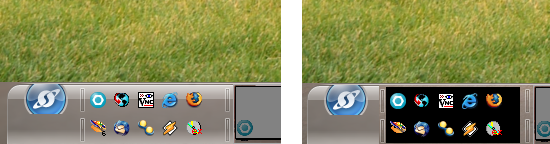
The left-most image is where you can see the wallpaper (the grassy image) stops just above the task-bar. Then my real background shows through the task-bar.
The right-most image shows what happens when I click to a different Virtual Desktop and then click back. the background of the Quick Launch area goes black. It happened in WB5.5 too, so I'm thinking it is related to VD not WB.

Reply #251 Monday, August 6, 2007 8:05 PM
Neil....While looking through the folder for the skin I noticed both of those listed in the skin if thats any help.
Reply #252 Monday, August 6, 2007 8:13 PM

The image on the left is how WB6Config previews the close button & top portion of the window frame right (correctly). The image in the middle is the source image. The image on the right is the close button & top portion of the window frame right as WB6 applies it to the active window - you can easily see the lighter hue of the two right-most pixel columns (the top portion of window frame right). Using magic pink trans.
Did not notice this until the .026 update, but could have been there before since it is subtle.
I believe all your painting issues are caused by a bug in the transparentblt support in your graphics card drivers. The drivers for early ATI boards have buggy alphablend support as well.
This would explain why it works perfectly on all our test boxes.
If you alter the hardware acceleration slider in windows (display properties->settings->advanced->troubleshoot) does the problem go away?

Reply #253 Monday, August 6, 2007 8:42 PM
okay, I'll give it go after I get home.. thanks
Reply #254 Monday, August 6, 2007 11:15 PM
Switched to VistaPlus and Vista32 and on both had the top part of the start orb still there on top. Switched to Twisted and it went away.
I'm seeing glow after effects on all the skin I've tried that had it, but the others seems to be more of a quick residual, then disappear on their own.
WindowBlinds version : WindowBlinds 6 (6.0 (beta build 19 x86))
WindowBlinds is installed correctly on this PC
WindowBlinds appears to be activated on this PC
Your machine supports per pixel borders on WindowBlinds skins.
(hp pavilion f50) 1 is attached to NVIDIA GeForce4 MX 440 with AGP8X
Wblind.dll 2007/08/03 11:51:20
Wbsrv.dll 2007/08/02 11:25:18
Wbconfig.exe 2007/08/02 11:25:47
Wbload.exe 2007/07/30 13:14:11
Wbhelp.dll 2007/07/24 10:21:07
Wbui.dll 2007/07/24 10:21:06
Tray.dll 2007/07/24 10:21:49
Reply #255 Monday, August 6, 2007 11:43 PM
The image on the left is how WB6Config previews the close button & top portion of the window frame right (correctly). The image in the middle is the source image. The image on the right is the close button & top portion of the window frame right as WB6 applies it to the active window - you can easily see the lighter hue of the two right-most pixel columns (the top portion of window frame right). Using magic pink trans.
Did not notice this until the .026 update, but could have been there before since it is subtle.
I believe all your painting issues are caused by a bug in the transparentblt support in your graphics card drivers. The drivers for early ATI boards have buggy alphablend support as well.
This would explain why it works perfectly on all our test boxes.
If you alter the hardware acceleration slider in windows (display properties->settings->advanced->troubleshoot) does the problem go away?
I dropped the slider down one notch from full and indeed the window frame right paints correctly now. So, a BIG thanks for recognizing that.

However, it didn't affect the painting issues I'm having with menus & MDI buttons - they still paint the same. With due respect, those painted flawlessly on this rig with 5.49 (even with full hardware accel) so it's hard for me to accept it is only the ATI drivers - something about the way WB paints menus must have changed with 5.50 & up. I would love to update these drivers but they are a proprietary Fujitsu set that I can't update, even using Patje's Mod Tool. Being a notebook with integrated graphics (and my primary business rig), I'm a little leery of how forcing a change might negatively affect the system, anyway.
I'm using .tga images for the menus with only 4 trans pixels, one in each corner, in case that somehow influences your thinking on this. The MDI buttons are using magic pink trans in the areas that paint darker.
I'm very grateful for the effort you've put in trying to diagnose & resolve my issues, Neil. Wish I could let you have this box for a bit to see what you could do...


Reply #256 Tuesday, August 7, 2007 2:55 AM
Now I had been running Leo for a while and wanted to use Diamond,
but the Right-Click menu and Program menus are mess up.
I have tried uninstalling/reinstalling didn't work.

Best regards,
Neksus

Reply #257 Tuesday, August 7, 2007 8:32 AM
First order of business, Nice work Stardock and StardockDesigns
Now I had been running Leo for a while and wanted to use Diamond,
but the Right-Click menu and Program menus are mess up.
I have tried uninstalling/reinstalling didn't work.
Best regards,
Neksus
Neksus,
Could you open the skin folder and delete all files with the extension ".WB4" and then try reapply the skin?
Another action that couls help is check for the latest ATI drivers, the newest is Catalyst 7.7 http://ati.amd.com/support/driver.html
Reply #258 Tuesday, August 7, 2007 3:40 PM
Build 27 has fixed the "per application feature disabling". Thanks a ton!
Who should I contact about the Virtual Desktop glitch with the Quick Launch part of the Task-bar? That is still happening - in fact I have turned off VD controlling my wallpaper, and it happens more frequently now.

Reply #259 Tuesday, August 7, 2007 5:35 PM

Reply #260 Tuesday, August 7, 2007 7:00 PM
Oh yeah forgot I had already tried deleting the WB4 files, but this time around it fixed it..seems odd to me.
Thanks for the reply
Please login to comment and/or vote for this skin.
Welcome Guest! Please take the time to register with us.
There are many great features available to you once you register, including:
- Richer content, access to many features that are disabled for guests like commenting on the forums and downloading skins.
- Access to a great community, with a massive database of many, many areas of interest.
- Access to contests & subscription offers like exclusive emails.
- It's simple, and FREE!
|
|
Page 13 of 27 | |
|
|---|
Reply #241 Monday, August 6, 2007 12:25 PM
Hey WG, are you running the latest version, deleting the wb4 files did not work for me, even after a reboot. Had to edit skin, see above reply.