



































help skinning/colouring application menu bar
Thursday, June 29, 2006 by liquidguru | Discussion: SkinStudio Help
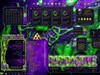
ok, i'm finally giving it a go, and trying to create a WB skin...could someone please tell me if it's possible to skin, or preferably re-colour, the menu bar background in applications...i've tried everything i can find, and to no avail..windows explorer is fine, it's other applications, as seen in the screeshot below,

thank you

thank you
liquidguru
Reply #2 Thursday, June 29, 2006 6:35 PM

Reply #2 Thursday, June 29, 2006 6:35 PM
thanks very much Night Train, that did the trick...fantastic
'm also having alot of trouble getting the TabPane background being anything other than white (ie the background panel in Display Properites), and the text color of 'File' in windows explorer is black, even though i've not got any black text set...are there some other settings i need to disable?
thank you
'm also having alot of trouble getting the TabPane background being anything other than white (ie the background panel in Display Properites), and the text color of 'File' in windows explorer is black, even though i've not got any black text set...are there some other settings i need to disable?
thank you
NightTrainthedark
Reply #3 Thursday, June 29, 2006 7:49 PM

Reply #3 Thursday, June 29, 2006 7:49 PM
Check your TAB PAGE image. I am gussing that is white. color it.
a shot in the dark about the black text- go to .. Controls/Menus/bar background/bar items...in the right tree ENABLE MENUBAR BUTTONS- make sure that is enabled.
liquidguru
Reply #4 Thursday, June 29, 2006 8:28 PM
Reply #4 Thursday, June 29, 2006 8:28 PM
hmmm, well everything looks fine in the preview panel or when clicking the Test button, just not when i apply the skin...
the same problem as i originally posted has started again, even though the Flat menus is disabled...wow, do you skinners have any hair left? mine's in chunks on the floor...i keep fiddling, thanks again for the suggestions, i had coloured the images...
cheers
the same problem as i originally posted has started again, even though the Flat menus is disabled...wow, do you skinners have any hair left? mine's in chunks on the floor...i keep fiddling, thanks again for the suggestions, i had coloured the images...
cheers
liquidguru
Reply #5 Thursday, June 29, 2006 9:33 PM
Reply #5 Thursday, June 29, 2006 9:33 PM
i'm not sure if it's normal or not, but i found that SkinStudio was using the 'original' .bmp in the skin directory, not the ones that i had changed, even though it said it was using them in SS. i renamed the bmp files for the menu backgrounds in explorer and now it seems to be working, all expect the text on the tools bars, which stubbonly remains black, even though everything to do with text in the Toolbars Buttons section is set to white....
NightTrainthedark
Reply #6 Friday, June 30, 2006 6:07 AM
Reply #6 Friday, June 30, 2006 6:07 AM
If you continue to have problems liquidguru you can zip over to the Skinartistry Workshop and upload the skin so I can take a peak at the file to see if anything is amiss. http://www.design.skinartistry.com/news.php

Please login to comment and/or vote for this skin.
Welcome Guest! Please take the time to register with us.
There are many great features available to you once you register, including:
- Richer content, access to many features that are disabled for guests like commenting on the forums and downloading skins.
- Access to a great community, with a massive database of many, many areas of interest.
- Access to contests & subscription offers like exclusive emails.
- It's simple, and FREE!
Reply #1 Thursday, June 29, 2006 5:54 PM
Assuming it is a per pixel framed skin, which it sure looks like,
In the left tree of Skinstudio, go to Controls/Menus/pull Down Background. In the right tree properties look for Flat menus-disables skining. Make sure that is disabled.
Then in classic colors section (Miscellaneous/colors) the color is set at Menus/Background menu.