





































Aston 1.9.2 released
Fast and beautiful Desktop replacement
Thursday, June 29, 2006 by Gladiators | Discussion: WinCustomize News
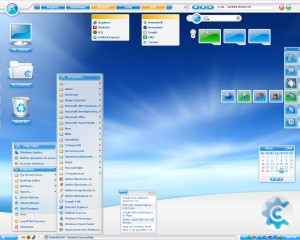
Key features:
* Fast, stable and highly responsive even on slow computers
* Easy customization of any Desktop parameter
* Hundreds of free Themes
* Lots of advanced features (hotkeys, Toolbars, freeform animated icons)
Download: Aston 1.9.2. Link: Aston website
 |
|
Page 2 of 2 | |
|
|---|


Reply #23 Sunday, July 2, 2006 12:07 PM
Not trying to put this app down, in fact it's pretty nice in a number of ways and it's obvious that the developer has put in a good amount of time, energy and love into this product but I'm a OD subscriber running DX Pro and not to sure I really need this but the un-installer needs a good looking over and a easier way, other than a system restore to get your system back.

Reply #24 Sunday, July 2, 2006 2:40 PM
This is just an observation, by the way, not an attack on anyone:
 as a developer myself, I too have to live with the fact that very few people actually read the documentation. Most of the time they won't even read the application's Introduction screen, they just click Ok to get on with it, accepting the defaults without even realizing what they are.
Reply #25 Sunday, July 2, 2006 4:54 PM
Reply #26 Sunday, July 2, 2006 7:31 PM
The fact is that there are *some* programs out there that require a bit of computer knowledge (some more, some less) to install and operate properly. A non-computer savvy user (and, again, I am definitely NOT referring to you) can get in trouble with these type of programs... it's not the user's fault either, it's just that 'you can't ask a baby to run before it can walk'.

Reply #27 Sunday, July 2, 2006 9:32 PM
| I believe that I should not have to edit the registry to un-install this and that programs like this should not require a geek degree. |
Litestep used to spit out an error [well, it was actually Windows 98 doing it] if your Doze install was lacking a particular dll file. The error was "you must re-install Windows". Lord knows how many people actually DID that....but unfortunately "please locate and install mvcp60.dll and all will be OK" was NOT in Windows' vocabulary of helpful hints and FAQs. It was, however, all over the place in the LS forums, etc.....along with the phrase 'RTFM'.
Because alternate shells is a fairly 'drastic' change to an OS's workings the idea of RTFM is paramount....and it wasn't until the latest rendition of Litestep-themeing [OTS2] that LS became even quasi geek-free...
Last time I used Aston it didn't appear to be a drama....[but that was some years ago]...

Reply #28 Sunday, July 2, 2006 9:35 PM
Yeah, it looked cool, but I could never use the start bar in Aston (I attributed it to probably some video driver somewhere-not wanting to blame Aston.
My opinion-it is NOT usable and definitely NOT ready for Prime Time. I was hoping that since it was version 1.92 it might be a GO.
If you are not comfortable editing your Registry, DON'T do it!

Reply #30 Monday, July 3, 2006 12:15 PM

Reply #31 Monday, July 3, 2006 12:20 PM
| This is probably one of the main reasons why alternate shells (i.e.; programs that replace Explorer as the shell instead of enhancing the existing shell) are not for everybody. |
Exactly! I looked at Aston Shell but wanted something to enhance/expand upon 'Explorer', rather than replace the shell with something I'm not savvy enough to use/repair (have read shell replacements can be tricky), which is why I purchased the Winstep Extreme package instead. However, Aston Shell looks good, so perhaps I'll look into it for my secondary OS when I become a little more savvy.

Reply #32 Monday, July 3, 2006 1:13 PM
Reply #33 Monday, July 3, 2006 3:33 PM
That being said, I still believe that if you are a developer, and have made the decision to charge for your application then by all rights you have, crossed that line so to speak, and now have the reponsibility to insure that your doing everything possible to make certain that the really simple things like installing and uninstalling of your application are as painless as possible with the expectation of the most generic level of technical expertise possible. At the very least, a qualifer during the installation that indicates that editing the registry to remove the application will be necessary.
At the end of the day, I agree the best advise is what some have already stated, if you are uncomfortable with tinkering with system settings and registry values, then do not install this. I still think that's to bad because fundamentally this a great concept for a alternate shell and some really nice eye candy for your desktop. Maybe the developer is reading this thread and will address this in a future build. I hope so because I think unless that issue is addressed, the Aston folks are severly limiting their potential market. Just my 2 cents worth.
BTW, not to try and promote or up-sell anything but a really good application for those of us without extensive backgrounds in the inner workings of the system registry, Registry Mechanic by PC Tools is great at solving registry problems and compacting your registry. It does cost too though.. $30 I think but worth it if you are doing a lot of tinkering. I'm sure there are a myraid of applications like this out there but worth looking into.
Reply #34 Monday, July 3, 2006 4:57 PM
What Aston WANTS to do is remain on your system and WANTS you to use ShellSwapper to go back and forth between Aston and Explorer. I tried this as well. Man, what a slow down! Explorer slowed to a CRAWL. That's when I had had enough. It still does not uninstall cleanly when you want it to.
Reply #35 Monday, July 3, 2006 10:57 PM
From the FAQ:
run %Aston%\Shswdos.exe at a command prompt.
Oleg & company have no desire to remain installed if they're not welcome...
Reply #36 Tuesday, July 4, 2006 11:09 AM
Perhaps it does not play well with WB5??? I did not unload WB5 before running Aston...
Reply #37 Tuesday, July 4, 2006 11:15 AM
The sentence above should be, "At this point, I don't believe I had Shellswapper installed..."
Reply #39 Tuesday, July 4, 2006 7:22 PM
Then, more than likely your system will have no shell.
Don't panic. It will probably boot into a screen with only the mouse showing.
Start Task Manager (CTRL-ALT-DEL)
File/Run...
Regedit [Enter]
- To set the DEFAULT system shell:
* Locate the following key:
HKEY_LOCAL_MACHINE\Software\Microsoft\Windows NT\CurrentVersion\Winlogon
* Change the string value named "Shell" to the location of the file you
want to use as your default system shell.
For Explorer use (do not specify a path):
Explorer.exe
Please login to comment and/or vote for this skin.
Welcome Guest! Please take the time to register with us.
There are many great features available to you once you register, including:
- Richer content, access to many features that are disabled for guests like commenting on the forums and downloading skins.
- Access to a great community, with a massive database of many, many areas of interest.
- Access to contests & subscription offers like exclusive emails.
- It's simple, and FREE!
|
|
Page 2 of 2 | |
|
|---|
Reply #21 Saturday, July 1, 2006 10:15 AM