





































Wanted......Apple OS
Monday, June 12, 2006 by Jafo | Discussion: Macintosh
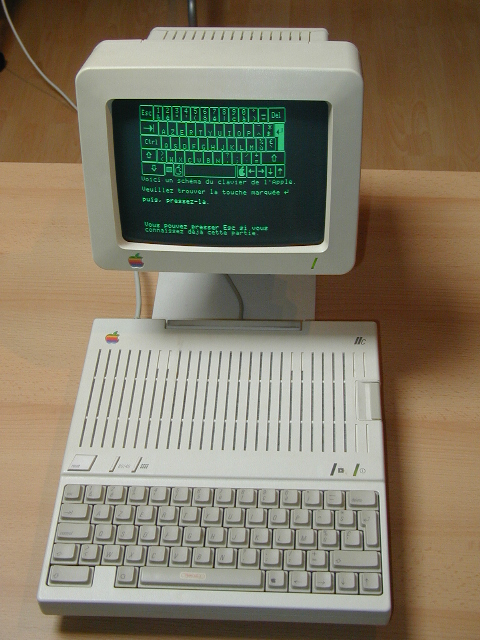
I have one of these....but need an 'easy' way to get hold of some OS disks for it....just the OS disks themselves, not all those null-modem data transfer/whatever solutions that need a soldering iron....just the disks....
Will pay handsomely....[afterall the whole computer was only AUD $5....with extra drive, printer and mouse].
I just want to be able to say:- "Yes, of course I have an Apple....what do you take me for....backward - primitive?"...
 |
|
Page 1 of 2 | |
|
|---|


Reply #3 Tuesday, June 13, 2006 2:14 AM

Reply #4 Tuesday, June 13, 2006 2:31 AM
| You should be able to download basic somewhere from the net and then copy it to a 5" floppy and then run it. |
No...not if it needs to be on 5.25 inch mac-formatted floppies...when all you have is the equivalent for PC.
Without the 'basic' I can't even format the floppies.
All I can do is 'turn it on'....the lights are on but no-one's home...
Reply #5 Tuesday, June 13, 2006 2:40 AM
Are you sure you can't find some utility that'll mac format a 5.25 inch floppy? I would have thought there'd be some overly eager guy on the internet who'd have released something.
Good luck with it though anyway...
Reply #6 Tuesday, June 13, 2006 2:46 AM
| Are you sure you can't find some utility that'll mac format a 5.25 inch floppy? I would have thought there'd be some overly eager guy on the internet who'd have released something. |
As I understand it the floppies are identical but the drives very definitely are not...one ver cannot read or write for the other as they are fundamentally incompatible....like 3,5 floppies vs tape drives...

Reply #7 Tuesday, June 13, 2006 7:42 AM
I couldn't find any place that sells it. I think your best bet will be eBay.


Reply #9 Tuesday, June 13, 2006 7:58 AM
I'll let you know.


Reply #10 Tuesday, June 13, 2006 8:04 AM
Don't know if a "modern"
 5.25" drive can emulate that at all no matter how good your programming skills!
There *were* some very clever DOS format proggys in the early days, but even running them under Windows - I don't like your chances.
Reply #11 Tuesday, June 13, 2006 8:19 AM
| I have a working IIc and I think I have the original system disks. I may have an external apple drive laying around too. We'll see what can be done. I'll let you know. |
Sounding good....Jafo crosses fingers....
Chris TH ...yes, I looked into the pros and cons...assuming there was some super-duper easy way....but there wasn't/isn't....

Reply #12 Tuesday, June 13, 2006 10:27 AM

Reply #13 Tuesday, June 13, 2006 3:19 PM

Out of curiosity.....what happens when you hit and release the "Reset" key and then press the "Ctrl" and "B" key simultaneously ?
Reply #14 Tuesday, June 13, 2006 4:35 PM

Reply #15 Tuesday, June 13, 2006 6:22 PM
| It just worked. |
My guess is you were about nine when they came out.......at that age everything 'just' works....
| I don't recall |
.....I can't remember what I had for breakfast


Reply #16 Tuesday, June 13, 2006 8:27 PM
| My guess is you were about nine when they came out.......at that age everything 'just' works |
You know, there was a time when you didn't even need disks?
http://www.physorg.com/news68796309.html
"Probably operated by crank, it survives in three main pieces and some smaller fragments."
This device, "could calculate the position of certain stars, at least the Sun and Moon, and perhaps predict astronomical phenomena"
Reply #17 Tuesday, June 13, 2006 8:37 PM
| what happens when you hit and release the "Reset" key and then press the "Ctrl" and "B" key simultaneously ? |
IIRC the targeting graticule pops up for the orbiting LASER satellite.
If you kept the EULA, the destruct sequence was encoded in the Apple Headquarters postcode. I think it points to Redmond by default?
Just don't aim it at your little brother, you'll have his eye out - OK?
Reply #18 Tuesday, June 13, 2006 9:13 PM
| Out of curiosity.....what happens when you hit and release the "Reset" key and then press the "Ctrl" and "B" key simultaneously ? |
Do I have to try that....or will it just then boot into Windows and subsequently go to BSOD so I feel right at home?....
Reply #20 Tuesday, June 13, 2006 10:17 PM
I remember that trick. It was so funny. In my computer class in high school, when there was a substitute, we did that on all the machines. I so want to take out my old Mac from the closet now!
Please login to comment and/or vote for this skin.
Welcome Guest! Please take the time to register with us.
There are many great features available to you once you register, including:
- Richer content, access to many features that are disabled for guests like commenting on the forums and downloading skins.
- Access to a great community, with a massive database of many, many areas of interest.
- Access to contests & subscription offers like exclusive emails.
- It's simple, and FREE!
|
|
Page 1 of 2 | |
|
|---|
Reply #1 Tuesday, June 13, 2006 1:03 AM