






































Need someone to figure out the problem....
Thursday, May 4, 2006 by dhaval_1920 | Discussion: WindowBlinds
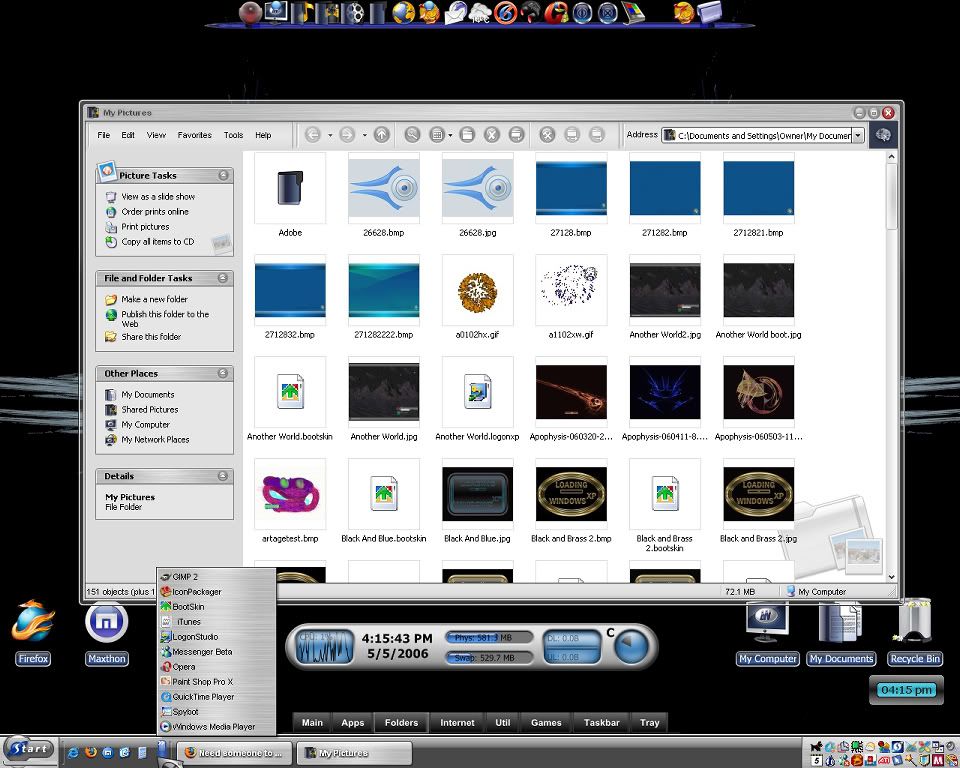
can someone please figureout the problem here....I am not getting the round corners in quick launch menu and also the transparancy....and the scroll bar in the window is also messed up....whats wrong?....


Cavan1
Reply #2 Friday, May 5, 2006 6:44 AM

Reply #2 Friday, May 5, 2006 6:44 AM
dhaval_1920, the quick launch and favorites menus will not be transparent as the are not menus they are toolbars. For the other issue
I think NT is right on, looks like explorer fell asleep and forgot how to paint the GUI. Quick launch should be brushed metal look, same
as the title bar looks, it is trying to apply the menu background to quick launch which is wrong.
I think NT is right on, looks like explorer fell asleep and forgot how to paint the GUI. Quick launch should be brushed metal look, same
as the title bar looks, it is trying to apply the menu background to quick launch which is wrong.
David Lyncheski
Reply #3 Friday, May 5, 2006 7:26 AM
Reply #3 Friday, May 5, 2006 7:26 AM
I have the same problem. Quick launch menu, transparancy and scroll bar. if I use arrow (or any other vista skin that is transparent) and your screensaver comes on, my cursorxp cursor goes behind the window frame. also my start button overlay goes under the menu. after a while i removed window blinds, but today i am going to reinstall it.
David Lyncheski
Reply #4 Friday, May 5, 2006 7:27 AM
Reply #4 Friday, May 5, 2006 7:27 AM
I have the same problem. Quick launch menu, transparancy and scroll bar. if I use arrow (or any other vista skin that is transparent) and your screensaver comes on, my cursorxp cursor goes behind the window frame. also my start button overlay goes under the menu. after a while i removed window blinds, but today i am going to reinstall it.
dhaval_1920
Reply #5 Friday, May 5, 2006 10:37 AM
rebooted 1000 times....but same problem....and by the way...I have LEGAL copy of WB5...

Reply #5 Friday, May 5, 2006 10:37 AM
rebooted 1000 times....but same problem....and by the way...I have LEGAL copy of WB5...
Cavan1
Reply #6 Friday, May 5, 2006 3:20 PM
Reply #6 Friday, May 5, 2006 3:20 PM
Hey dhaval_1920, have you tried switching to another skin, then reboot, then try Aura again.
Do you have shareware or purchased version of WB. If purchased and you had shareware first did you uninstall shareware before installing full version.
If that does not work you may need to uninstall and reinstall WB 5.
Aura should look like this.
Do you have shareware or purchased version of WB. If purchased and you had shareware first did you uninstall shareware before installing full version.
If that does not work you may need to uninstall and reinstall WB 5.
Aura should look like this.
dhaval_1920
Reply #7 Saturday, May 6, 2006 9:32 AM
Reply #7 Saturday, May 6, 2006 9:32 AM
Tried that too Cavan....but same thing....
but forget about quicklaunch....take a look at the scrollbar in the window....the left scrollbar is total black....and the one on the right
side is not even skinned........
but forget about quicklaunch....take a look at the scrollbar in the window....the left scrollbar is total black....and the one on the right
side is not even skinned........

dhaval_1920
Reply #9 Monday, May 8, 2006 10:39 AM
Reply #9 Monday, May 8, 2006 10:39 AM
here it is....
WindowBlinds 5.0 System Information Report:
STATUS : WB+ SRV+ HLP+ UI+ TRAY+
WindowBlinds is installed correctly on this PC.
WindowBlinds appears to be activated on this PC
Your machine supports per pixel borders on WindowBlinds skins.
You have 2 monitors.
(Default Monitor) 1 is attached to NVIDIA GeForce 6800 Ultra
(Default Monitor) 2 is attached to NVIDIA GeForce 6800 Ultra
Wblind.dll 2006/03/21 13:33:46
Wbsrv.dll 2005/12/20 22:57:44
Wbconfig.exe 2006/03/19 14:33:44
Wbload.exe 2005/12/21 00:04:40
Wbhelp.dll 2004/09/18 15:37:00
Wbui.dll 2005/12/06 21:29:06
Tray.dll 2005/11/02 13:28:26
WindowBlinds 5.0 System Information Report:
STATUS : WB+ SRV+ HLP+ UI+ TRAY+
WindowBlinds is installed correctly on this PC.
WindowBlinds appears to be activated on this PC
Your machine supports per pixel borders on WindowBlinds skins.
You have 2 monitors.
(Default Monitor) 1 is attached to NVIDIA GeForce 6800 Ultra
(Default Monitor) 2 is attached to NVIDIA GeForce 6800 Ultra
Wblind.dll 2006/03/21 13:33:46
Wbsrv.dll 2005/12/20 22:57:44
Wbconfig.exe 2006/03/19 14:33:44
Wbload.exe 2005/12/21 00:04:40
Wbhelp.dll 2004/09/18 15:37:00
Wbui.dll 2005/12/06 21:29:06
Tray.dll 2005/11/02 13:28:26
Bichur
Reply #10 Monday, May 8, 2006 10:02 PM
legal in what country?
It doesn't look completely broke, but it does look cracked.
Reply #10 Monday, May 8, 2006 10:02 PM
| I have LEGAL copy of WB5.. |
legal in what country?
| here it is.... |
It doesn't look completely broke, but it does look cracked.
Please login to comment and/or vote for this skin.
Welcome Guest! Please take the time to register with us.
There are many great features available to you once you register, including:
- Richer content, access to many features that are disabled for guests like commenting on the forums and downloading skins.
- Access to a great community, with a massive database of many, many areas of interest.
- Access to contests & subscription offers like exclusive emails.
- It's simple, and FREE!
Reply #1 Friday, May 5, 2006 5:37 AM