































cutout icon
Wednesday, April 19, 2006 by riempies | Discussion: WinCustomize Talk
how does one create a object that is a cutout similar to food object to place on your desktop as link, with the background around the cutout showing the desktop behind and not say a white square?
Keikonium
Reply #2 Wednesday, April 19, 2006 6:01 PM

Reply #2 Wednesday, April 19, 2006 6:01 PM
This is best done with DesktopX. This is just about the only thing I can do with Desktop X lol. Time to throw together another tutorial  . I will make another post that will include all the images and such. So sit tight...

 . I will make another post that will include all the images and such. So sit tight...

Keikonium
Reply #3 Wednesday, April 19, 2006 6:37 PM
Reply #3 Wednesday, April 19, 2006 6:37 PM
Alrighty, I hope this is what you are asking about:
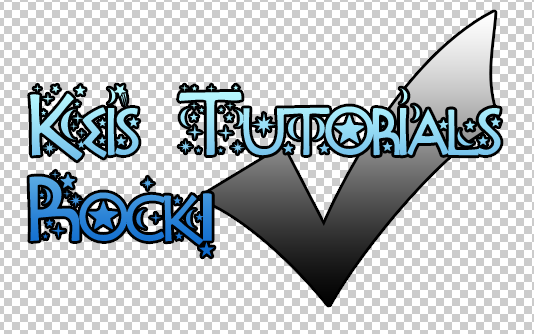
Before we start, we have to have an image. So open up Photoshop, or your photo editor of choice. Hopefully it has transparancy (so no MSPaint here ). Create an image, and have it transparent in the background like this:
Now we can get started with the creation. Open up the DesktopX Builder and right click the tray icon and then go to new object:
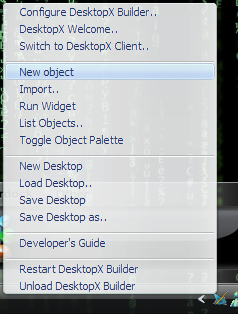
The screen on the left will come up. The one on the right comes up when you click Change (beside object type):
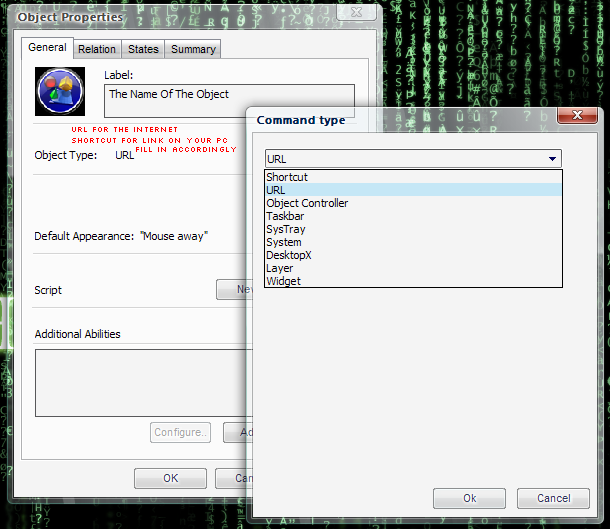
If you want it to link to a file/folder on your desktop, choose shortcut. If you want a web URL choose, URL.
Next, click on the states tab > appearance > image. Choose the image you want:
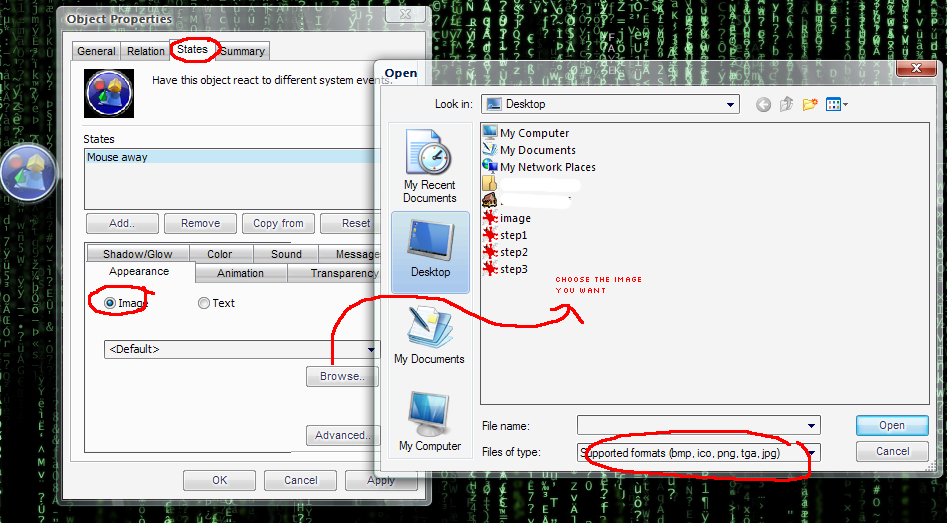
Click Apply and you end with this:

Of course, you can play around with the options here:
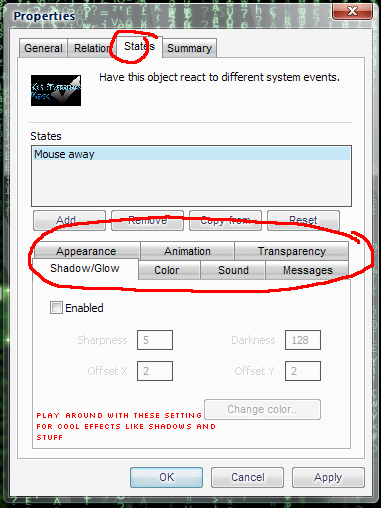
You can add shadows, sounds (I think), and other fun things. Just follow the images, and you should be fine . Also keep in mind this is very basic. Just using the built in stuff that comes with desktopX. Nothing fancy like custom code or anything.
I hope this is what you are looking for. Good luck  .
Before we start, we have to have an image. So open up Photoshop, or your photo editor of choice. Hopefully it has transparancy (so no MSPaint here
 ). Create an image, and have it transparent in the background like this:
Now we can get started with the creation. Open up the DesktopX Builder and right click the tray icon and then go to new object:
The screen on the left will come up. The one on the right comes up when you click Change (beside object type):
If you want it to link to a file/folder on your desktop, choose shortcut. If you want a web URL choose, URL.
Next, click on the states tab > appearance > image. Choose the image you want:
Click Apply and you end with this:

Of course, you can play around with the options here:
You can add shadows, sounds (I think), and other fun things. Just follow the images, and you should be fine
 . Also keep in mind this is very basic. Just using the built in stuff that comes with desktopX. Nothing fancy like custom code or anything.
I hope this is what you are looking for
. Good luck  .

Bichur
Reply #5 Wednesday, April 19, 2006 11:44 PM

Reply #5 Wednesday, April 19, 2006 11:44 PM
If you use paint - everything you want to be transparent
needs to be 'magic pink'
R - 255
G - 0
B - 255
needs to be 'magic pink'
R - 255
G - 0
B - 255
riempies
Reply #6 Thursday, April 20, 2006 6:57 AM
Reply #6 Thursday, April 20, 2006 6:57 AM
many thanks for that Keikonium and Sir Bichur, will give it a go tonight
on both photoshop an paint
on both photoshop an paint
riempies
Reply #7 Thursday, April 20, 2006 7:13 AM
Reply #7 Thursday, April 20, 2006 7:13 AM
Keikonium,
is it possible to get a copy of your wallpaper somewhere?
plus how do you get your meny bars to be transparent (windows)
is it possible to get a copy of your wallpaper somewhere?
plus how do you get your meny bars to be transparent (windows)
Keikonium
Reply #8 Thursday, April 20, 2006 1:42 PM
Reply #8 Thursday, April 20, 2006 1:42 PM
I made the wallpaper myself. You probably wont like it tho >_o. It may look like that matrix, but it really says, Enter the Keitrix . Here is a link to the wallpaper:
Link
I still have the PSD... Its a huge 64 MB tho >_o...
If you know a place I could upload that much, I'd upload and give you the link so you can play around with it yourself .
. Here is a link to the wallpaper:Link
I still have the PSD... Its a huge 64 MB tho >_o...
If you know a place I could upload that much, I'd upload and give you the link so you can play around with it yourself
 .
Keikonium
Reply #9 Thursday, April 20, 2006 1:46 PM
Reply #9 Thursday, April 20, 2006 1:46 PM
Oh and for the windows... I use WB5 . You need the paid version tho... *cough*
. You need the paid version tho... *cough*
Keikonium
Reply #10 Thursday, April 20, 2006 1:51 PM
Reply #10 Thursday, April 20, 2006 1:51 PM
Gah, sorry to triple post, but if you wanted, I could put text on the "matrix" wallpaper for you, and just link you to the .png if you wanted . I love working in photoshop, so it would be no trouble.
Also, let us know how your DesktopX thing went
. I love working in photoshop, so it would be no trouble.Also, let us know how your DesktopX thing went
riempies
Reply #11 Thursday, April 20, 2006 5:30 PM
Reply #11 Thursday, April 20, 2006 5:30 PM
Keikonium, is it possible for you to email the png without any writing on to...
[email protected]
ps i take it psd is created via wb5?
[email protected]
ps i take it psd is created via wb5?
riempies
Reply #12 Thursday, April 20, 2006 5:33 PM
Reply #12 Thursday, April 20, 2006 5:33 PM
in addition, is it possible to create an object and when you click on it will
open say 3 othe objects on the desktop?
say...
a - a1
- a2
- a3
and link say a1 to a file/ or possibly an address display?
similar to fly outs?
open say 3 othe objects on the desktop?
say...
a - a1
- a2
- a3
and link say a1 to a file/ or possibly an address display?
similar to fly outs?
ZubaZ
Reply #13 Thursday, April 20, 2006 5:46 PM
Reply #13 Thursday, April 20, 2006 5:46 PM
I know you can script an object to open other objects. You can also send messages between objects.
You can add a message to an object on Mouse state and then on another object you can have a state that recieves that mesage and does something )like become visible.

You can add a message to an object on Mouse state and then on another object you can have a state that recieves that mesage and does something )like become visible.

Keikonium
Reply #14 Thursday, April 20, 2006 7:43 PM
Reply #14 Thursday, April 20, 2006 7:43 PM
I am not sure how to do what you are requesting. Like Zubaz said, you can do it with scripting, but I don't know how to do that  . I only have DesktopX for the sheer pleasure in having it lol. Anyway, the background is on it's way
 .
And if you don't want to wait for the email, please feel free to just right click and save from here:
Link
Anyone can use this for anything as long as my name is meantioned. Also, hopefully you can figure out how to launch 3 items on a single click ! (I can do it in dos with a batch file, but thats no help with dkestopX )
 . I only have DesktopX for the sheer pleasure in having it lol. Anyway, the background is on it's way
 .
And if you don't want to wait for the email, please feel free to just right click and save from here:
Link
Anyone can use this for anything as long as my name is meantioned
. Also, hopefully you can figure out how to launch 3 items on a single click ! (I can do it in dos with a batch file, but thats no help with dkestopX )
Bichur
Reply #15 Thursday, April 20, 2006 9:33 PM
no. it's the basic default file of Photoshop - saves all the layers and such so you can keep working on it later. Like a file named workinprogress.psd
Reply #15 Thursday, April 20, 2006 9:33 PM
| ps i take it psd is created via wb5? |
no. it's the basic default file of Photoshop - saves all the layers and such so you can keep working on it later. Like a file named workinprogress.psd
Please login to comment and/or vote for this skin.
Welcome Guest! Please take the time to register with us.
There are many great features available to you once you register, including:
- Richer content, access to many features that are disabled for guests like commenting on the forums and downloading skins.
- Access to a great community, with a massive database of many, many areas of interest.
- Access to contests & subscription offers like exclusive emails.
- It's simple, and FREE!
Reply #1 Wednesday, April 19, 2006 5:36 PM