






































z-index problems with Windowblinds
Saturday, February 25, 2006 by Sir Meili | Discussion: WindowBlinds
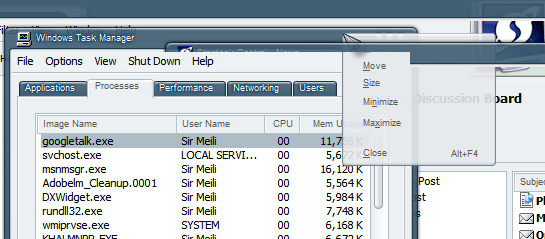
the frames of the window are moving to the highest z-index level. This causes my cursorxp cursors to go under the borders (though not when I turn off cursorxp) and you can see that my always on top object dock flows under the borders as well. Even some window borders are messed up. I know it can seem confusing by looking at the picture I provided, but that is truley the effect I get. I've tried restarting with no change.
Any help would be appreciated
Sir Meili

Reply #2 Monday, February 27, 2006 1:48 PM
I'll paste my system information as you request, but as for removing the 'sir' from my nick, I will not be doing that. That is my name that i've used on the net for many years before the inception of wincustomize. I've had that nick here since 2001 and I don't see a reason to change it. Sorry if this offends anyone. I don't intend it to do so. It's just my name and I don't see why I should change it

Sincerely,
SirMeili

P.S. Here is the information you requested:
WindowBlinds 5.0 System Information Report:
STATUS : WB+ SRV+ HLP+ UI+ TRAY+
WindowBlinds is installed correctly on this PC.
WindowBlinds appears to be activated on this PC
Your machine supports per pixel borders on WindowBlinds skins.
You have 2 monitors.
(Default Monitor) 1 is attached to NVIDIA GeForce Go 6800
(Default Monitor) 2 is attached to NVIDIA GeForce Go 6800
Wblind.dll 2006/02/10 19:33:34
Wbsrv.dll 2006/02/05 12:58:22
Wbconfig.exe 2005/12/05 18:42:52
Wbload.exe 2006/01/19 16:19:18
Wbhelp.dll 2004/09/18 15:37:00
Wbui.dll 2005/12/06 21:29:06
Tray.dll 2005/11/02 13:28:26


Reply #3 Monday, February 27, 2006 2:15 PM
The use of "Sir" in your nick doesn't bother me one bit nor should it bother anyone.
I've had the same issues with the cursor going behind window frames with certain WB5 skins while using CursorXP and have only been able to get back to normal by a reboot. This seems to occur when changing blinds a few times through WindowBlinds Configuration. Hopefully the programmers will be able to duplicate this and come up with a solution in the next release.


Reply #4 Monday, February 27, 2006 2:30 PM
I don't have access to WB (at work) - which version per SDC is that? seems a couple of dates are old...but I could be wrong since I'm going by memory.
are your drivers up to date? if not, might try updated drivers. if so, might try a roll back (some work better on older drivers)
Reply #5 Monday, February 27, 2006 2:32 PM
The problem is a bug in XP itself.
After a screen resolution change on some pcs (but not all), the OS starts to paint semi transparent things backwards so things lower in the z-order get painted on top of those things above them.
This isn't a problem on XP 64 bit or 2003 server as Microsoft have apparently fixed this on those OSes. My feeling is that it is more common on machines with multiple monitors, but why that is is currently unknown.
This has been a problem with CursorXP and transparent windows ever since that product was released and a similar thing could be reproduced with any other app making use of semi transparency.
Rebooting will always fix it and it should remain fixed until your screen resolution changes. It has been noticed that changing res a few times can make the OS correct itself.
Reply #6 Monday, February 27, 2006 4:39 PM
Sir Bichur: yes i think my version of SDC is a couple of versions behind, but that would be because it keeps telling me there are updates, but doesn't initiate the update for some reason. As far as drivers, I am running the newest drivers for my card, and as you'll read forthcoming, returning to one monitor fixed the problem for now.
Neil: thank you, going back to one monitor did fix the problem. I wish M$ would release a fix for it, but that's not SD's problem
. I am wondering. I am about the buy a 24" flatpanel for my laptop and run it in clone mode. Do you know if this has the same effect? I was running it in dual screen mode when the problem appeared. Just curious.Any who...thank you all for your responses,
SirMeili

Reply #7 Monday, February 27, 2006 6:46 PM

Reply #8 Monday, February 27, 2006 7:01 PM
Download a curretn version of SDC and then let it update. One less issue.
Reply #9 Monday, February 27, 2006 7:34 PM
With that said, I'm still mostly pleased with my Windowsblinds 5 purchase (and the amount of updates), but I didn't know that this bug was going to just be ignored because the issue begins with Windows.
Reply #10 Monday, February 27, 2006 7:45 PM
| Just because it is a bug in Windows doesn't mean there isn't a way to fix it. |
No...there certainly is a way.....petition Microsoft to correct an otherwise un-noticed 'error'. My bet it it is only the GUI customizing/skinning crowd who even notice, and for Redmond it's perhaps a non-issue....
Z-order issues are quite a load of fun with alternate shells as well [eg Litestep]...so even under an alternate GUI they remain problematic at times...

Please login to comment and/or vote for this skin.
Welcome Guest! Please take the time to register with us.
There are many great features available to you once you register, including:
- Richer content, access to many features that are disabled for guests like commenting on the forums and downloading skins.
- Access to a great community, with a massive database of many, many areas of interest.
- Access to contests & subscription offers like exclusive emails.
- It's simple, and FREE!
Reply #1 Sunday, February 26, 2006 12:08 AM
Side Suggestion: Remove "sir" from your nick ... as 'sir' is used as honforic for the users at a certain level .. and you are abit lower in rank @ WC ...!!!