





































 |
|
Page 1 of 3 | |
|
|---|
RaSt2005
Comment #2 Wednesday, June 6, 2007 7:20 PM

Comment #2 Wednesday, June 6, 2007 7:20 PM
Wow, that is very nice!!!!!!!!!!!!!!!
I watched for a blinds like this, matching with my BECKS Sysmetrix!
I found it!!!
Thank you!!!
I watched for a blinds like this, matching with my BECKS Sysmetrix!
I found it!!!
Thank you!!!


unclerob
Comment #6 Thursday, June 7, 2007 12:26 AM

Comment #6 Thursday, June 7, 2007 12:26 AM
thank you to all of you for your great feedback, I'm glad you like it!!! �� �
�
 �
�
Nimbin
Comment #9 Thursday, June 7, 2007 6:02 AM

Comment #9 Thursday, June 7, 2007 6:02 AM
excellent, beautiful, fantastic, great, wonderful ummm and i need a thesaurus to say other compliments. bloody nice work mate this has become my new default theme 

J. Aroche
Comment #10 Thursday, June 7, 2007 12:43 PM

Comment #10 Thursday, June 7, 2007 12:43 PM
Looking very good unclerob! Really like the vlack and green combination! Oh and thanks for the mention and compliments man, really appreciate it and if you tweak a little the brightness/contrast of the cursor in cursorxp it'll match perfectly
Great skin man!
and if you tweak a little the brightness/contrast of the cursor in cursorxp it'll match perfectly Great skin man!

Kinger
Comment #11 Thursday, June 7, 2007 2:20 PM

Comment #11 Thursday, June 7, 2007 2:20 PM
Fantastic,as usual. Reminds me of being a kid again when I could actualy go to the corner Drug Store and by these for a Dime. Love the added shortcuts at the top. Already applied to my Blinds. Looking foreward to more from you.
koolet22
Comment #12 Thursday, June 7, 2007 3:02 PM

Comment #12 Thursday, June 7, 2007 3:02 PM
Thank u uncle rob. been waiting for this. Hope u will consider making Dare Devil WB. Please???
La Boca Loca
Comment #13 Thursday, June 7, 2007 4:21 PM

Comment #13 Thursday, June 7, 2007 4:21 PM
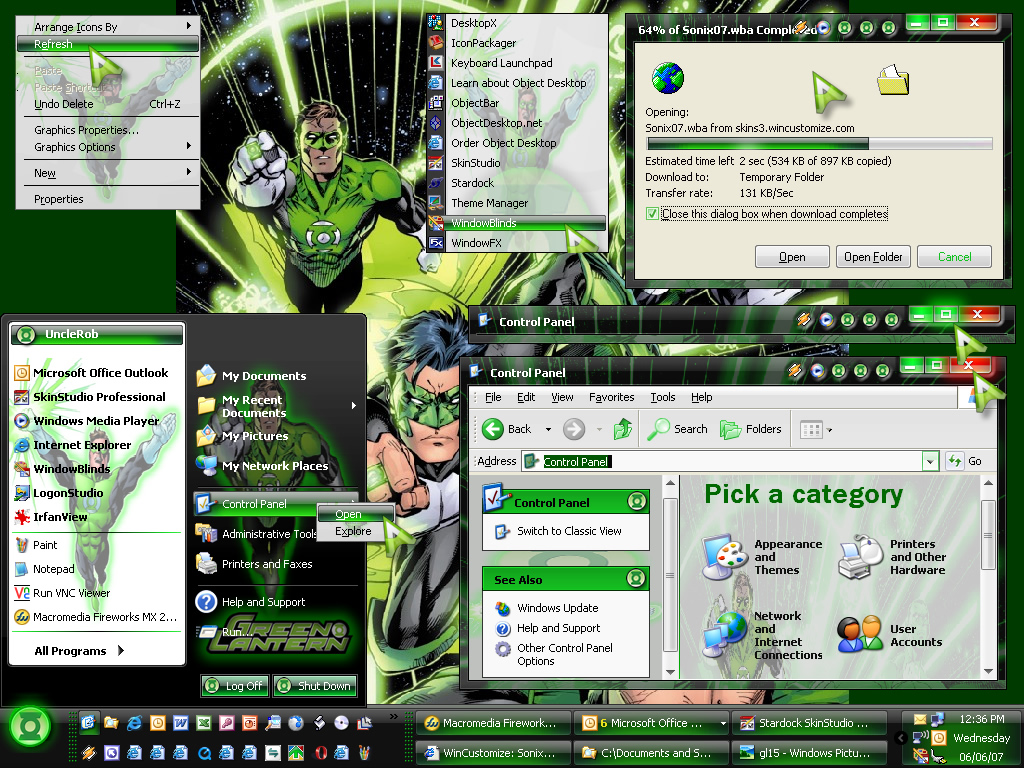
This is a beautiful skin and theme. I am using Windowblinds 5 but am having problem with it displaying all the features as shown. I got the cursors and those are great and working.
*****Yeah got it all worked out and love my wallpaper too**********
Now if you are in the mood someday a red and black Sin City or 300!
*****Yeah got it all worked out and love my wallpaper too**********
Now if you are in the mood someday a red and black Sin City or 300!
bmetelsky
Comment #14 Thursday, June 7, 2007 4:45 PM

Comment #14 Thursday, June 7, 2007 4:45 PM
Awesome work! I think I'll be using this for some time.
� �
�
�
 �
�
messiah1
Comment #15 Thursday, June 7, 2007 8:24 PM
You came up with a new color? Does crayola know about this. � �
�

Comment #15 Thursday, June 7, 2007 8:24 PM
vlack
You came up with a new color? Does crayola know about this. �
 �
�
Sheldon Williams
Comment #16 Thursday, June 7, 2007 10:16 PM
Comment #16 Thursday, June 7, 2007 10:16 PM
Great skin unclerob, I really love your work. I'm such a comic fan, and I'm really glad to see the character based skins. Keep up the great work!
unclerob
Comment #17 Friday, June 8, 2007 9:27 AM
Comment #17 Friday, June 8, 2007 9:27 AM
Thank you all for the great comments & compliments, I'm glad you liked the skin, it's something I've wanted to have for quite some time and I think it turned out ok. Eventually I would like to learn how to create custom animations as well as developing the skill of creating custom toolbar icons to make these wb skins more complete.
Hi La Boca Loca (nice name, if I understand it correctly, crazy lips or crazy mouth ��)
- what specific features are not working properly for you, maybe we can help you fix the problems.
I know that sometimes my oversized startbuttons don't appear correctly but if you're running WB5 at your end, it supports oversized startbuttons - if this is a problem for you, try resizing the taskbar (make it taller and then resize back to your normal height, as per the screenshot I always double the height of my taskbar, I think it looks better that way and the startbutton is completely shown) as this forces the startbutton to be displayed properly when it sometimes appears to be cut-off. Also some users have mentioned in forums that not every portion of windows is getting skinned as they expected and for some I've offered the tip that has helped a few. Right click on the "My Computer" on your windows desktop, click on properties, click on the "Advanced" page tab, click on settings in the Performance section, select "Adjust for Best Appearance" and then scroll down the entire list of options and make sure the last item is selected as well (sometimes it is not selected for some reason), the option is "Use Visual Styles on Windows & Buttons" - definitely check that option, you want to skin the windows & buttons. Click on Apply & OK, and then Click on Apply & OK a 2nd time to get out those screens and close the "My Computer" dialog screens. If that doesn't work, try going into windowblinds configuration, double click on the wb system tray applet (in the lower right corner on your taskbar next to the time of day display), apply the windows classic skin to go to the windows default look and then reselect the skin that you want to apply and hopefully that fixes any display issues you're having. If that doesn't work, try posting a screenshot here to let us know what isn't being displayed and we can look into this further. ��
Hi La Boca Loca (nice name, if I understand it correctly, crazy lips or crazy mouth �
�)- what specific features are not working properly for you, maybe we can help you fix the problems.
I know that sometimes my oversized startbuttons don't appear correctly but if you're running WB5 at your end, it supports oversized startbuttons - if this is a problem for you, try resizing the taskbar (make it taller and then resize back to your normal height, as per the screenshot I always double the height of my taskbar, I think it looks better that way and the startbutton is completely shown) as this forces the startbutton to be displayed properly when it sometimes appears to be cut-off. Also some users have mentioned in forums that not every portion of windows is getting skinned as they expected and for some I've offered the tip that has helped a few. Right click on the "My Computer" on your windows desktop, click on properties, click on the "Advanced" page tab, click on settings in the Performance section, select "Adjust for Best Appearance" and then scroll down the entire list of options and make sure the last item is selected as well (sometimes it is not selected for some reason), the option is "Use Visual Styles on Windows & Buttons" - definitely check that option, you want to skin the windows & buttons. Click on Apply & OK, and then Click on Apply & OK a 2nd time to get out those screens and close the "My Computer" dialog screens. If that doesn't work, try going into windowblinds configuration, double click on the wb system tray applet (in the lower right corner on your taskbar next to the time of day display), apply the windows classic skin to go to the windows default look and then reselect the skin that you want to apply and hopefully that fixes any display issues you're having. If that doesn't work, try posting a screenshot here to let us know what isn't being displayed and we can look into this further. �
�
tomva
Comment #18 Friday, June 8, 2007 11:49 AM
Comment #18 Friday, June 8, 2007 11:49 AM
Its really nice, but i can't find the wallpaper that you used on your screenshot on dcc comics or on google images  . Can you please give me a direct link or send it to me? email: [email protected]. Thank you!
 . Can you please give me a direct link or send it to me? email: [email protected]. Thank you!
La Boca Loca
Comment #19 Friday, June 8, 2007 11:56 AM
Comment #19 Friday, June 8, 2007 11:56 AM
You are right that is a nickname as I constantly surprise my friends. I did get it all to work ( I just deleted and re downloaded) and I am loving it. To Tomva I was able to find the wallpaper at the DC comic link he posted, did a search, found the one I wanted and saved as my wallpaper.
unclerob
Comment #20 Friday, June 8, 2007 3:24 PM
Comment #20 Friday, June 8, 2007 3:24 PM
I couldn't find that same wallpaper image again on dc's website but I found a link on another site with the same image, you can use the following link to find it:
http://www.desktopia.com/cgi-bin/ImageFolio3/imageFolio.cgi?action=view&link=Animation_-_Comics/Green_Lantern&image=28411.jpg&img=&tt=
and quite a few other green lantern walls from here:
http://www.desktopia.com/wallpapers/Animation_-_Comics/Green_Lantern
http://www.desktopia.com/cgi-bin/ImageFolio3/imageFolio.cgi?action=view&link=Animation_-_Comics/Green_Lantern&image=28411.jpg&img=&tt=
and quite a few other green lantern walls from here:
http://www.desktopia.com/wallpapers/Animation_-_Comics/Green_Lantern
Please login to comment and/or vote for this skin.
Welcome Guest! Please take the time to register with us.
There are many great features available to you once you register, including:
- Richer content, access to many features that are disabled for guests like commenting on the forums and downloading files.
- Access to a great community, with a massive database of many, many areas of interest.
- Access to contests & subscription offers like exclusive emails.
- It's simple, and FREE!
|
|
Page 1 of 3 | |
|
|---|





Comment #1 Wednesday, June 6, 2007 2:24 PM
it is called Green Light by J. Aroche,
here is the link:
WWW Link
If the above link doesn't work, use the following url:
https://www.wincustomize.com/skins.aspx?skinid=2188&libid=25
Javier makes some of the best cursors I've ever seen, I couldn't use this wb skin without using the Green Light cursor he made - check out his other work, it's awesome!!! �
Green Lantern themed accessories (bootskins, logins, rightclicks, etc.) available on this site from myself & other authors can be found using the following search link:
WWW Link
The wallpaper shown in the preview can be obtained from DC Comics website (a great source of dc universe fan art!) http://www.dccomics.com/downloads/