




































 |
|
Page 1 of 2 | |
|
|---|
Jim Krasewitz
Comment #2 Saturday, March 24, 2007 9:45 AM
Comment #2 Saturday, March 24, 2007 9:45 AM
Well, 257 downloads and only one comment, I'll make the second one, very nice follow up to the blue one, though we are still awaiting blue with a bit more transparency, this one is very nice, thanks for download. jim
unclerob
Comment #3 Saturday, March 24, 2007 4:09 PM

Comment #3 Saturday, March 24, 2007 4:09 PM
Jim: thank you for the great feedback.
FYI - Blue Vista Basic v2.0 (original version was v1.0) was released at the beginning of last week, it didn't get a reset date so you didn't see it as a recently updated skin. It has much improved transparency in the start panel substyles that have transparency, and I added glow buttons (min/max/close window buttons along with start button) try it out and let me know what you think. � �
�
FYI - Blue Vista Basic v2.0 (original version was v1.0) was released at the beginning of last week, it didn't get a reset date so you didn't see it as a recently updated skin. It has much improved transparency in the start panel substyles that have transparency, and I added glow buttons (min/max/close window buttons along with start button) try it out and let me know what you think. �
 �
�
unclerob
Comment #4 Saturday, March 24, 2007 4:14 PM
Comment #4 Saturday, March 24, 2007 4:14 PM
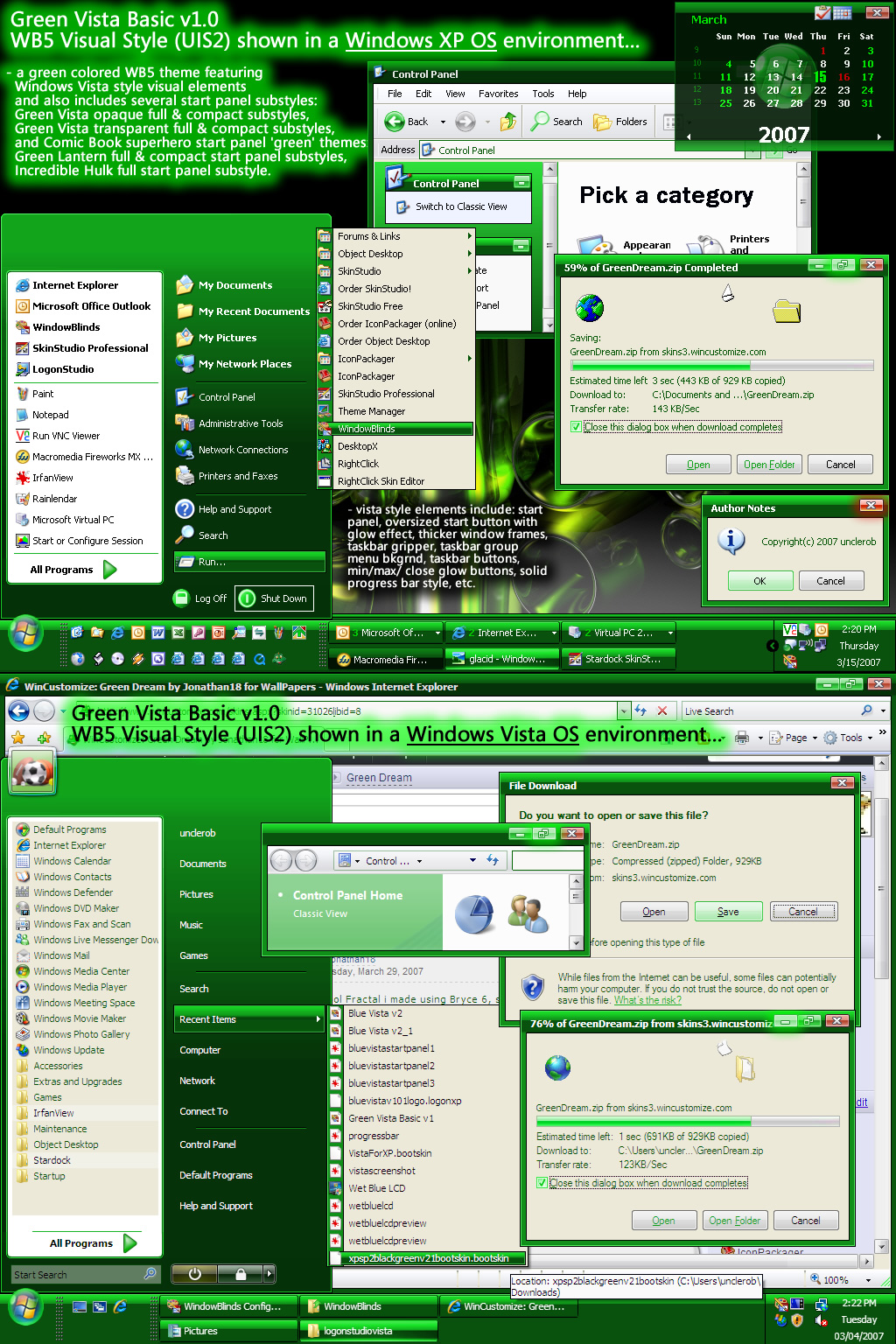
Jonkar thank you for the wonderful comments, green is my favorite color but I wasn't sure if it would be rec'd well by other people because I couldn't imagine a green skin being anyone's favorite (except for myself and Kermit the frog � �, and maybe the Incredible Hulk & Green Lantern).
No one mentioned anything about the "superhero" start panel substyles, does anyone like the Green Lantern or Hulk substyles? - I know they're simple and only consisted of start panel images but I've never done anything like that and was wondering if people liked it. This green wb has more substyles than any of my other wb skins that I've uploaded thus far! I was going to add a green dollar bill startpanel substyle but I thought I would get possible negative feedback for that so I decided against it.
All in all, it was a fun project to work on, I hope after loading & using a theme like this that other people can think that GREEN can be great too.
FYI - I'm putting the finishing touches on a blue ice theme (see the screenshots section for a preview of the wb in an early stage), working on a red vista basic (I've done black, blue, green, red had to be in there eventually) and a captain america themed wb.
 �, and maybe the Incredible Hulk & Green Lantern).
No one mentioned anything about the "superhero" start panel substyles, does anyone like the Green Lantern or Hulk substyles? - I know they're simple and only consisted of start panel images but I've never done anything like that and was wondering if people liked it. This green wb has more substyles than any of my other wb skins that I've uploaded thus far! I was going to add a green dollar bill startpanel substyle but I thought I would get possible negative feedback for that so I decided against it.
All in all, it was a fun project to work on, I hope after loading & using a theme like this that other people can think that GREEN can be great too.
FYI - I'm putting the finishing touches on a blue ice theme (see the screenshots section for a preview of the wb in an early stage), working on a red vista basic (I've done black, blue, green, red had to be in there eventually) and a captain america themed wb.
Jim Krasewitz
Comment #5 Sunday, March 25, 2007 4:20 AM
Comment #5 Sunday, March 25, 2007 4:20 AM
Thanks unclerob for pointing out that Blue Vista had been updated, is now downloaded and installed. I had been watching for the update but as you said, update did not show. Jim
Bazz5
Comment #6 Sunday, March 25, 2007 6:58 AM
Comment #6 Sunday, March 25, 2007 6:58 AM
Yes green is my favorite color to and you came up with a great shade Im running
vista ultimate but my desktop is running this theme it works great thanks a lot unclerob��
vista ultimate but my desktop is running this theme it works great thanks a lot unclerob�
�
unclerob
Comment #7 Sunday, March 25, 2007 11:07 AM
Comment #7 Sunday, March 25, 2007 11:07 AM
Thank You Bazz5, I'm very glad to hear that this theme works great in Windows Vista,
you're the first person to tell me that you're using one of my themes in a Windows Vista os environment.
you're the first person to tell me that you're using one of my themes in a Windows Vista os environment.
unclerob
Comment #8 Sunday, March 25, 2007 11:08 AM
Comment #8 Sunday, March 25, 2007 11:08 AM
Jim, I'm glad you downloaded the update, there were several other improvements aside from the improved transparency in that theme, I'm sure it was well worth the download. Thank you for your continued patronage! ��
�
pjdark
Comment #9 Sunday, March 25, 2007 11:44 AM

Comment #9 Sunday, March 25, 2007 11:44 AM
great work unclerob!!  more irish green colors...excellent!
 more irish green colors...excellent!
Bazz5
Comment #11 Monday, March 26, 2007 11:01 AM
Comment #11 Monday, March 26, 2007 11:01 AM
Unclerob not to mislead anyone who may read my previous comments,while Windowblinds
run fine with Vista,their is a problem when running animated wallpaper as this requires
Windows Aero to logon correctly.��
run fine with Vista,their is a problem when running animated wallpaper as this requires
Windows Aero to logon correctly.�
�
unclerob
Comment #12 Monday, March 26, 2007 11:59 AM
Comment #12 Monday, March 26, 2007 11:59 AM
- shouldn't be a problem, I didn't include any wallpaper images with the windowblind itself and the wallpaper link I provided above is for a standard desktop wallpaper image created by skinhit and it is not an animated wallpaper.
Yukon28
Comment #13 Tuesday, March 27, 2007 3:30 PM

Comment #13 Tuesday, March 27, 2007 3:30 PM
I like the green very much but I get a hot pink line in the show hidden icons on the task bar and also surrounding the green bar when downloading peogress window is open. Do you know why I would get this. doesnt look good with hot pink line on the taskbar.
unclerob
Comment #14 Tuesday, March 27, 2007 4:09 PM
Comment #14 Tuesday, March 27, 2007 4:09 PM
Hi Yukon28, I don't experience those problems at all but I would like to see what it looks like at your end, can you send me a screenshot of the areas you're referring to - it would be appreciated!
my email addy is rfcilia @ gmail . com
Also let me know if you're running Windows XP or Windows Vista
If you're running Windows XP, are you running
right click on My Computer, click on Properties, clicked on the Advanced page tab, click the Settings button in the Performance section, what setting do you have selected. Is it set for "Adjust for best appearance" or "Adjust for best performance", if it's set for custom, make sure that the last item is selected: "Use visual styles on windows & buttons"
Also after checking & confirming that you're not running in Windows Classic mode and that you haven't turned off all of winxp's eye candy (running in classic mode, gives you a default grey task bar, startbutton, grey simple window frames, etc). , try re-applying the windowblind theme. I have found that sometimes for whatever reason I've had to re-apply a specific theme a few times because the previous theme hasn't been fully removed when another skin was chosen which resulted in a weird combination of previous & current skin components and possibly the problems you're seeing. Also, when all fails, try rebooting your pc and then applying the theme to see if that fixes the problem.
My themes are created in a winxp environment for a winxp environment, I hear they work in Vista as well but I can't confirm that personally as I only have windowblinds installed on my winxp machine and not my vista pc. The other limitation I have is screen resolutions, I skin for a 1024x768 environment but my skins should work in a varied resolution environment, bigger or smaller - I have yet to hear about a screen resolution that causes the problem you're describing but anything is possible.
You shouldn't see any magic pink in my themes - I definitely wouldn't want you to; I test my skins extensively before uploading to the site so if there is a problem I definitely want to fix it. If after the above troubleshooting you're still seeing pink in certain sections, email me a screenshot and I'll see what I can do. I could even offer to remotely connect to your pc using windows remote assistance to see if I can fix the problem that way.
Let me know how the troubleshooting turns out! Thanks for the help!
my email addy is rfcilia @ gmail . com
Also let me know if you're running Windows XP or Windows Vista
If you're running Windows XP, are you running
right click on My Computer, click on Properties, clicked on the Advanced page tab, click the Settings button in the Performance section, what setting do you have selected. Is it set for "Adjust for best appearance" or "Adjust for best performance", if it's set for custom, make sure that the last item is selected: "Use visual styles on windows & buttons"
Also after checking & confirming that you're not running in Windows Classic mode and that you haven't turned off all of winxp's eye candy (running in classic mode, gives you a default grey task bar, startbutton, grey simple window frames, etc). , try re-applying the windowblind theme. I have found that sometimes for whatever reason I've had to re-apply a specific theme a few times because the previous theme hasn't been fully removed when another skin was chosen which resulted in a weird combination of previous & current skin components and possibly the problems you're seeing. Also, when all fails, try rebooting your pc and then applying the theme to see if that fixes the problem.
My themes are created in a winxp environment for a winxp environment, I hear they work in Vista as well but I can't confirm that personally as I only have windowblinds installed on my winxp machine and not my vista pc. The other limitation I have is screen resolutions, I skin for a 1024x768 environment but my skins should work in a varied resolution environment, bigger or smaller - I have yet to hear about a screen resolution that causes the problem you're describing but anything is possible.
You shouldn't see any magic pink in my themes - I definitely wouldn't want you to; I test my skins extensively before uploading to the site so if there is a problem I definitely want to fix it. If after the above troubleshooting you're still seeing pink in certain sections, email me a screenshot and I'll see what I can do. I could even offer to remotely connect to your pc using windows remote assistance to see if I can fix the problem that way.
Let me know how the troubleshooting turns out! Thanks for the help!
Yukon28
Comment #15 Tuesday, March 27, 2007 4:38 PM
Comment #15 Tuesday, March 27, 2007 4:38 PM
Yukon28 here, sorry still get the same results. I have tryed all that you have suggested. I'm not sure how to go about sending you a screen shot? The only difference as I am using Vista, but I have only come across one other theme that had a problem such as yours so I'm not to sure.
unclerob
Comment #16 Tuesday, March 27, 2007 5:17 PM
Comment #16 Tuesday, March 27, 2007 5:17 PM
Well that's probably the reason for the problem, you're running Vista and although Windowblinds does work in Vista I think you will see that certain themes for whatever reason don't translate properly when used in a Vista environment.
I just setup a virtual pc running Windows XP and installed this theme in that virtual winxp environment and it runs fine and I tested it in resolutions beyond 1024x768, I used both 1280x1024 and 1600x1200 and it looks good.
I'm sorry to hear that it doesn't work properly in Vista, wasn't sure how this would turn out in Vista but I have heard of known issues where the skins don't work properly in certain areas. Plus those recommendations I gave you in the previous post were meant for a winxp environment, don't think they would correctly apply to Windows Vista. Not sure what I can do to help you at this point.
My vista skins are meant for winxp users who would like a look similar to Windows Vista while running Windows XP. You already have Vista so the look is pretty much acheived at your end, aside from the green color. When I get a production vista machine running, I will attempt to create wb's for the vista environment.
Although I wonder why you're seeing different results from user Bazz5 (see comment#6 above), he is running Windows Vista Ultimate and reports that this theme works fine in that environment, wonder why you're not getting that same result.
As far as sending a screenshot, you should be able to hit the printscreen key on your keyboard, open up a simple image editing program like MS Paint (which comes included with the OS), click on Edit & Paste and the screenshot should appear. Save the file with a name of your choosing in a location like my documents or something that you will remember. Once that's done, you can just email the specific file over but like I said there isn't much I can do considering you're running Windows Vista but I would be curious to see what the problem does look like. Also you still haven't mentioned what screen resolution you're running at and if you're using the 60 day trial version of Windowblinds or the full/paid version - there is a difference between the 2 versions.
I hope that helps. � �
�
I just setup a virtual pc running Windows XP and installed this theme in that virtual winxp environment and it runs fine and I tested it in resolutions beyond 1024x768, I used both 1280x1024 and 1600x1200 and it looks good.
I'm sorry to hear that it doesn't work properly in Vista, wasn't sure how this would turn out in Vista but I have heard of known issues where the skins don't work properly in certain areas. Plus those recommendations I gave you in the previous post were meant for a winxp environment, don't think they would correctly apply to Windows Vista. Not sure what I can do to help you at this point.
My vista skins are meant for winxp users who would like a look similar to Windows Vista while running Windows XP. You already have Vista so the look is pretty much acheived at your end, aside from the green color. When I get a production vista machine running, I will attempt to create wb's for the vista environment.
Although I wonder why you're seeing different results from user Bazz5 (see comment#6 above), he is running Windows Vista Ultimate and reports that this theme works fine in that environment, wonder why you're not getting that same result.
As far as sending a screenshot, you should be able to hit the printscreen key on your keyboard, open up a simple image editing program like MS Paint (which comes included with the OS), click on Edit & Paste and the screenshot should appear. Save the file with a name of your choosing in a location like my documents or something that you will remember. Once that's done, you can just email the specific file over but like I said there isn't much I can do considering you're running Windows Vista but I would be curious to see what the problem does look like. Also you still haven't mentioned what screen resolution you're running at and if you're using the 60 day trial version of Windowblinds or the full/paid version - there is a difference between the 2 versions.
I hope that helps. �
 �
�
unclerob
Comment #17 Tuesday, March 27, 2007 5:25 PM
Comment #17 Tuesday, March 27, 2007 5:25 PM
2 1/2 stars.... hmmm... � �
�
well I guess that's better than no stars or 1 or 2 stars.
Don't know what the low rating is based on? Wish I could get some criteria and constructive criticism from the people that have rated the skin and give me an idea of what they didn't like (aside from the color ��) I thought overall that the skin is crisp & clean, not too bright, uses nice features like oversized start button, glow buttons for the min/max/close window buttons, the start panel styles were numerous and the transparent start panel styles turned out pretty good - any ideas... anyone?, anyone? I guess regardless of the current rating, I'm having fun and that's the most important part.
�� I'm happy that it's rec'd decent attention thus far, it can't be that bad, 2600+ downloads in 4 days is not too shabby. Thank you to all who have downloaded it and all of you who took the time to leave me feedback!
I definitely look forward to more comments & constructive criticism, tell me what can be done to make it a better skin for use in a windows xp environment.
 �
�well I guess that's better than no stars or 1 or 2 stars.
Don't know what the low rating is based on? Wish I could get some criteria and constructive criticism from the people that have rated the skin and give me an idea of what they didn't like (aside from the color �
�) I thought overall that the skin is crisp & clean, not too bright, uses nice features like oversized start button, glow buttons for the min/max/close window buttons, the start panel styles were numerous and the transparent start panel styles turned out pretty good - any ideas... anyone?, anyone? I guess regardless of the current rating, I'm having fun and that's the most important part.�
� I'm happy that it's rec'd decent attention thus far, it can't be that bad, 2600+ downloads in 4 days is not too shabby. Thank you to all who have downloaded it and all of you who took the time to leave me feedback!I definitely look forward to more comments & constructive criticism, tell me what can be done to make it a better skin for use in a windows xp environment.
Bazz5
Comment #18 Wednesday, March 28, 2007 6:53 AM
Comment #18 Wednesday, March 28, 2007 6:53 AM
Just so you are aware I have the same as Yukon28 which are a pink hue either side of downloading bar,and a pink line where hide inactive items tab sits,I have looked at Blue Vistav2 which has the same problems Mauve Boost has
no problems McQueens Red Vista v2 has download bar problem but hide icon tab is OK.Dont
let the 21/2 stars bother you ,your work rates a minimum 4 to me keep up the great work
and have more fun��
no problems McQueens Red Vista v2 has download bar problem but hide icon tab is OK.Dont
let the 21/2 stars bother you ,your work rates a minimum 4 to me keep up the great work
and have more fun�
�
unclerob
Comment #19 Wednesday, March 28, 2007 8:09 AM
Comment #19 Wednesday, March 28, 2007 8:09 AM
Bazz5, I love hearing those kind of comments - it definitely fuels the fire when working on these wb themes. I just wish you guys didn't see that problem, I will look at Mauve Boost to see what the difference is and see if I can't fix blue vista's issues. Let me get back to you. Send me a screenshot if you can, see comment #14 above for my email addy. Thank You! ��
�
unclerob
Comment #20 Wednesday, March 28, 2007 12:55 PM
Comment #20 Wednesday, March 28, 2007 12:55 PM
OK, I just setup Windows Vista Ultimate ( a beta version that I have, rc1 or rc2, can't remember which) on a test machine. Like I've mentioned before, although I skin for the winxp os environment, after hearing what you both have said about how this skin appears in Vista, I was very curious to see what you were seeing. I've installed the blue & green vista basic wb's on my test vista machine and I see the pink area around the horizontal notification arrow on the taskbar (a vertical line, not horizontal) - vista is not properly being skinned by windowblinds for whatever reason, the "magic pink" (the pink area you're referring to) shouldn't be showing at all. It definitely doesn't show up on my winxp machines. But I'm working on a fix that will work for both environments, winxp & vista. Send me your email addresses and I will email you the update wb files for both blue & green vista basic. You can test it out at your end and if it works, I'll upload the revised version to this site and credit you both with the updates. Thanks for your help on this!
Please login to comment and/or vote for this skin.
Welcome Guest! Please take the time to register with us.
There are many great features available to you once you register, including:
- Richer content, access to many features that are disabled for guests like commenting on the forums and downloading files.
- Access to a great community, with a massive database of many, many areas of interest.
- Access to contests & subscription offers like exclusive emails.
- It's simple, and FREE!
|
|
Page 1 of 2 | |
|
|---|




Comment #1 Saturday, March 24, 2007 8:43 AM