




































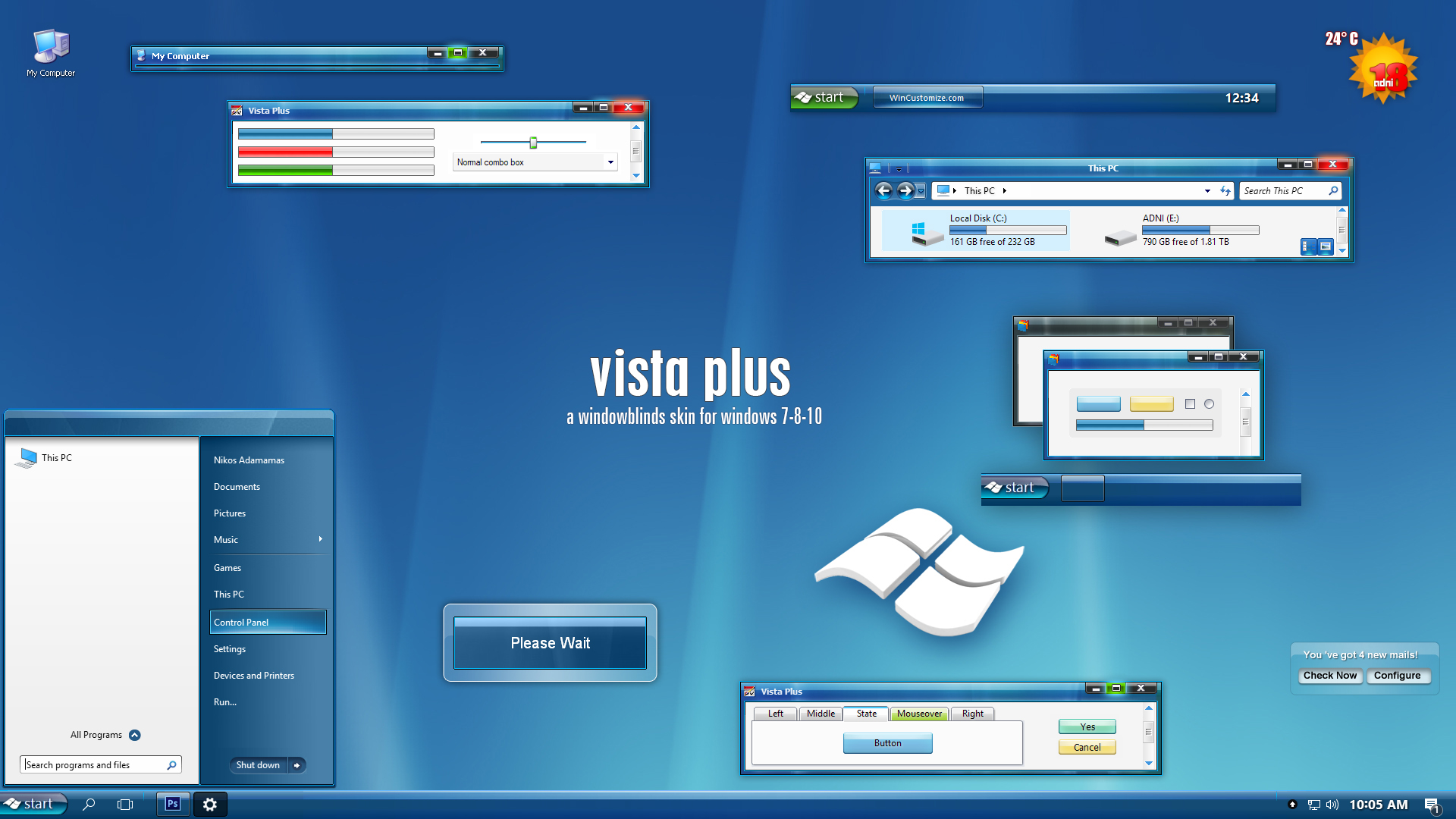
 |
|
Page 7 of 22 | |
|
|---|
joserey
Comment #123 Monday, October 2, 2006 2:27 AM

excellente dude! and i don't even need wb5 to enjoy it!!!
thanks for sharing this


Comment #123 Monday, October 2, 2006 2:27 AM

excellente dude! and i don't even need wb5 to enjoy it!!!
thanks for sharing this


adni18
Comment #124 Monday, October 2, 2006 3:02 PM
Comment #124 Monday, October 2, 2006 3:02 PM
You are welcome Bubbletoes and joserey (alo) and thanks for your nice comments 

OAKside24
Comment #125 Monday, October 2, 2006 7:29 PM

Comment #125 Monday, October 2, 2006 7:29 PM
One of the best skins ever made for the 'Blinds.
Congrats, much appreciated adni18.
Congrats, much appreciated adni18.

adni18
Comment #128 Wednesday, October 4, 2006 8:50 AM
Comment #128 Wednesday, October 4, 2006 8:50 AM
Hi KarmaGirl, I have to solve first a minus issue with this skin and then an update will follow asap
Jim Krasewitz
Comment #129 Wednesday, October 4, 2006 11:18 AM
Comment #129 Wednesday, October 4, 2006 11:18 AM
Hi adni18, I too have this issue with IE7, the tools bars not skinning but remaining black, dammned pest as I love blue skins and would love to use this one, all other windows are fine. Jim
adni18
Comment #130 Thursday, October 5, 2006 4:33 AM
Comment #130 Thursday, October 5, 2006 4:33 AM
Hi Jim Krasewitz
I am using IE version 7.0.5700.6 right now and I don't have this issue.
I wonder why this is happening to you...
I will appreciate any tip or help on this "Black" issue
I am using IE version 7.0.5700.6 right now and I don't have this issue.
I wonder why this is happening to you...
I will appreciate any tip or help on this "Black" issue

BitiumRibbon
Comment #131 Thursday, October 5, 2006 12:47 PM
Comment #131 Thursday, October 5, 2006 12:47 PM
Hey, Mastertang, I had the same thing happen to me when I tried fiddling around with it; mistake. Anyway, I removed the skin, got rid of all evidence of it, and downloaded it fresh. It hasn't happened since.
Hope that works!
Hope that works!
JohnKennington
Comment #132 Tuesday, October 10, 2006 5:43 PM
Comment #132 Tuesday, October 10, 2006 5:43 PM
Not compatible with IE7. Creates gray on black text. Otherwise good, just not ready for prime time. I did what others did above but still have the issue.
adni18
Comment #133 Wednesday, October 11, 2006 1:52 AM
Comment #133 Wednesday, October 11, 2006 1:52 AM
Thanks for the tip BitiumRibbon
It is compatible with IE JohnKennington , I am using IE7 now, though, there are some issues, I know, which have been fixed, so stay tuned for the version 2 (update).
It is compatible with IE JohnKennington , I am using IE7 now, though, there are some issues, I know, which have been fixed, so stay tuned for the version 2 (update).
magardan
Comment #134 Wednesday, October 11, 2006 12:50 PM
Comment #134 Wednesday, October 11, 2006 12:50 PM
How does the roll up feature work??  Otherwise great skin.
 Otherwise great skin.
bondr006
Comment #135 Wednesday, October 11, 2006 2:46 PM
Comment #135 Wednesday, October 11, 2006 2:46 PM
removed double post Be careful about refreshing the page. It will repost your comment....
BeLGaRaTh67
Comment #136 Wednesday, October 11, 2006 5:33 PM

Comment #136 Wednesday, October 11, 2006 5:33 PM
Will the suite be updated with this or will it need to be downloaded manually? Either way, not had any problems ... AWESOME yet again
adni18
Comment #137 Wednesday, October 11, 2006 6:58 PM
Comment #137 Wednesday, October 11, 2006 6:58 PM
Thanks bondr006 I have done another skin with Aero Glass touch
It is under the "Close" button on the titlebar magardan Thanks
Thanks BeLGaRaTh67 the suite is working fine, no manually download needed
It is under the "Close" button on the titlebar magardan Thanks
Thanks BeLGaRaTh67 the suite is working fine, no manually download needed
bondr006
Comment #138 Wednesday, October 11, 2006 7:43 PM
Comment #138 Wednesday, October 11, 2006 7:43 PM
Master adni18 wrote: "It is under the "Close" button on the titlebar magardan Thanks"
Could you please explan this in a little more detail for me. Thanks.
Could you please explan this in a little more detail for me. Thanks.
adni18
Comment #139 Thursday, October 12, 2006 2:13 AM
Comment #139 Thursday, October 12, 2006 2:13 AM
OK you are right bondr006 sometimes this tip doesn't work for unknown reasons to me.
Any way, you can activate the titlebar rollup/rolldown feature from within Windowblinds configuration.
Find there, in the right bottom corner, the "Advanced Settings" button and just choose and apply the options you like
Any way, you can activate the titlebar rollup/rolldown feature from within Windowblinds configuration.
Find there, in the right bottom corner, the "Advanced Settings" button and just choose and apply the options you like
CaveBear
Comment #140 Thursday, October 12, 2006 2:56 AM
Comment #140 Thursday, October 12, 2006 2:56 AM
"A skinner can�t use other skins than his own, no matter how beautiful they are"
 Nice to know that I'm not alone in feeling that way. Believe it or not, I'm still using my Blue Lagoon skin I made two years ago! Sadly, I am so busy with work that I don't have time to create any new skins, and trust me, I'm SICK of looking at my current skin, but every time I try someone else's skin, I keep reverting back to my own...
Your statement is soooo true... sigh...
 Nice to know that I'm not alone in feeling that way. Believe it or not, I'm still using my Blue Lagoon skin I made two years ago! Sadly, I am so busy with work that I don't have time to create any new skins, and trust me, I'm SICK of looking at my current skin, but every time I try someone else's skin, I keep reverting back to my own...
Your statement is soooo true... sigh...

Please login to comment and/or vote for this skin.
Welcome Guest! Please take the time to register with us.
There are many great features available to you once you register, including:
- Richer content, access to many features that are disabled for guests like commenting on the forums and downloading files.
- Access to a great community, with a massive database of many, many areas of interest.
- Access to contests & subscription offers like exclusive emails.
- It's simple, and FREE!
|
|
Page 7 of 22 | |
|
|---|




Comment #121 Friday, September 29, 2006 3:12 PM
Hi mastertang625 I don't know what is happening with your computer, never happen to my computer. I have no idea how you can fix it... sorry.