





































 |
|
Page 6 of 22 | |
|
|---|
techtype
Comment #102 Tuesday, September 19, 2006 4:42 PM
OK, you know what you want best!

Comment #102 Tuesday, September 19, 2006 4:42 PM
| was talking about the "mask" dear techtype, this shutdown dialog is old style, like Windows 2000, the wallpaper is beautiful Thank you |
OK, you know what you want best!

Javel
Comment #103 Wednesday, September 20, 2006 7:31 PM
Comment #103 Wednesday, September 20, 2006 7:31 PM
HOw do you add this skin yea it DL's but then when the pop up says click this ballon toa dd i click it and it goes to original windows 98 skin..any help also..where is this file saved at when i DL it
adni18
Comment #104 Thursday, September 21, 2006 2:10 AM
Comment #104 Thursday, September 21, 2006 2:10 AM
Hello Javel,
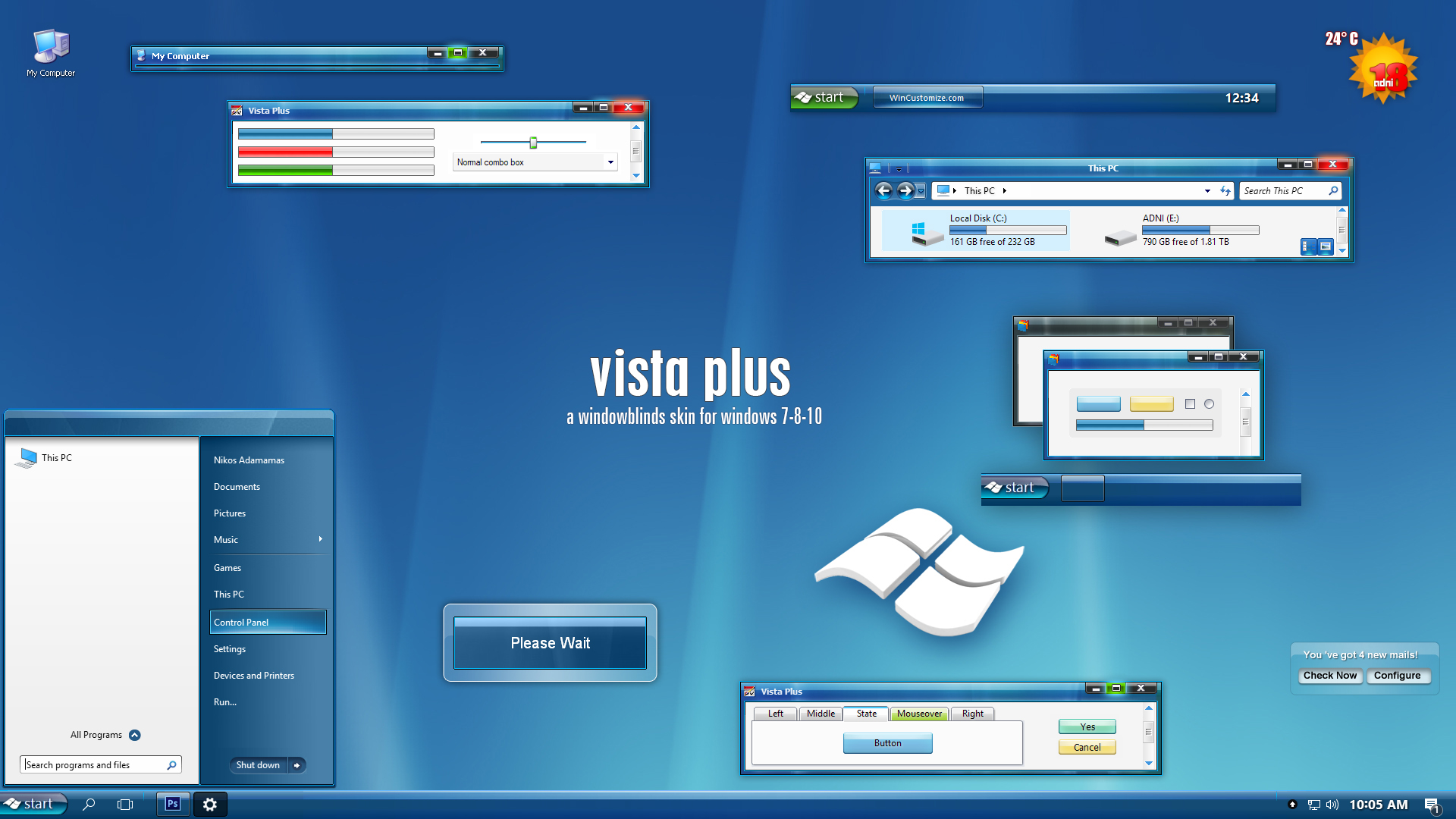
Right click on desktop picture-> pop-up-menu-> Properties-> Appearance-> select the skin.
You should have Windowblinds installed.
Get the skin from this link: http://www.adni18.com/gallery/details.php?image_id=253
Right click on desktop picture-> pop-up-menu-> Properties-> Appearance-> select the skin.
You should have Windowblinds installed.
Get the skin from this link: http://www.adni18.com/gallery/details.php?image_id=253

Wet Monkey
Comment #105 Thursday, September 21, 2006 8:08 PM

Comment #105 Thursday, September 21, 2006 8:08 PM
I don't comment often on WB skins but I DL'ed this one several weeks ago and am still using it!!! Some kind of record for me. Excellent skin. Perfect IMHO. Thank you. 

Wet Monkey
Comment #106 Thursday, September 21, 2006 8:09 PM
Comment #106 Thursday, September 21, 2006 8:09 PM
I don't comment often on WB skins but I DL'ed this one several weeks ago and am still using it!!! Some kind of record for me. Excellent skin. Perfect IMHO. Thank you.
Atazoth
Comment #108 Saturday, September 23, 2006 12:30 AM

Comment #108 Saturday, September 23, 2006 12:30 AM
Awsome! Adni, Certainly the best Vista skin ever
Thanks alot, simply one of the greatest skins around
Thanks alot, simply one of the greatest skins around
JohnKennington
Comment #109 Sunday, September 24, 2006 12:44 PM
Comment #109 Sunday, September 24, 2006 12:44 PM
Great skin. I like it very much with one exception. It seems to have an issue with IE7. The toolbar background remains black making it diffficult to read.
adni18
Comment #111 Sunday, September 24, 2006 2:24 PM
Comment #111 Sunday, September 24, 2006 2:24 PM
Thank you JohnKennington 
Never happen to me, but some people have mention this issue,
still I don't have any solution about it, because I can't reproduce it in my computer

Never happen to me, but some people have mention this issue,
still I don't have any solution about it, because I can't reproduce it in my computer

wstaylor
Comment #112 Monday, September 25, 2006 6:13 PM

Comment #112 Monday, September 25, 2006 6:13 PM
Nikos. Long time no talk to... This is amazing work! 5 stars from me in my first comment in a long time.
basementghostsinging
Comment #114 Tuesday, September 26, 2006 5:00 PM
Comment #114 Tuesday, September 26, 2006 5:00 PM
When I download it, my computer says it doesn't recognize the file type and won't open it. What do I do?
Larken
Comment #115 Wednesday, September 27, 2006 1:23 AM
Comment #115 Wednesday, September 27, 2006 1:23 AM
This is a great skin, but I ran in some problems when using programs. For winace, I get black boxes where certain texts are supposed to be.
Link
Also, on msn, the font color where it says people are set as busy or away seems to be white, with a white background, so it results in the words not being seen.
Any ways to solve these? Have to say this is great work, I would use this skin even if this can't be solved
Link
Also, on msn, the font color where it says people are set as busy or away seems to be white, with a white background, so it results in the words not being seen.
Any ways to solve these? Have to say this is great work, I would use this skin even if this can't be solved
adni18
Comment #116 Wednesday, September 27, 2006 5:17 AM
Comment #116 Wednesday, September 27, 2006 5:17 AM
Hi basementghostsinging have you installed Windowblinds in your computer?
Thank you very much Larken
I know this issue with my skin and some programs, still don't know how to solve it...
As soon as I find any soilution I will update the skin
Thank you very much Larken
I know this issue with my skin and some programs, still don't know how to solve it...
As soon as I find any soilution I will update the skin
adi231189
Comment #117 Wednesday, September 27, 2006 7:27 AM
Comment #117 Wednesday, September 27, 2006 7:27 AM
i am new but superb work adni18.looking forward to listen from u more
BitiumRibbon
Comment #119 Thursday, September 28, 2006 1:43 PM
Comment #119 Thursday, September 28, 2006 1:43 PM
Question, and it may be a stupid question, but I'm going to ask anyway: I want to change the tooltip font and background, window background, etc. and I manage to, and it works for a while, but whenever I turn off and turn on the computer or log out and log back in, it switches back to the default. Any way to fix this so that it stays permanent?
Thanks, though, I love the scheme SO much!
Thanks, though, I love the scheme SO much!
mastertang625
Comment #120 Friday, September 29, 2006 1:40 PM
Comment #120 Friday, September 29, 2006 1:40 PM
Eacn time I try to use a skin, the internet browser is skinned with the correct skin. But the windows like my docs and my pics and the taskbar and start menu are all unskinned and its Windows Classic. I tried to change the appearance stuff on the properties but it dodnt work. Anyone know how to fix this? By the way this is the best skin i ever used!!! If only I could fix the problem.
Please login to comment and/or vote for this skin.
Welcome Guest! Please take the time to register with us.
There are many great features available to you once you register, including:
- Richer content, access to many features that are disabled for guests like commenting on the forums and downloading files.
- Access to a great community, with a massive database of many, many areas of interest.
- Access to contests & subscription offers like exclusive emails.
- It's simple, and FREE!
|
|
Page 6 of 22 | |
|
|---|




Comment #101 Tuesday, September 19, 2006 2:45 PM
Thank you