





































 |
|
Page 1 of 2 | |
|
|---|
Tecumseh
Comment #2 Saturday, March 1, 2003 3:52 PM

Comment #2 Saturday, March 1, 2003 3:52 PM
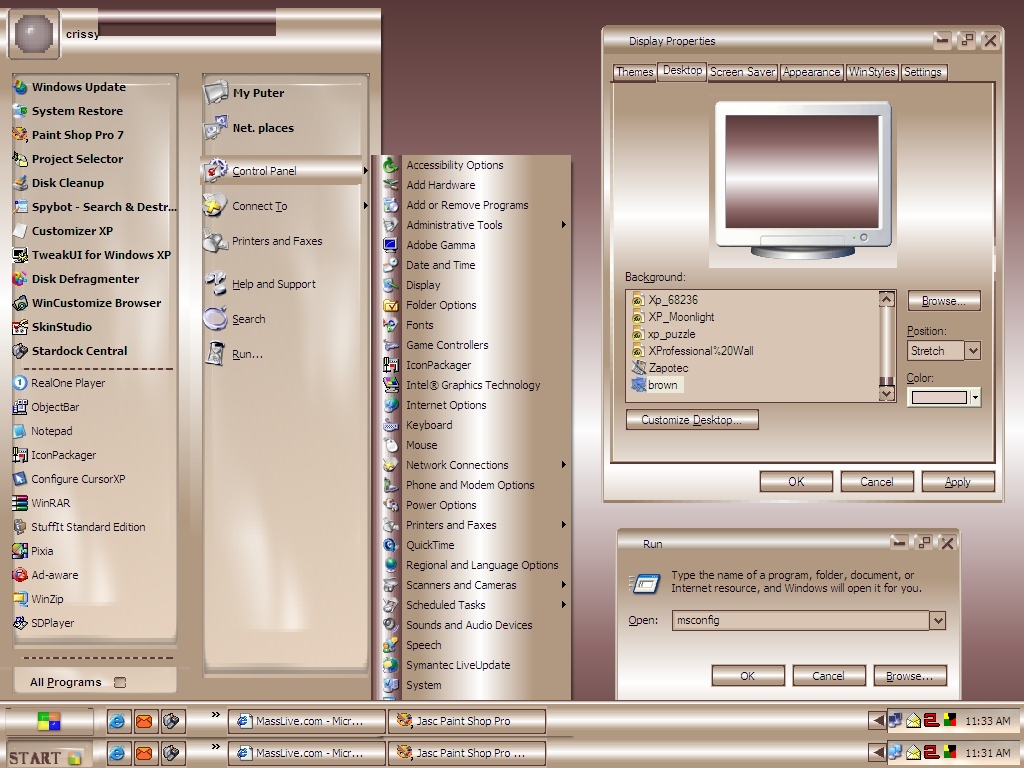
crissy14, the XP skin is missing as glowdark stated. All that is downloading is the 9x base in your mocha color.
crissy14
Comment #3 Saturday, March 1, 2003 4:02 PM

Comment #3 Saturday, March 1, 2003 4:02 PM
I realize that now. Apparently I did something wrong. Trying to fix it. 

slinky1947
Comment #4 Saturday, March 1, 2003 9:06 PM

Comment #4 Saturday, March 1, 2003 9:06 PM
Okay, working now and very pretty. I mean pretty! For your first, this is excellent. Eagerly waiting for the next one. Congrats, great job! and of course, Thanks!
TBoy34
Comment #5 Saturday, March 1, 2003 9:25 PM

Comment #5 Saturday, March 1, 2003 9:25 PM
Congratulations on your first. It's really pretty and sleek. I can't wait to see your next one. I love this color. Very flattering to the computer. 

nvcc
Comment #6 Saturday, March 1, 2003 11:16 PM
Comment #6 Saturday, March 1, 2003 11:16 PM
Hi there I downloaded I got some colour but nothing near the quality I see in your Preview. I just get the Windows 98 look with some mocah colour but no metallics. I cant wait till it works!
Klatuu Berada
Comment #7 Sunday, March 2, 2003 12:32 AM

Comment #7 Sunday, March 2, 2003 12:32 AM
Are you sure this is your first?...looks Very professional to me  . Nicely Done. Looking forward to seeing more from you in the future.
 . Nicely Done. Looking forward to seeing more from you in the future.
Rednose
Comment #8 Sunday, March 2, 2003 7:36 AM
Comment #8 Sunday, March 2, 2003 7:36 AM
Very nice, I like your blend of colors, and the cool start button. Thanks!
digital_trucker
Comment #9 Sunday, March 2, 2003 7:55 AM

Comment #9 Sunday, March 2, 2003 7:55 AM
I'm running Win2K. The wallpaper doesn't look like the preview. Also, the maximize/minimize button doesn't work. Sure is pretty!
crissy14
Comment #10 Sunday, March 2, 2003 9:20 AM
Comment #10 Sunday, March 2, 2003 9:20 AM
digital trucker
So sorry, but the wallpaper you see in the skinshot is not included in the package. I just used that as a contrast. There are however, three other wallpapers included. As far as the min/max button not working, I don't know what to tell you,: It works on my computer running Win XP Pro. Ill look into it though.
So sorry, but the wallpaper you see in the skinshot is not included in the package. I just used that as a contrast. There are however, three other wallpapers included. As far as the min/max button not working, I don't know what to tell you,: It works on my computer running Win XP Pro. Ill look into it though.

White_Moth
Comment #12 Sunday, March 2, 2003 12:32 PM

Comment #12 Sunday, March 2, 2003 12:32 PM
I like it crissy14, it's simple and sweet, very crisp and clean.
I hope my first can achieve these standards.
I hope my first can achieve these standards.
elvee
Comment #13 Sunday, March 2, 2003 1:16 PM
Comment #13 Sunday, March 2, 2003 1:16 PM
Ms. crissy14...this is very nicely done for you're first time. I sense great potential
Paul Williams
Comment #14 Sunday, March 2, 2003 4:43 PM
Comment #14 Sunday, March 2, 2003 4:43 PM
this is a great skin, but.... the print underneath the icons on the desktop are blurry. how come? is it because i have Win ME? 
Angel_Wings
Comment #15 Monday, March 3, 2003 12:27 PM
Comment #15 Monday, March 3, 2003 12:27 PM
Hey, this is gorgeous, crissy!
If you hadn't said this was your first WB skin I'd have never guessed in a MILLION years!
Great job!
Wanna teach me? LOL!
((((BIG HUGS))))
-Shmoooooooooopy!
If you hadn't said this was your first WB skin I'd have never guessed in a MILLION years!
Great job!
Wanna teach me? LOL!
((((BIG HUGS))))
-Shmoooooooooopy!
pixElated
Comment #16 Monday, March 3, 2003 9:24 PM
Comment #16 Monday, March 3, 2003 9:24 PM
The Maximize-Restore button doesn't work.
The graphics look nice.
The graphics look nice.
phantomskies
Comment #17 Tuesday, March 4, 2003 11:06 AM
Comment #17 Tuesday, March 4, 2003 11:06 AM
This is beautiful!!!!
I love it!!!!!!
But I can't seem to get the max/min button the work (
This is definately on of my favorites so far!! And I would like to use this one for a very long time!! Hope you can fix the button !! Great Job!!!!!
I love it!!!!!!
But I can't seem to get the max/min button the work (

This is definately on of my favorites so far!! And I would like to use this one for a very long time!! Hope you can fix the button
!! Great Job!!!!!
crissy14
Comment #18 Tuesday, March 4, 2003 3:33 PM
Comment #18 Tuesday, March 4, 2003 3:33 PM
ok people, thanks for the feedback. That's three people so far saying that the min/max button doest work. I'll take another look at it. Hope I can fix it. This is my first skin, and Iknew Id probably make a few mistakes. Also thanks for the compliments,I never really expected any 

pixElated
Comment #19 Tuesday, March 4, 2003 8:59 PM
Comment #19 Tuesday, March 4, 2003 8:59 PM
When I rebooted my system, the quick launch area came up black, until I launched an application. I think that can happen if the buttons are not exactly the same size, with exactly the same size border on either side.
One minor complaint - I'd like it better if there were no grippers on the taskbar. They kind of disrupt the smoothness of the rest of the design.
Nice going with the graphics, the colors and the design. It's quite impressive.
One minor complaint - I'd like it better if there were no grippers on the taskbar. They kind of disrupt the smoothness of the rest of the design.
Nice going with the graphics, the colors and the design. It's quite impressive.
crissy14
Comment #20 Tuesday, March 4, 2003 9:16 PM
Comment #20 Tuesday, March 4, 2003 9:16 PM
Pixelated
You can hide the grippers on the taskbar by locking it. At least you can with Win Xp. I don't remember if earlier versions of Windows have this feature. About the quick launch area re-appearing upon reboot, I have that happen with a good number of skins I download. I always wondered why it did that. Ill have to look into your thoughts on why it happens and see if it makes a difference. Im glad you like the colors/graphics. Thanks
You can hide the grippers on the taskbar by locking it. At least you can with Win Xp. I don't remember if earlier versions of Windows have this feature. About the quick launch area re-appearing upon reboot, I have that happen with a good number of skins I download. I always wondered why it did that. Ill have to look into your thoughts on why it happens and see if it makes a difference. Im glad you like the colors/graphics. Thanks
Please login to comment and/or vote for this skin.
Welcome Guest! Please take the time to register with us.
There are many great features available to you once you register, including:
- Richer content, access to many features that are disabled for guests like commenting on the forums and downloading files.
- Access to a great community, with a massive database of many, many areas of interest.
- Access to contests & subscription offers like exclusive emails.
- It's simple, and FREE!
|
|
Page 1 of 2 | |
|
|---|





Comment #1 Saturday, March 1, 2003 2:15 PM