





































|
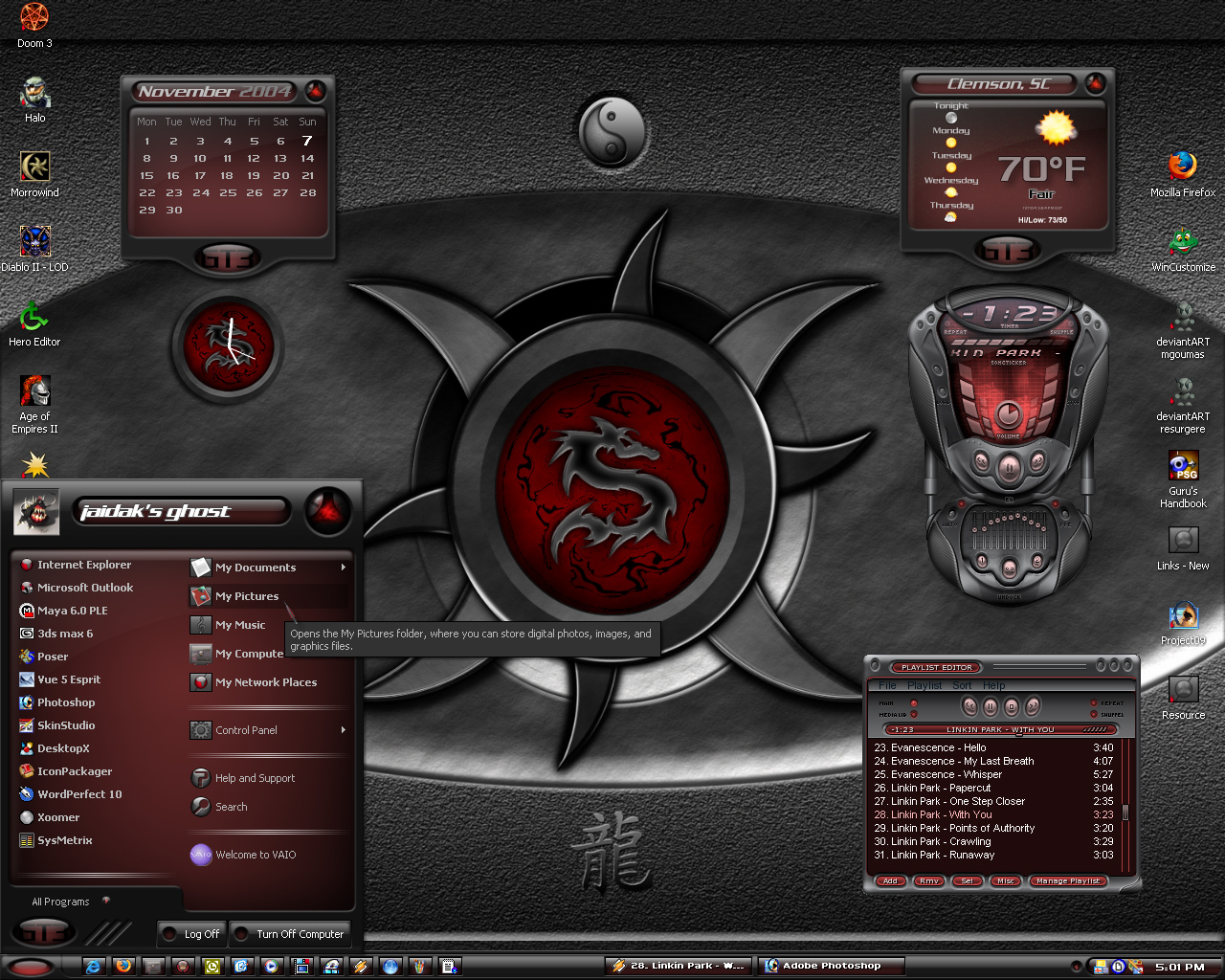
GT3Red-SpyderbyteGraphXUpdated Nov 07, 2004 by jaidaksghost |
||||||
 |
|
Page 1 of 2 | |
|
|---|


JPK69
Comment #4 Monday, November 8, 2004 2:10 AM
Comment #4 Monday, November 8, 2004 2:10 AM
jesus, this is sick, the wallpaper looks so wikid  great shot, keep up the great work mate, jpk69
 great shot, keep up the great work mate, jpk69

RedBuzzard
Comment #7 Monday, November 8, 2004 10:48 AM

Comment #7 Monday, November 8, 2004 10:48 AM
Love the recolor and the wall is awesome. Another fine work. 

irishman055
Comment #9 Tuesday, November 9, 2004 7:06 AM

Comment #9 Tuesday, November 9, 2004 7:06 AM
Very nice... But where did you get that GT3 DesktopX Widget at?
Jachyra
Comment #11 Tuesday, November 9, 2004 9:34 AM

Comment #11 Tuesday, November 9, 2004 9:34 AM
Sweet shot. Hard to pull off a reddish desktop, but you did it

 Shot of the Day, huh? eek. hehe...
jaidaksghost
Comment #13 Tuesday, November 9, 2004 2:33 PM
Comment #13 Tuesday, November 9, 2004 2:33 PM
thanks for all the coments. Look Spyder: We got the shot of the day. Thanks for the great wall.
I made the widget myself. I haven't asked for permission to release it because Tiggz usually makes excelllent stuff of his own. I may have to ask this time.
I made the widget myself. I haven't asked for permission to release it because Tiggz usually makes excelllent stuff of his own. I may have to ask this time.


lgspence
Comment #15 Tuesday, November 9, 2004 6:10 PM
Comment #15 Tuesday, November 9, 2004 6:10 PM
This is so awesome,Will it be available for download?
jaidaksghost
Comment #16 Tuesday, November 9, 2004 6:58 PM
Comment #16 Tuesday, November 9, 2004 6:58 PM
thanks again for all the comments.
To stem the flow of e-mails here are some directions to get GT3red for yourself follow.
Download the GT3 skin from Wincustomize and follow the directions below. The wallpaper is also available there. It's called Dragon.
To change the color of the windowblinds is pretty simple. In the system tray there is a windowblinds icon. Right-click on it and choose configure. In the window that opens up you will see all your installed blinds. On the right side of the menu choose change skin color. Try a couple of the reds. Different monitors will display the colors differently so you may not get an exact match to mine.
Hope this helps the newbies.
-�jaidaksghost�

To stem the flow of e-mails here are some directions to get GT3red for yourself follow.
Download the GT3 skin from Wincustomize and follow the directions below. The wallpaper is also available there. It's called Dragon.
To change the color of the windowblinds is pretty simple. In the system tray there is a windowblinds icon. Right-click on it and choose configure. In the window that opens up you will see all your installed blinds. On the right side of the menu choose change skin color. Try a couple of the reds. Different monitors will display the colors differently so you may not get an exact match to mine.
Hope this helps the newbies.
-�jaidaksghost�

jaidaksghost
Comment #17 Tuesday, November 9, 2004 7:02 PM
Comment #17 Tuesday, November 9, 2004 7:02 PM
i'm gonna drop a line to Tiggz about the weather widget.
jaidaksghost
Comment #19 Tuesday, November 9, 2004 9:25 PM
Comment #19 Tuesday, November 9, 2004 9:25 PM
got permission for the weather widget. look for it to come up. thanks Tiggz. see more of Tiggz stuff at http://tiggz.wincustomize.com/Gallery.aspx?SID=4234&LibID=-1&view=1&sortby=4&sortdir=DESC&p=1&advanced=0&searchtxt=GT3&UID=695407

Please login to comment and/or vote for this skin.
Welcome Guest! Please take the time to register with us.
There are many great features available to you once you register, including:
- Richer content, access to many features that are disabled for guests like commenting on the forums and downloading files.
- Access to a great community, with a massive database of many, many areas of interest.
- Access to contests & subscription offers like exclusive emails.
- It's simple, and FREE!
|
|
Page 1 of 2 | |
|
|---|


![Aero11 (Vista Edition) [Theme Preview]](https://skins17.wincustomize.com/40/19/4019518/13/28337/preview-13-28337-100x75.jpg?d=1677593646.38)


Comment #1 Sunday, November 7, 2004 8:44 PM