








































 |
|
Page 1 of 2 | |
|
|---|
jazzymjr
Comment #2 Tuesday, September 20, 2005 8:05 AM

Comment #2 Tuesday, September 20, 2005 8:05 AM
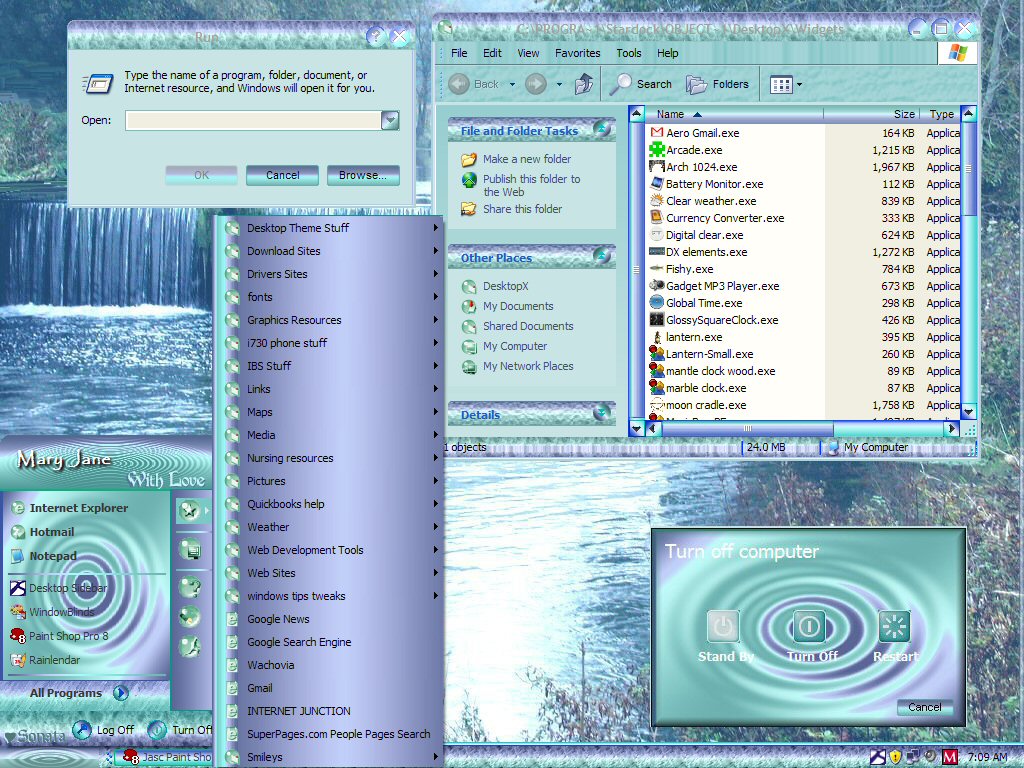
Karen, the original start menu was huge! It did have the graphic in the programs list. But I changed everything else on it. I did the shutdown, logoff, task pane skinning myself. I also changed colors a little as well. Also made the menus non-flat (or whatever you call it!) Now, if I can figure out how to make toolbar icons.... There are green, purple, and rose substyles, and they are all a little different..the thing that ties them together is the graphic on the programs list in the start menu.
Thanks for the feedback, Karen.
Thanks for the feedback, Karen.


jazzymjr
Comment #4 Tuesday, September 20, 2005 11:24 AM
Comment #4 Tuesday, September 20, 2005 11:24 AM
Thanks, goober..this is a little scary...trying to port a VS, and getting everything right!


jazzymjr
Comment #8 Tuesday, September 20, 2005 4:10 PM
Comment #8 Tuesday, September 20, 2005 4:10 PM
Thank you, Bet. Do you have any idea on how to make toolbars? 


 I can't tell you how much I love the design and color. It is a gorgeous blind. I can't wait till you're finished!!!
jazzymjr
Comment #10 Tuesday, September 20, 2005 6:54 PM
Comment #10 Tuesday, September 20, 2005 6:54 PM
Thank you so much, cindi!
I have a question for everyone. I have finished the blind (it is actually 4 blinds...this one is just one of them..they are all substyles). I did not skin the toolbar icons or animations....don't know how to do that. My question is: If I upload this as one file, it will be a 3.9 mb file! Is that too large of a file? Should I break them apart, and upload one at a time as separate files? Also, is it ok to upload blinds without skinning the toolbar icons and animations? (Everything else is skinned.)
OOPS...I said one question....sorry about that...more questions came to me!
I have a question for everyone. I have finished the blind (it is actually 4 blinds...this one is just one of them..they are all substyles). I did not skin the toolbar icons or animations....don't know how to do that. My question is: If I upload this as one file, it will be a 3.9 mb file! Is that too large of a file? Should I break them apart, and upload one at a time as separate files? Also, is it ok to upload blinds without skinning the toolbar icons and animations? (Everything else is skinned.)
OOPS...I said one question....sorry about that...more questions came to me!

buzzh58
Comment #11 Tuesday, September 20, 2005 8:41 PM

Comment #11 Tuesday, September 20, 2005 8:41 PM
Jazzy, Im not a 100% sure on this but it shouldnt be 3.9mb if you zip for distribution in Skinstudio. You should be packaging and zipping only the wbload document.
Either way I think its better if you keep all substyles together.
Either way I think its better if you keep all substyles together.
jazzymjr
Comment #12 Tuesday, September 20, 2005 9:10 PM
Comment #12 Tuesday, September 20, 2005 9:10 PM
Buzz, I did zip for distribution in Skinstudio. These blinds have a lot of graphics in them. The original VS was 3.2 mb, and he did not skin the shutdown/wait/logoff stuff, or the buttons for them, or the task pane. And I made some changes, that added a few more graphics. So, I guess that accounts for the large size. I hope people don't get too upset with the size of the file!
buzzh58
Comment #13 Tuesday, September 20, 2005 9:40 PM
Comment #13 Tuesday, September 20, 2005 9:40 PM
Ok then Jazzy, If people like it they will dload it regardless,,Skin Factories latest Alienware theme was a 62mb download.
Good luck
Good luck

boopish
Comment #14 Tuesday, September 20, 2005 10:20 PM
Comment #14 Tuesday, September 20, 2005 10:20 PM
Jazzy...e-mail me and I'll be glad to help as much as I can.
Fairyy~
Comment #15 Wednesday, September 21, 2005 8:27 AM
3.9 mbs isnt that big really..not for 4 blinds in one...although, ive had a few blinds that only had 1 substyle and this was well known skinner and blind was 8 mbs. I searched through that folder 20 times trying to figure out what made it so big. Sometimes a large bmp of a wall gets by me and can be 5 mbs. Sometimes its just not possible to figure out. Maybe you should ask in forum. Corky_O usually can explain what to look for. Sometimes its the way you resave the graphics that cause them to increase in size.
But..like buzz said..wont matter..if they like it, they will d/load it. 75% of ppl have dsl or cable. Ill be the one taking a nap during the d/load on dial up

Comment #15 Wednesday, September 21, 2005 8:27 AM
| My question is: If I upload this as one file, it will be a 3.9 mb file |
3.9 mbs isnt that big really..not for 4 blinds in one...although, ive had a few blinds that only had 1 substyle and this was well known skinner and blind was 8 mbs. I searched through that folder 20 times trying to figure out what made it so big. Sometimes a large bmp of a wall gets by me and can be 5 mbs. Sometimes its just not possible to figure out. Maybe you should ask in forum. Corky_O usually can explain what to look for. Sometimes its the way you resave the graphics that cause them to increase in size.
But..like buzz said..wont matter..if they like it, they will d/load it. 75% of ppl have dsl or cable. Ill be the one taking a nap during the d/load on dial up
Fairyy~
Comment #16 Wednesday, September 21, 2005 8:29 AM
Lots dont do the tool bar icons or animation...and those will only add more to size. I wouldnt worry about those. I dont even care if a skin is animated.And..I would keep them all together...
Comment #16 Wednesday, September 21, 2005 8:29 AM
| Also, is it ok to upload blinds without skinning the toolbar icons and animations? |
Lots dont do the tool bar icons or animation...and those will only add more to size. I wouldnt worry about those. I dont even care if a skin is animated.And..I would keep them all together...
Fairyy~
Comment #17 Wednesday, September 21, 2005 8:33 AM
men ( rolling eyeballs)
Comment #17 Wednesday, September 21, 2005 8:33 AM
| ,,Skin Factories latest Alienware theme was a 62mb |
men ( rolling eyeballs)
jazzymjr
Comment #18 Wednesday, September 21, 2005 11:30 AM
Karen, ironically, the way I saved the graphics I used, actually decreased the file size! I left all his original graphics in there, in case someone doesn't like what I did. But, adding the logoff/shutdown/wait thingys did add to the size...since I had to make 2 per blind, for a total of 8! I guess I will just stop worrying about it!
I agree....men and their "toys"! I would think long and hard about downloading a blind that big...cause it gets bigger once it is uncompressed!
Well, gonna do a final check, and, hopefully, upload it yet today.
Thanks for all the help!
Comment #18 Wednesday, September 21, 2005 11:30 AM
| Sometimes its the way you resave the graphics that cause them to increase in size. |
Karen, ironically, the way I saved the graphics I used, actually decreased the file size! I left all his original graphics in there, in case someone doesn't like what I did. But, adding the logoff/shutdown/wait thingys did add to the size...since I had to make 2 per blind, for a total of 8! I guess I will just stop worrying about it!
| men ( rolling eyeballs) |
I agree....men and their "toys"! I would think long and hard about downloading a blind that big...cause it gets bigger once it is uncompressed!
Well, gonna do a final check, and, hopefully, upload it yet today.
Thanks for all the help!
Fairyy~
Comment #19 Wednesday, September 21, 2005 6:33 PM
Comment #19 Wednesday, September 21, 2005 6:33 PM
You could of tested it out ..feel free to send it if you need to check anything. Looking forward to this
~Angelic DestinE
Comment #20 Wednesday, September 21, 2005 8:04 PM

Comment #20 Wednesday, September 21, 2005 8:04 PM
Mary Jane I love the ports you did. My God. You put me to shame. I'm using the blind right now and loving it.
Please login to comment and/or vote for this skin.
Welcome Guest! Please take the time to register with us.
There are many great features available to you once you register, including:
- Richer content, access to many features that are disabled for guests like commenting on the forums and downloading files.
- Access to a great community, with a massive database of many, many areas of interest.
- Access to contests & subscription offers like exclusive emails.
- It's simple, and FREE!
|
|
Page 1 of 2 | |
|
|---|

![Aero11 (Vista Edition) [Theme Preview]](https://skins17.wincustomize.com/40/19/4019518/13/28337/preview-13-28337-100x75.jpg?d=1677593646.38)


Comment #1 Tuesday, September 20, 2005 7:47 AM
Ill tell you..im spoiled with tool bar icons now..I hate those windows default ones now. Not sure who could help you with that.
You did a great job though..