






































johnthecompnerd
Comment #3 Sunday, December 30, 2007 8:01 PM

Comment #3 Sunday, December 30, 2007 8:01 PM
What did you use for Stacks? I use the stack docklet but I wonder if what you have is any better.
Mirsguy
Comment #4 Sunday, December 30, 2007 8:56 PM

Comment #4 Sunday, December 30, 2007 8:56 PM
Thanks for the compliments, everyone!
johnthecompnerd: visit this forum and see reply #2 for the stacks docklet that I use.
https://forums.wincustomize.com/?aid=170537#1403961
johnthecompnerd: visit this forum and see reply #2 for the stacks docklet that I use.
https://forums.wincustomize.com/?aid=170537#1403961
Mirsguy
Comment #5 Sunday, December 30, 2007 9:03 PM
Comment #5 Sunday, December 30, 2007 9:03 PM
BTW-if anyone's interested or curious, I got the space Leopard wallpaper by doing a Google image search for "Leopard Wallpaper." 

Gabs Daman
Comment #6 Monday, December 31, 2007 9:08 AM
Comment #6 Monday, December 31, 2007 9:08 AM
hello,
How do I add this theme????
Do I have to have ObjectDock Plus???
I have downloaded the .dockzip file. How do I open it?
In which folder do I put it????
Thank you
How do I add this theme????
Do I have to have ObjectDock Plus???
I have downloaded the .dockzip file. How do I open it?
In which folder do I put it????
Thank you
Mirsguy
Comment #7 Monday, December 31, 2007 10:55 AM
Comment #7 Monday, December 31, 2007 10:55 AM
Once downloaded, simply open the downloaded file and it will automatically save into your "Stardock" folder inside of your "My Documents" folder.
For OD+, see the front page of this site: https://www.stardock.com/products/objectdock/
For OD+, see the front page of this site: https://www.stardock.com/products/objectdock/
Gabs Daman
Comment #8 Monday, December 31, 2007 12:12 PM
Comment #8 Monday, December 31, 2007 12:12 PM
But when I try to open the .dockzip file downloaded, it asks me with which program it wants open the file. If I say ObjectDock, nothing happens.
Help me plz.
Thanks
Help me plz.
Thanks
Cr1sYs
Comment #9 Monday, December 31, 2007 10:19 PM
Comment #9 Monday, December 31, 2007 10:19 PM
Hey how do you get the docks on top and on the left and right? can you add more than 1 dock?? I was so confused when i looked at your screenshot.
IronCrux0
Comment #10 Tuesday, January 1, 2008 1:58 AM
Comment #10 Tuesday, January 1, 2008 1:58 AM
How do you get your flyout menus to go like that?
Mirsguy
Comment #11 Tuesday, January 1, 2008 3:37 AM
Comment #11 Tuesday, January 1, 2008 3:37 AM
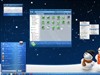
IronCrux0: That is the stack docklet, not a flyout menu. See comment #4 on this page about where to find it. It's cool!
Mirsguy
Comment #12 Tuesday, January 1, 2008 2:27 PM
Comment #12 Tuesday, January 1, 2008 2:27 PM
Cr1sYs: Objectdock Plus gives you the option of placing multiple docks on your screen, such as I have. See comment # 7.
Mirsguy
Comment #14 Tuesday, March 4, 2008 2:05 AM
Comment #14 Tuesday, March 4, 2008 2:05 AM
anyone82: It's hard to tell from your picture, but maybe you can try this: right click on an icon on your top dock and select "this dock", then "position on screen", then select "top".
jonathanbaker1
Comment #15 Monday, May 12, 2008 6:45 AM

Comment #15 Monday, May 12, 2008 6:45 AM
I like!! C'mon people its worth more that 2 stars... I gave you five.

Please login to comment and/or vote for this skin.
Welcome Guest! Please take the time to register with us.
There are many great features available to you once you register, including:
- Richer content, access to many features that are disabled for guests like commenting on the forums and downloading files.
- Access to a great community, with a massive database of many, many areas of interest.
- Access to contests & subscription offers like exclusive emails.
- It's simple, and FREE!




Comment #1 Sunday, December 30, 2007 8:11 AM
Duke261