








































armaninyc
Comment #3 Sunday, September 24, 2006 7:21 PM
Comment #3 Sunday, September 24, 2006 7:21 PM
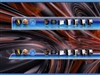
Your Suspended Blue Glass Bar is Hot!!!! Now that i have it, how do I open an use it???
 Armaninyc
 Armaninyc
Cavan1
Comment #4 Sunday, September 24, 2006 9:11 PM
Comment #4 Sunday, September 24, 2006 9:11 PM
Hey armaninyc, first have you downloaded and installed ObjectDock. If not click link to ObjectDock website at top of page.
To use dock you need to unzip the download file and move the folder to C:\Program Files\Stardock\ObjectDock\Backgrounds.
To change dock, right click on dock, Dock Settings, look for Appearance, Config layout is different in the Plus version I have and the free thus I am not sure of the free config layout. When have Appearance settings select dock from drop list.
To use dock you need to unzip the download file and move the folder to C:\Program Files\Stardock\ObjectDock\Backgrounds.
To change dock, right click on dock, Dock Settings, look for Appearance, Config layout is different in the Plus version I have and the free thus I am not sure of the free config layout. When have Appearance settings select dock from drop list.
armaninyc
Comment #5 Monday, September 25, 2006 7:48 PM
Comment #5 Monday, September 25, 2006 7:48 PM
HEY MASTER APPRENTICE !!!!!!!!!! It worked so well, an it looks even HOTTER, then what I thought, no that I see it. Keep skinning, GOd has blessed you with an awesome talent, an I hope you go far as you like with it!!!!!!!!

 Armaninyc

 Armaninyc
armaninyc
Comment #7 Sunday, November 5, 2006 12:56 AM
Comment #7 Sunday, November 5, 2006 12:56 AM
Hey Cavan, I have 1 more question, does this also apply to tabbed docks?
Armaninyc
Armaninyc
armaninyc
Comment #8 Sunday, November 5, 2006 12:57 AM
Comment #8 Sunday, November 5, 2006 12:57 AM
Hey Cavan, I have 1 more question, does this also apply to tabbed docks?
Armaninyc
Armaninyc
Cavan1
Comment #9 Monday, November 6, 2006 5:52 PM
Comment #9 Monday, November 6, 2006 5:52 PM
Hey armaninyc, any dock can be used for a tabbed dock ( some may not look right due to .ini settings for it ), it will use the default tabs that come with Object Dock.
I just tried it, other than having the default grey tabs it looks not bad. I may have to make a tabbed version now,
using blanks as tabs so text is on the bar.
I just tried it, other than having the default grey tabs it looks not bad. I may have to make a tabbed version now,
using blanks as tabs so text is on the bar.
armaninyc
Comment #10 Tuesday, November 7, 2006 4:55 PM
Comment #10 Tuesday, November 7, 2006 4:55 PM
Thanks Cavan, I asked only because I am not using object plus, and when i attempted to use the tabbed dock, it looked nothing like the original.
thanks Again,
Armaninyc
thanks Again,
Armaninyc
Cavan1
Comment #11 Tuesday, November 7, 2006 6:49 PM
Comment #11 Tuesday, November 7, 2006 6:49 PM
Hey armaninyc, for tabbed docks you need Object Dock Plus, using tabbed docks for standard zoomers very rarely works well.
This is because the .ini settings for tabbed docks have more ways that things can be controlled to get the look you want.
This is because the .ini settings for tabbed docks have more ways that things can be controlled to get the look you want.
armaninyc
Comment #12 Tuesday, November 7, 2006 7:52 PM
Comment #12 Tuesday, November 7, 2006 7:52 PM
AS always, thanks so much, now I have to get PLUS!!
Armaninyc
Armaninyc
Please login to comment and/or vote for this skin.
Welcome Guest! Please take the time to register with us.
There are many great features available to you once you register, including:
- Richer content, access to many features that are disabled for guests like commenting on the forums and downloading files.
- Access to a great community, with a massive database of many, many areas of interest.
- Access to contests & subscription offers like exclusive emails.
- It's simple, and FREE!





Comment #1 Thursday, September 7, 2006 12:23 AM