





































World of Warcraft Desktop Updated!
Support for Windows Vista
Tuesday, June 2, 2009 by Island Dog | Discussion: WinCustomize News
Stardock has released an update to the official World of Warcraft Desktop. The suite, created by Stardock Design with both original artwork and in-game interface graphics from Blizzard's popular massively multiplayer game. The World of Warcraft Desktop uses the MyColors theme manager to apply the WoW suite, without the installation of any other applications.
The WoW MyColors suite includes an updated visual style, with support for both Windows XP and Vista. Icons are included for the XP version, and some slick WoW wallpapers are also included.
 |
 |
The World of Warcraft Desktop is free, and can be downloaded here!
 |
|
Page 1 of 2 | |
|
|---|




Reply #4 Tuesday, June 2, 2009 5:39 PM


Reply #6 Tuesday, June 2, 2009 9:21 PM
MyColors is used as this is an "all in one" solution for people who don't have WB, Object Desktop, etc. It's an entire desktop suite, not just a WB skin.
Reply #7 Tuesday, June 2, 2009 11:48 PM

Reply #8 Wednesday, June 3, 2009 12:18 AM
 Edit: It has been a little over 10 minutes since I started installing windowblinds. icacls.exe still running, installation ongoing? Why is this?
Reply #9 Wednesday, June 3, 2009 12:37 AM
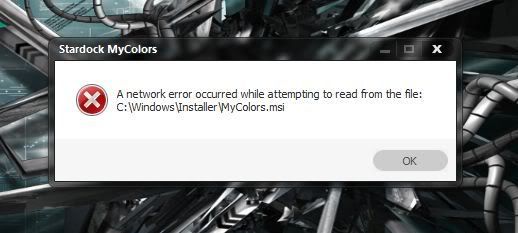
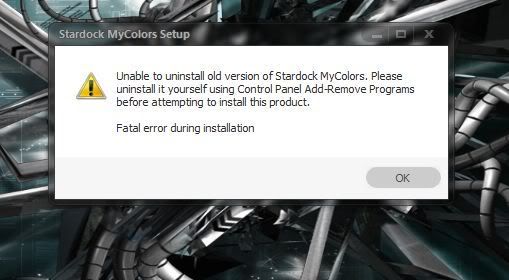 I already uninstalled it!!!
Reply #10 Wednesday, June 3, 2009 1:06 AM

Reply #11 Wednesday, June 3, 2009 2:57 AM

Reply #12 Wednesday, June 3, 2009 7:40 AM
Reply #13 Wednesday, June 3, 2009 10:04 AM
- oh, and yes I realize the key word here is FREE and some will say I have no right to express dissatisfaction with a FREE process.
Perhaps I'll keep a virtual workstation around with MC installed on it. After install I can grab the content and put it on my real system which does not have MC.

Reply #14 Wednesday, June 3, 2009 11:17 AM
Packaging in one format is easier/cheaper for the producer and the consumer. For people outside this forum, MyColors is also good marketing for other themes. More easy/inexpensive distribution means that more can be done in the app developement department.
My point is that MyColors is good for you . . even if you don't like it.
Reply #15 Wednesday, June 3, 2009 1:23 PM
Reply #16 Wednesday, June 3, 2009 5:28 PM
Reply #17 Wednesday, June 3, 2009 5:45 PM
Um... considering they call it
the official World of Warcraft Desktop.
I would assume Blizzard has been involved in the making of it... 
Also, it's not something that's uploaded to the WC gallery, so those restrictions doesn't apply anyway.
Reply #18 Wednesday, June 3, 2009 7:06 PM
Reply #19 Wednesday, June 3, 2009 11:04 PM
Well, since no one seems to be jumping in here to help with this problem, I just extracted the files and installed each part seperately. That was the only way I could get it to install.

Reply #20 Thursday, June 4, 2009 2:24 AM
 How about a sleak black Guild Wars Theme huh huh?
Any talented skinners into makeing a clean not to " Cartoony " Windows Blind Theme for Guild Wars. sorry I'm a bit bias
How about a sleak black Guild Wars Theme huh huh?
Any talented skinners into makeing a clean not to " Cartoony " Windows Blind Theme for Guild Wars. sorry I'm a bit bias 
Please login to comment and/or vote for this skin.
Welcome Guest! Please take the time to register with us.
There are many great features available to you once you register, including:
- Richer content, access to many features that are disabled for guests like commenting on the forums and downloading skins.
- Access to a great community, with a massive database of many, many areas of interest.
- Access to contests & subscription offers like exclusive emails.
- It's simple, and FREE!
|
|
Page 1 of 2 | |
|
|---|
Reply #1 Tuesday, June 2, 2009 4:22 PM
cool!