






































DriveScan
where can i get it?
Thursday, January 19, 2006 by Ebdowy Fe Alsooq | Discussion: Requests
hi there, there was a handy program called DriveScan in the Object Desktop, but it seems i can't fid itin the Stardock Central. any help on how can i get it since i can't see it in the Central? thanks in advanced
ZubaZ
Reply #2 Thursday, January 19, 2006 5:48 PM

Reply #2 Thursday, January 19, 2006 5:48 PM
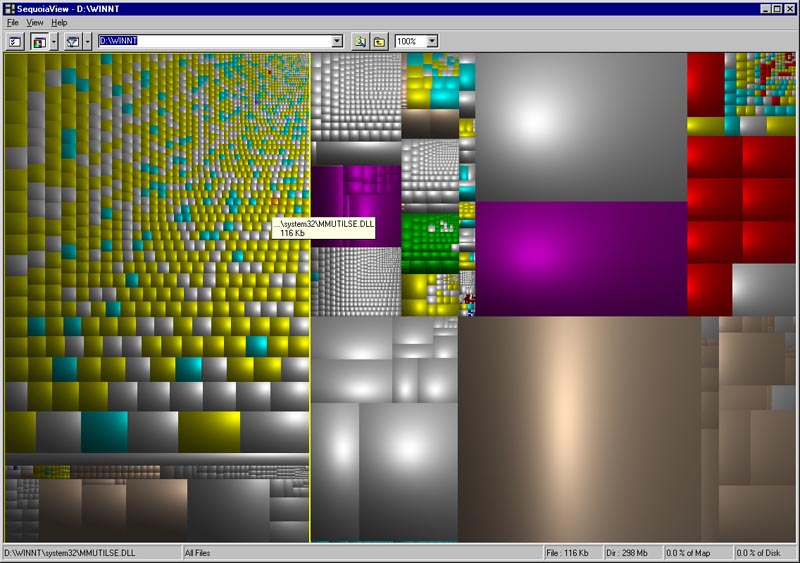
Stardock makes some great apps . . but I reccommend sequoiaview for drive mapping. Not only is it useful, it's art. http://www.win.tue.nl/sequoiaview/


Bichur
Reply #3 Thursday, January 19, 2006 5:58 PM 
you mentioned this a long time ago...had forgotten about it...still have no idea what the hell I'm looking at, but it's purty.

Reply #3 Thursday, January 19, 2006 5:58 PM

you mentioned this a long time ago...had forgotten about it...still have no idea what the hell I'm looking at, but it's purty.

Ebdowy Fe Alsooq
Reply #4 Thursday, January 19, 2006 6:09 PM
Reply #4 Thursday, January 19, 2006 6:09 PM
i tried the sequoiaview and i didn't like it. Drivescan is much neat and simple. still waiting for an answer on where i can get it, i went through my Central option and settings but couldn't find away on how to make it reapear again. and i don't want to download the old objectdesktop again.
ZubaZ
Reply #5 Thursday, January 19, 2006 6:11 PM
Reply #5 Thursday, January 19, 2006 6:11 PM
Wow. Too big. Didn't realize the image was resized in the img tag. Sorry. 
Differetn file types have different colors. All my music files are green for example. Each file is a square. Size of the square = size of file.

Differetn file types have different colors. All my music files are green for example. Each file is a square. Size of the square = size of file.
Jafo
Reply #6 Thursday, January 19, 2006 6:37 PM

Reply #6 Thursday, January 19, 2006 6:37 PM
Citizen Ebdowy Fe Alsooq ...in SDC make sure you have 'show pre-release versions' clicked. Drivescan is there...2.00c.026 ....

Adamness
Reply #7 Thursday, January 19, 2006 6:54 PM

Reply #7 Thursday, January 19, 2006 6:54 PM
I checked, and I don't see it either. Checked the settings and everything is fine, but still don't see DriveScan.
ZubaZ
Reply #8 Thursday, January 19, 2006 6:59 PM
Reply #8 Thursday, January 19, 2006 6:59 PM
Try going Tools | settings | Internet | Refresh XML data.
That might help. Can't hurt.
That might help. Can't hurt.
Ebdowy Fe Alsooq
Reply #9 Thursday, January 19, 2006 6:59 PM
Reply #9 Thursday, January 19, 2006 6:59 PM
Admin Jafo.. i cheked all the opetions and settings including the "Show pre-release". restarted the PC sevral times. but there is no use..


Ebdowy Fe Alsooq
Reply #10 Thursday, January 19, 2006 7:03 PM
Reply #10 Thursday, January 19, 2006 7:03 PM
Zubaz thanks but refreshing the XML didn't do anything.
Koasati
Reply #11 Thursday, January 19, 2006 9:03 PM

Reply #11 Thursday, January 19, 2006 9:03 PM
Try going to View > Show/Hide Applications, and see if it's set to show, if it is, hide it, and set it back to show. Might have to close SDC and reopen.
Koasati
Reply #12 Thursday, January 19, 2006 9:28 PM
Reply #12 Thursday, January 19, 2006 9:28 PM
If all else fails, TreeSizeFree is like DriveScan's twin brother.... http://www.jam-software.com/freeware/index.shtml
aimzzz
Reply #13 Thursday, January 19, 2006 9:36 PM

Reply #13 Thursday, January 19, 2006 9:36 PM
#2 I've gotta try it just to look at it
(secret confession-- before MS changed the Defrag GUI, I used to become mesmerized watching it, even tho it was boring & slow.)
(secret confession-- before MS changed the Defrag GUI, I used to become mesmerized watching it, even tho it was boring & slow.)

ZubaZ
Reply #14 Thursday, January 19, 2006 9:51 PM
Me too.
Reply #14 Thursday, January 19, 2006 9:51 PM
| (secret confession-- before MS changed the Defrag GUI, I used to become mesmerized watching it, even tho it was boring & slow.) |
Me too.

Adamness
Reply #15 Thursday, January 19, 2006 10:33 PM
Reply #15 Thursday, January 19, 2006 10:33 PM
I had the same problem about DriveScan now showing. Not that I really care, but now that I know it's not working, I'm going to obsess over it until it's fixed.
I went to the show/hide application and DriveScan is checked but won't show. I hid and unhid it but still no luck. Weird.
By the way, what is DriveScan?
I went to the show/hide application and DriveScan is checked but won't show. I hid and unhid it but still no luck. Weird.
By the way, what is DriveScan?

ZubaZ
Reply #16 Thursday, January 19, 2006 10:53 PM
It's like sequoiaview but simpler.
I graphiclly shows a hard drives and how much space folders and files take up. It makes it real easy to clean up the crap.
Reply #16 Thursday, January 19, 2006 10:53 PM
| By the way, what is DriveScan? |
It's like sequoiaview but simpler.
I graphiclly shows a hard drives and how much space folders and files take up. It makes it real easy to clean up the crap.
aimzzz
Reply #17 Thursday, January 19, 2006 11:42 PM
Reply #17 Thursday, January 19, 2006 11:42 PM
Zubaz -- thanks for the link-- sequoiaview is trippy-- will try putting it to use tomorrow.
Adamness
Reply #18 Friday, January 20, 2006 12:11 AM
Reply #18 Friday, January 20, 2006 12:11 AM
Sounds cool. I want it now. Gotta figure out why it won't show in SDC.
Please login to comment and/or vote for this skin.
Welcome Guest! Please take the time to register with us.
There are many great features available to you once you register, including:
- Richer content, access to many features that are disabled for guests like commenting on the forums and downloading skins.
- Access to a great community, with a massive database of many, many areas of interest.
- Access to contests & subscription offers like exclusive emails.
- It's simple, and FREE!
Reply #1 Thursday, January 19, 2006 5:33 PM
check you settings to make sure you have marked to visible (maybe, not home can't check)