









































Object desktop manager not working
Monday, August 3, 2026 by slamani | Discussion: Object Desktop
Hi,
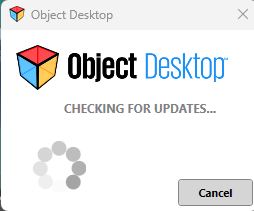
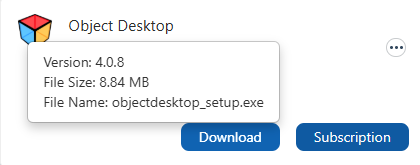
The object desktop manager does not work and cannot be opened. I uninstalled it, restated my computer and reinstalled using the newest version 4.08 from my account at Stardock.com. After it installs, Object Desktop is stuck on "checking for updates" and nothing else happens. Please help resolve.
Sincerely,
Adel
Reply #2 Wednesday, August 5, 2026 12:29 PM
1 - My sybscription is still active.
2 - I tested it on my laptop and it works fine
3 - On my desktop, I disabled the firewall and virus scan, uninstalled and reinstalled O.D. but I am having the same problem as shown in my first message.
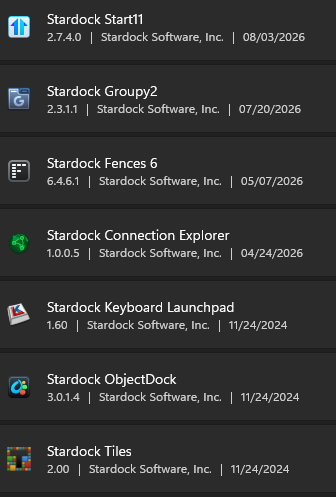
O.D. used to work fine for years on the same desktop. I hae the following Stardock apps installed in my computer. Can you please help resolve?

Reply #3 Wednesday, August 5, 2026 2:17 PM
Hi Adel,
Thanks for posting. I'm not aware of other reports of this at this time and will be glad to look into it.
Is there anything unique about your machine you can think of that might be causing an error or other problem when checking for updates? For example, are you on a machine in a corporate environment, and/or may have unique security settings?
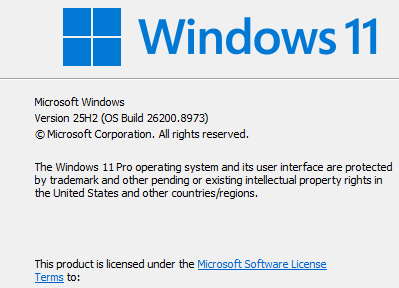
Could you also please let us know your exact Windows version? Run winver.exe from Start to get the exact build please.
Thanks again and best regards,
Adam McGuinness
Stardock Support Specialist
Reply #4 Saturday, August 8, 2026 2:36 PM
It is a personal desktop not corporate environment. No unique security settings besides windows security. I disabled the firewall and virus scan, uninstalled and reinstalled O.D. with no success.

Reply #5 Saturday, August 8, 2026 10:52 PM
Perhaps, there is issue with your current admin account. As a test, try creating a new admin account and login into that new admin account and test it, please report back.
Thank you,
Basj,
Stardock Community Assistant
Reply #6 Monday, August 10, 2026 1:31 PM
Hi Slamani, thanks for answering.
We have a test build you can try which you can download and install from here:
Please let us know if this helps. If it doesn't you can submit log data to us via support ticket. To find the log, you can paste this into File Explorer:
- %AppData%\Stardock\ObjectDesktop\ObjectDesktop_log.txt
Then attach the file in a support ticket to send to us to investigate further:
Best regards,
Adam McGuinness
Stardock Support Specialist
Reply #7 Monday, August 10, 2026 2:13 PM
Adam,
I tried the new build, and Object Desktop is now working correctly on my system. Thank you for your help.
I do wish I had been informed earlier that the issue was already known and under investigation, as I spent no less than three hours troubleshooting and attempting to resolve it on my own.
Sincerely,
Adel
Please login to comment and/or vote for this skin.
Welcome Guest! Please take the time to register with us.
There are many great features available to you once you register, including:
- Richer content, access to many features that are disabled for guests like commenting on the forums and downloading skins.
- Access to a great community, with a massive database of many, many areas of interest.
- Access to contests & subscription offers like exclusive emails.
- It's simple, and FREE!
Reply #1 Monday, August 3, 2026 12:11 PM
Hello,
Sorry to hear you are having issues. I tested it on my system, and I can not reproduce your issue. Object Desktop check for updates and load without issue. Few things to check.
Thank you.
Basj,
Stardock Community Assistant.