







































Cannot reinstall Groupy 2
Windows update 6/10/26 reassigned drive letters
Thursday, June 11, 2026 by bgartlover | Discussion: Groupy
Good Day
My subscription OD-0174974-OEM-3623434530 is active until Sept 2027. Windows update of 6/10/26 reassigned drive letters and the external drive that contains my work folders is no longer accessible via Groupy 2. Following advice in this forum I uninstalled Groupy 2 intending ti reinstall it. Object Desktop manafer shows it listed, but when "open" is clicked the software responds that it needs to be reinstalled.
I've downloaded Object Desktop manager and reinstalled (since it appears individual downloads of the suite are no longer available) but there is no 'install' option provided.
Please advise.
Reply #2 Thursday, June 11, 2026 11:10 AM
Groupy must be installed in program files which would be on drive C in almost every situation I think.

Reply #3 Thursday, June 11, 2026 11:48 AM
Yes, it was reassigned to a partition on Drive C. Now I have a "Local Disk E" that's empty.
Given that I need a new computer, and with all that's happening with Secure boot cert, I don't want to try and reassign that letter.
The link ... /myaccount/products only shows OD flavors, Cursor Effects Plus and Start 10.
I will try purging. Thanks.
Reply #4 Friday, June 12, 2026 7:53 AM
Update: Purge ran, did not force restart. Restarted, and installed trial version from /products; activated.
It's an option under All Programs-->Stardock-->Groupy, but it still can't be found from Object Desktop manager even though listed,
I can live with it. Thanks!

Reply #5 Friday, June 12, 2026 8:14 AM
Update: Purge ran, did not force restart. Restarted, and installed trial version from /products; activated.
It's an option under All Programs-->Stardock-->Groupy, but it still can't be found from Object Desktop manager even though listed,
I can live with it. Thanks!
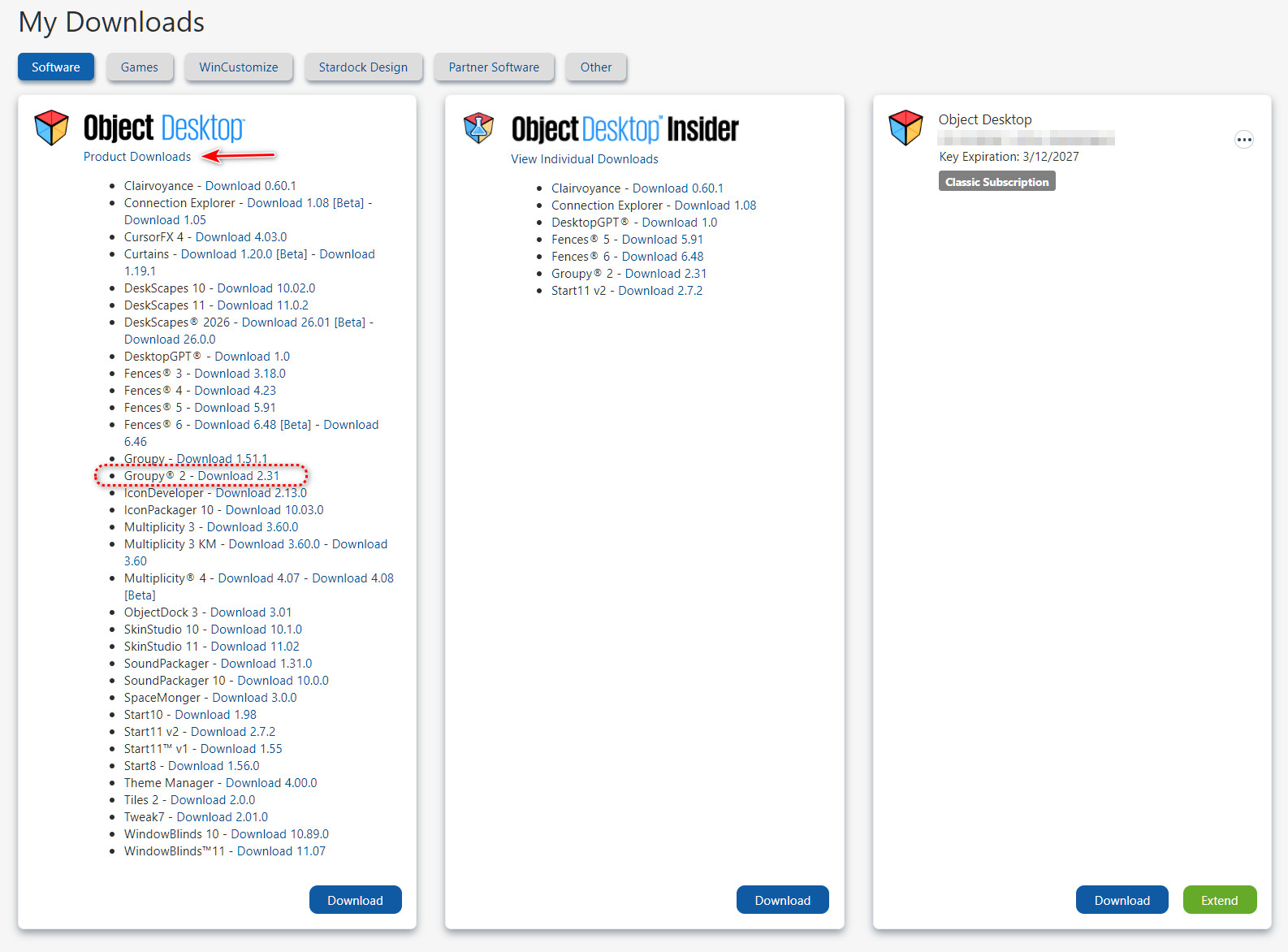
Click the "Product Downloads" link shown in the pic below and you will get all the downloads available to you with your Object Desktop subscription.
Please login to comment and/or vote for this skin.
Welcome Guest! Please take the time to register with us.
There are many great features available to you once you register, including:
- Richer content, access to many features that are disabled for guests like commenting on the forums and downloading skins.
- Access to a great community, with a massive database of many, many areas of interest.
- Access to contests & subscription offers like exclusive emails.
- It's simple, and FREE!
Reply #1 Thursday, June 11, 2026 10:50 AM
Curious, was the original drive letter for your external drive reassigned to another drive? If not, you could change the external drive letter back to it's original letter using Disk Management.
Another thing to try is to purge Groupy 2 using the purge tool located here. and then reinstall using the latest version available on your Account Download page https://store.stardock.com/myaccount/products