












































Deskscapes 2026
Wednesday, June 10, 2026 by tellisbd | Discussion: DeskScapes
I searched the Forums and haven't found a reference to this issue, so maybe it hasn't been addressed.
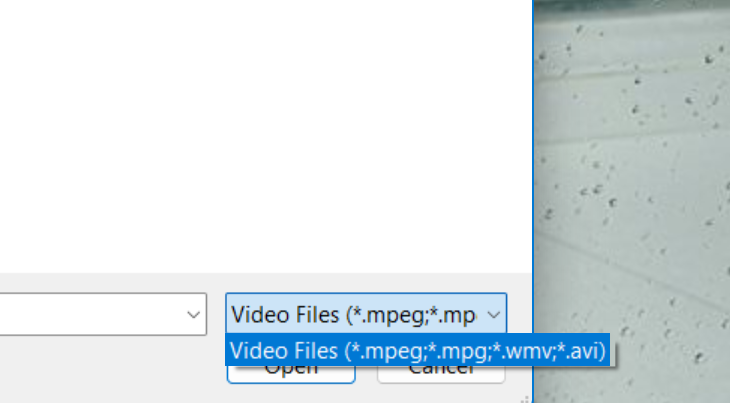
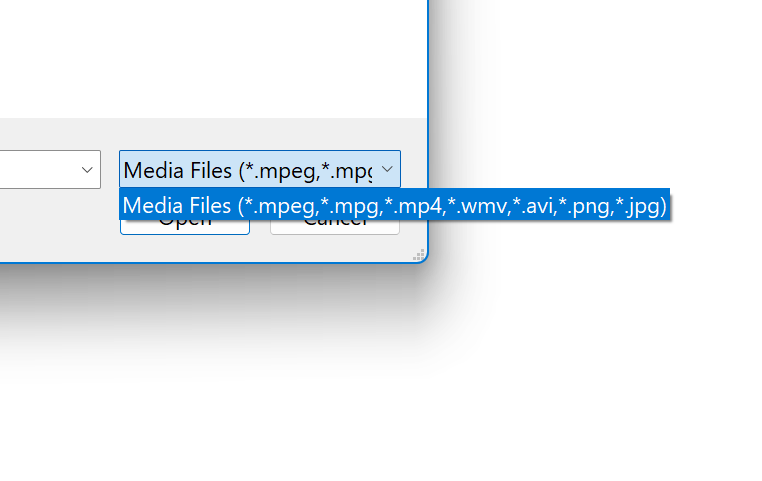
In the previous edition of Deskscapes, when using DreamMaker, you were allowed to use mpeg, mpg, mp4, wmv, avi, png, or jpg files to create a Dream with a single video file. In Deskscapes 2026, you are only allowed to use mpeg, mpg, wmv and avi.
Is support for the other file types going to be reinstated? My issue is particularly with the mp4 files as I commonly use them to make 4K Dreams.
This is Deskscapes 2026 using DreamMaker 3
This is the previous version.
Thanks for looking into this.

Reply #2 Thursday, June 11, 2026 11:10 AM
Hi Tellisbd,
Thank you for posting.
In the previous edition of Deskscapes, when using DreamMaker, you were allowed to use mpeg, mpg, mp4, wmv, avi, png, or jpg files to create a Dream with a single video file. In Deskscapes 2026, you are only allowed to use mpeg, mpg, wmv and avi.
Is support for the other file types going to be reinstated? My issue is particularly with the mp4 files as I commonly use them to make 4K Dreams.
With the current DeskScapes2026 and the included DreamMaker, it does seem that after clicking the "Browse" button for video files in DreamMaker, "mp4" isn't included on the listed file types.
However, I tried browsing to a .mp4 file on my desktop anyway. After selecting it, I was able to use that mp4 file to create a Dream anyway. Does this work for you?
Best regards,
Adam McGuinness
Stardock Support Specialist
Reply #3 Thursday, June 11, 2026 12:43 PM
Hi Adam,
Tested this morning. Dreammaker 3 only shows files as in the shot above, it won't recognize any other files. Some programs will have a "All Files" or "Show All Files" drop down option, but my 2026 does not and I cannot select an mp4 file. Can't force an mp4 load.
I have loaded the old Dreammaker separately, without downloading the old Deskscapes. It won't allow "All Files" or other file options either, although it does allow me to see and use mp4's.
If you are dragging and dropping the mp4, I'm not sure how that's possible in the program parameters. Maybe my fault.
Thanks for looking into it.
BT
Reply #4 Thursday, June 11, 2026 1:16 PM
I have loaded the old Dreammaker separately, without downloading the old Deskscapes. It won't allow "All Files" or other file options either, although it does allow me to see and use mp4's.
Thank you for checking and clarifying. I seem to have done the same as you, and I can see how that can be confusing with two different DreamMakers. I will have this logged.
Internal Reference: ODNT-12458
Best Regards,
Adam McGuinness
Stardock Support Specialist
Reply #5 Monday, June 22, 2026 3:50 PM
Hello again,
Following up here to let you know, DeskScapes 26.01 beta has now been updated to 26.0.1.1. For details and feedback, please see:
https://forums.stardock.com/541745/deskscapes-v-26-01-beta-feedback/page/1
Thanks again for your time, feedback, and support.
Best regards,
Adam McGuinness
Stardock Support Specialist
Please login to comment and/or vote for this skin.
Welcome Guest! Please take the time to register with us.
There are many great features available to you once you register, including:
- Richer content, access to many features that are disabled for guests like commenting on the forums and downloading skins.
- Access to a great community, with a massive database of many, many areas of interest.
- Access to contests & subscription offers like exclusive emails.
- It's simple, and FREE!
Reply #1 Wednesday, June 10, 2026 8:40 PM
Hello,
Sorry to hear you are having issues. I have forwarded your problem/question to Stardock Support Team for their assistance. Please keep an eye on this thread for any updates. We appreciate your feedback and patience. Thank you.
Basj,
Stardock Community Assistant