









































Windows 10 no longer enabling me to customize desktop icons
Especially executables
Wednesday, June 3, 2026 by The-Reaper-Man | Discussion: Object Desktop
Well, as I said, Windows 10 Version 22H2, has suddenly stopped allowing me to customize many of my desktop icons for my shortcuts. Executable programs will only accept the icon of the program, no a custom icon. Does anyone know how to fix this?

Reply #2 Wednesday, June 3, 2026 12:41 PM
I'm just right clicking on the shortcut, clicking properties, and clicking change icon. From there I go to various folders, where I have tons of ico's I have accumulated over the years and choose one for whatever program the shortcut belongs to. This has always worked like a charm, until about a week ago.

Reply #3 Wednesday, June 3, 2026 2:43 PM
I don't have Windows 10, but I tried changing icons on the desktop of Win32 apps, Windows apps, and Windows Store apps in Windows 11 25H2. I was able to change all three using the process you describe above.
Have you tried restarting your computer to see if that makes a difference?

Reply #4 Wednesday, June 3, 2026 6:03 PM
Well, as I said, Windows 10 Version 22H2, has suddenly stopped allowing me to customize many of my desktop icons for my shortcuts. Executable programs will only accept the icon of the program, no a custom icon. Does anyone know how to fix this?
After I read this I checked mine, and mine is working. And I also have the windows version you have.

Reply #5 Wednesday, June 3, 2026 10:30 PM
I don't remember being able to change icons for .exe files; I was only able to change them for shortcuts. I changed icons for .exe files in the past using Resource Hacker. I can still change shortcut icons on Windows IoT Enterprise edition.

Reply #6 Thursday, June 4, 2026 1:47 AM
I tested on my Windows 10 VM and it look like I still can change it. But, do note that I am not at the latest Windows 10 OS Build.
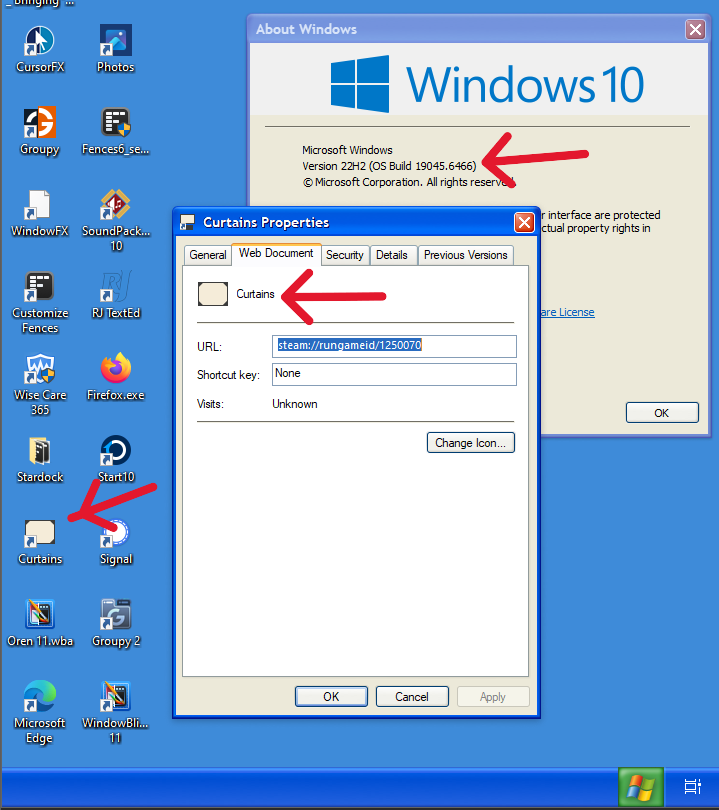
Thank you,
Basj,
Stardock Community Assistant
Reply #7 Thursday, June 4, 2026 6:12 AM
I tested on my Windows 10 VM and it look like I still can change it. But, do note that I am not at the latest Windows 10 OS Build.
Thank you,
Basj,
Stardock Community Assistant
Yes, but that is for a shortcut, not for the program .exe file. For example, I installed a portable version of Foobar2000; inside the program folder, there is a Foobar2000.exe file to launch the program; I cannot change that icon. I placed the folder in my documents and created a shortcut to the Foobar2000.exe file on my desktop and changed the icon for it.
The-Reaper_Man said, "Executable programs will only accept the icon of the program, not a custom icon." "Does anyone know how to fix this?" So I am assuming that he wants to be able to change the icon of .exe files ("Executable"), not a shortcut to said .exe file, because doing that works with Windows 10.
Like I mentioned, I don't know if you could ever change the icon of an executable file without using a third-party program such as Resource Hacker; I can remember using that program to do so.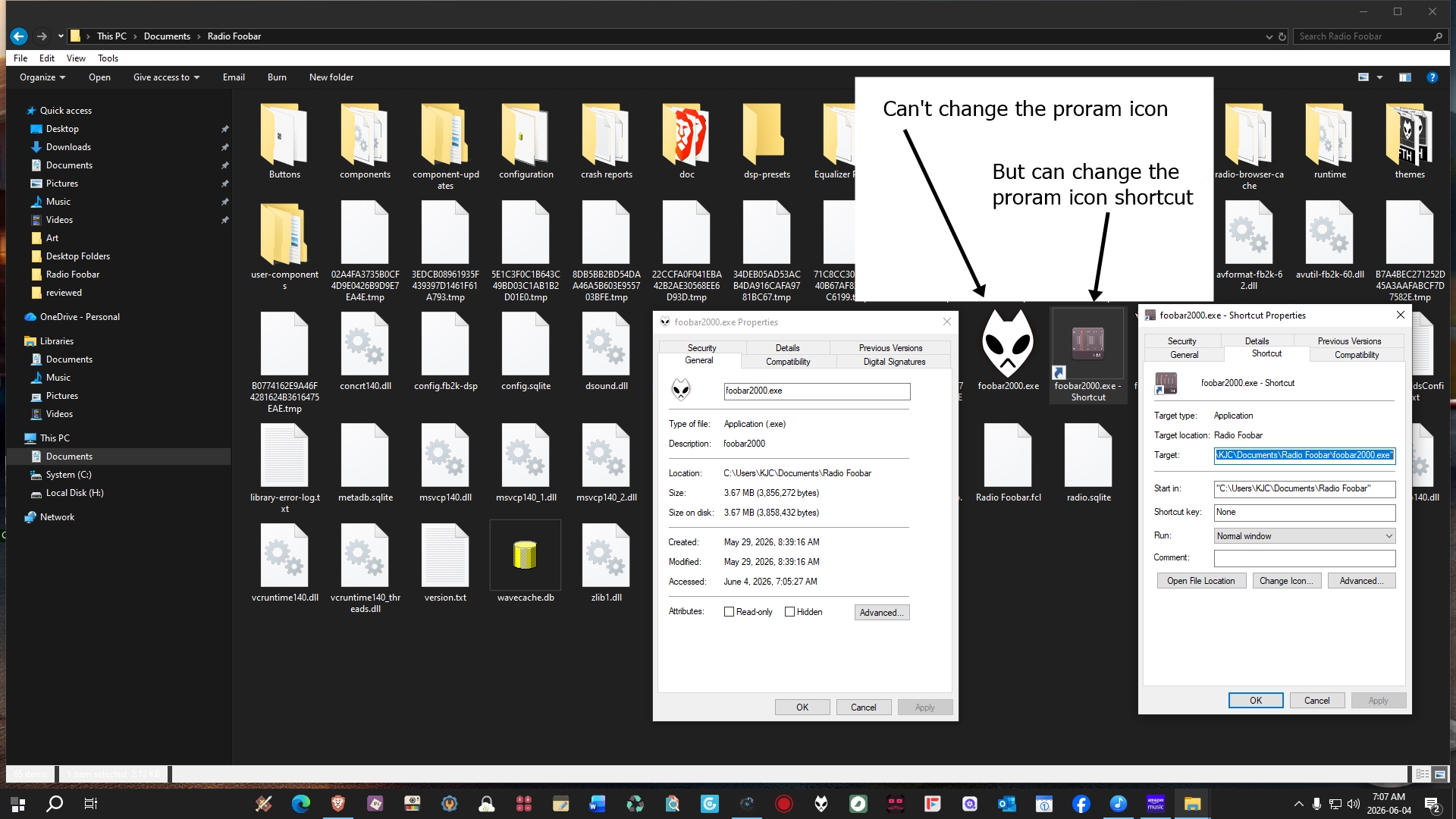
Reply #8 Thursday, June 4, 2026 6:19 AM
Yes, but that is for a shortcut, not for the program .exe file
I was only responded to OP issue. OP mentioned issue for shortcut.
Thank you,
Basj,
Stardock Community Assistant
Reply #9 Thursday, June 4, 2026 6:55 AM
Yes, but that is for a shortcut, not for the program .exe file.
Junior,
Please look at Reply #2 where Reaper explains the process he was using to change the icon of a shortcut on his desktop.
"I'm just right clicking on the shortcut, clicking properties, and clicking change icon. From there I go to various folders, where I have tons of ico's I have accumulated over the years and choose one for whatever program the shortcut belongs to. This has always worked like a charm, until about a week ago."
Reply #10 Thursday, June 4, 2026 7:19 AM
Yes, but that is for a shortcut, not for the program .exe file.
Junior,
Please look at Reply #2 where Reaper explains the process he was using to change the icon of a shortcut on his desktop.
"I'm just right clicking on the shortcut, clicking properties, and clicking change icon. From there I go to various folders, where I have tons of ico's I have accumulated over the years and choose one for whatever program the shortcut belongs to. This has always worked like a charm, until about a week ago."
Yes, and I was talking about this "Executable programs will only accept the icon of the program, no a custom icon. Does anyone know how to fix this?" Does not the end of the sentence mean he also wants to change executable programs?
Anyways, I guess it does not matter, especially if I read it wrong, so everyone, just ignore what I wrote.
Reply #11 Friday, June 5, 2026 11:59 AM
The computer is behaving kind of wonky at the moment. Now I can change the icon to a customized one for most of my desktop icons, with the exception of IconPackager and CursorFX. But when I right click on the icons to change them, it will think I'm right clicking on the desktop itself and not include properties as one of the options. But if I right click on another icon, it will show properties. Then when I go back to the original icon a second time and right click it, properties will be included and from there I can replace the original icon with a custom one. That's nuts! 🤪
Reply #12 Friday, June 5, 2026 12:08 PM
What happens if you left-click the desktop first and then right-click the shortcut? Does Properties show up in the menu?
Reply #13 Saturday, June 6, 2026 12:50 PM
What happens if you left-click the desktop first and then right-click the shortcut? Does Properties show up in the menu?
Yes, you're right! The properties menu does show up when I try it that way. Thanks, pelaird! 😊
Please login to comment and/or vote for this skin.
Welcome Guest! Please take the time to register with us.
There are many great features available to you once you register, including:
- Richer content, access to many features that are disabled for guests like commenting on the forums and downloading skins.
- Access to a great community, with a massive database of many, many areas of interest.
- Access to contests & subscription offers like exclusive emails.
- It's simple, and FREE!
Reply #1 Wednesday, June 3, 2026 12:11 PM
What process are you using to apply the custom icons?