





































SkinStudio 10 - where is hyperlink color set ???
Monday, April 13, 2026 by Derell Licht | Discussion: WindowBlinds
I'm using a theme called Knot Aero, dating back to 2010...
https://www.wincustomize.com/explore/windowblinds/6211/
I'm using the dark green preset; it is a lovely theme, except that the hyperlinks are in dark blue against dark green background, thus almost unreadable:
https://www.flickr.com/photos/derelllicht/55206067045/
I tried modifying it in WB Modify style interface, but can't find the appropriate field.
So, I switched to Skin Studio, but I have two issues there:
1. I don't see how to select a preset in SS10
2. I don't see where to edit hyperlink colors
Could someone give me a pointer on this??

Reply #2 Monday, April 13, 2026 9:20 PM
Hello,
Sorry to hear you are having issues. It look like Derbar is using some other color for its links. Here is what I get when I change the hotlink color. The filezilla link change to hotlink.
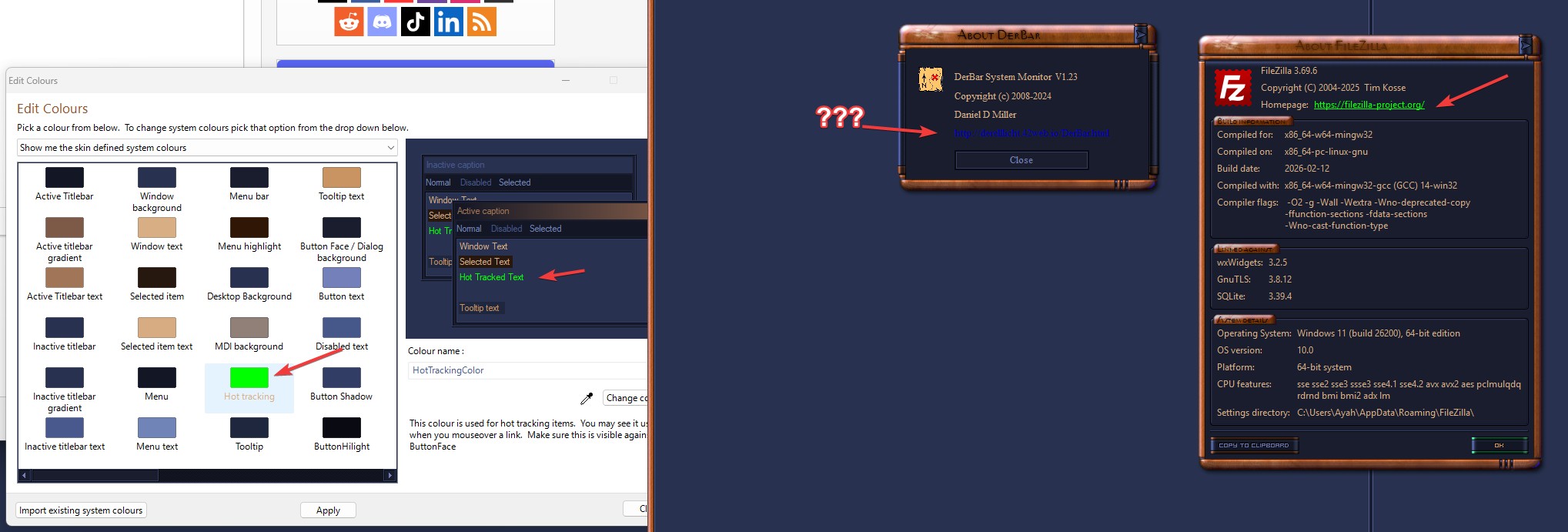
Perhaps someone else can help with some pointers.
Thank you.
Basj,
Stardock Community Assistant.

Reply #3 Monday, April 13, 2026 9:27 PM
Interesting... I get the same thing as you get, in Filezilla's About dialog...
I'll have to go back and look at that dialog in DerBar again - though afaik it is using standard WinAPI calls...
HAH!!!
perhaps it is *this* line ?!?!?!
<pre>SetTextColor(hdc, RGB(0, 0, 192)); </pre>
<sigh>
Okay, I know what to do now...
case closed...
Reply #4 Monday, April 13, 2026 9:38 PM
Interesting... I get the same thing as you get, in Filezilla's About dialog...
I'll have to go back and look at that dialog in DerBar again - though afaik it is using standard WinAPI calls...
HAH!!!
perhaps it is *this* line ?!?!?!
- SetTextColor(hdc, RGB(0, 0, 192));
<sigh>
Okay, I know what to do now...
case closed...
If there are any other WinAPI programmers who are curious about this issue, I fixed it with this:
- // SetTextColor(hdc, RGB(0, 0, 192));
- COLORREF fgnd = GetSysColor(COLOR_HOTLIGHT) ;
- SetTextColor(hdc, fgnd);
Please login to comment and/or vote for this skin.
Welcome Guest! Please take the time to register with us.
There are many great features available to you once you register, including:
- Richer content, access to many features that are disabled for guests like commenting on the forums and downloading skins.
- Access to a great community, with a massive database of many, many areas of interest.
- Access to contests & subscription offers like exclusive emails.
- It's simple, and FREE!
Reply #1 Monday, April 13, 2026 4:42 PM
Later note:
I went in with a color picker, and found that the hyperlink color is 0,0,192 ...
There are *no* fields in the WB "Modify style" interface, that are anywhere near that color.
I wonder if the hyperlink color isn't controlled by WB at all?? (at least in WB10, which is what I'm using)