






































Disk space issue for Deskscapes
Sunday, January 4, 2026 by Blaine Tellis | Discussion: DeskScapes
I recently discovered that DeskScapes saves its files to three different locations on my hard disk:
C:\ProgramData\Stardock\DeskScapes\ExtractedData\
C:\Users\Public\Documents\Stardock\Dreams\
C:\Users\name\Documents\Stardock
Needless to say, with multiple large files, this really eats up disk space. I have tried to delete the "Users" file folders, but this occasionally cause issues with some files, particularly the Desktop Collage DeskScape. Which of these is meant to be the primary save location?
I did find the "ExtractedData" folder seems to save all the "parts" of the DeskScape before it is combined into a Dream. For example, for a Dream I created, folder "Estes {DAF4141A-DE06-49D8-BB8A-E07B86C836F9}" contains "cache.ini and "estes.mp4". The "4K Dragon Fire" from your website contains four files, including "4K Dragon Fire.avi", "4K Dragon Fire_Preview.jpg", "cache (2).ini", and "cache.ini". Are these files then redudant and fair game for deletion?
Just looking for some tips on how to retrieve a little disk space. Thanks in advance for any insight.
BT
Reply #2 Monday, January 5, 2026 7:55 AM
ExtractedData is where the dreams are extracted when they are in use.
You can clean up this folder if you wish by clicking on settings in the DeskScapes UI, then pick settings from the menu and then on the advanced tab you can click clear extracted files folder.
Reply #3 Monday, January 5, 2026 6:24 PM
Thanks for the replies basj and Neil.
Neil, hadn't seen the advanced tab in DeskScapes. Guess I should browse a little deeper. That takes care of the ExtractedData folder, but do I still need to keep BOTH of the User folders?
BT

Reply #4 Monday, January 5, 2026 7:42 PM
I believe Niel was referring to this one.
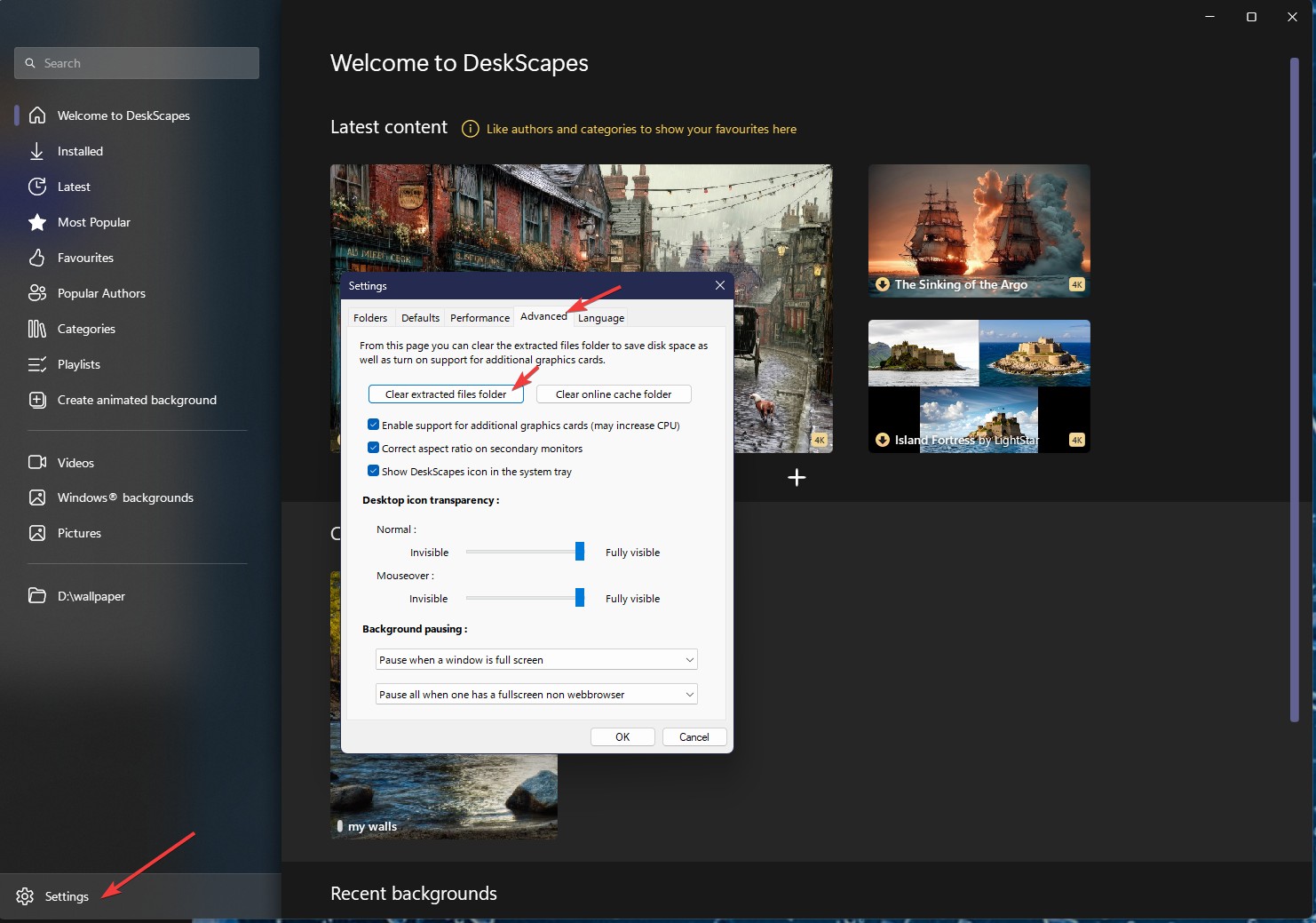
Thank you,
Basj,
Stardock Community Assistant

Reply #5 Tuesday, January 6, 2026 3:32 PM
but do I still need to keep BOTH of the User folders?
I leave both the folders out there because they are expected to be there. I see that dreams downloaded via the DeskScapes interface are saved in the UserName folder, and dreams installed during the DeskScapes installation are installed to the Public folder. You do not need to leave the dreams in those folders, you can put them anywhere you like including on a second hard drive. You need to tell DeskScapes to look in that new location, in Basj's screenshot of the Settings window you can see the tab labeled "Folders" - you need to go to that tab and add the new file location there. I leave the installed dreams in the Public folder (and back them up) so that DeskScapes can do as it will with them during installs/uninstalls. Otherwise all of my dreams reside on a 2nd drive. I don't seem to have any problem moving the Desktop Collage dream around, so I'm not sure what to tell you there.
Reply #6 Tuesday, January 6, 2026 6:27 PM
Thanks DaveRI, I will give your suggestions a try and see if that helps!
Please login to comment and/or vote for this skin.
Welcome Guest! Please take the time to register with us.
There are many great features available to you once you register, including:
- Richer content, access to many features that are disabled for guests like commenting on the forums and downloading skins.
- Access to a great community, with a massive database of many, many areas of interest.
- Access to contests & subscription offers like exclusive emails.
- It's simple, and FREE!
Reply #1 Sunday, January 4, 2026 10:21 PM
Hello,
I have forwarded your problem/question to Stardock Support Team for their assistance. Please keep an eye on this thread for any updates. We appreciate your feedback and patience. Thank you.
Basj,
Stardock Community Assistant