

































Border / Frame added to Windows Start menu
Thursday, September 5, 2024 by MeanMrGene1968 | Discussion: WindowBlinds
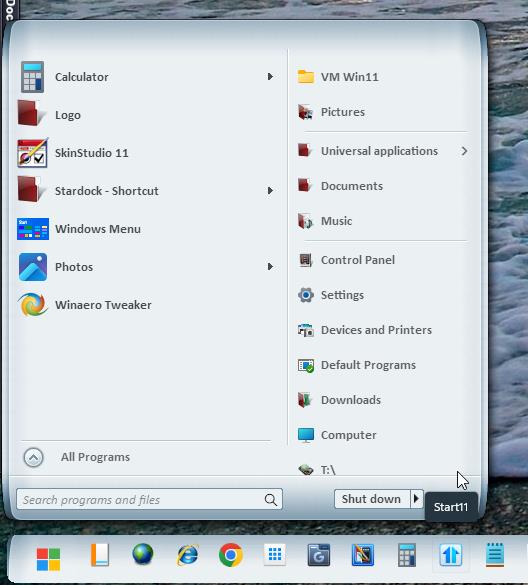
I don't know if this is a WB issue or an START 11 issue - but on a few of my WB Skins - it has added this border around the Start Menu pop-up window - but none of the other pop-up windows.
Is there a setting in my WB that I need to check off - or one in my START 11 that I need to turn on/off to make this border disappear?
Any help you can give me would be greatly appreciated.


Reply #2 Friday, September 6, 2024 12:24 AM
I only use Stardock Software, and it doesn't appear on ALL of the skins - just a select few. 90% of the skins that I do use are from a user called "LightStar" and he was unable to re-create the problem on his end. (Like the WB skin: White Beauty pictured above)

Reply #3 Friday, September 6, 2024 2:18 AM
Hello,
Sorry to hear you are having issues. Need to know more on your system.
- Windows10 or 11? And need its full version and OS Build number. Please use Winver.exe
- Windowblinds version number.
Thank you.
Basj,
Stardock Community Assistant.
Reply #4 Friday, September 6, 2024 2:40 AM
Here is the info you requested + my START 11 info as well ... And as you can see - there is no issue with the Windows 11 Pop-up window.


Reply #5 Friday, September 6, 2024 3:06 AM
This is what I get on my Windows 11 system. And looking back at your screenshot, your taskbar also not using the correct taskbar graphics. It might be something to do with Start11. Please try this, uninstall Start11v2, reboot immediately after uninstall finished. Re-download Start11 latest version available to you. Install it. Reboot immediately again, right after installation done. Retest and report back.
Thank you,
Basj,
Stardock Community Assistant
Reply #6 Friday, September 6, 2024 7:58 AM
I just turned the transparency all the way up on my taskbar to make it see-through, and changed the start button using START 11
Reply #7 Friday, September 6, 2024 8:09 AM
** I think I found the problem!! - I had "USE MICA EFFECTS instead of the usual menu transparency" turned-on in the options on START 11
I turned this option OFF and the black border disappeared. 
Wonder why I turned this option on in the first place?

Reply #8 Friday, September 6, 2024 8:20 AM
Great, thank you. I can reproduce your issue on my system when I turn on Mica on. I have forwarded your problem/question to Stardock Support Team for their assistance. Please keep an eye on this thread for any updates. We appreciate your feedback and patience.
Basj,
Stardock Community Assistant
Reply #10 Saturday, September 7, 2024 1:05 AM
Thanks & I'll definitely keep an eye out for any updates
Reply #11 Saturday, September 7, 2024 1:06 AM
Glad you figured it out MeanMrGene1968.

Thanks for your suggestion to post something here in the forums.

Reply #12 Monday, September 9, 2024 3:36 PM
Hello all,
Quick update on this for whom it may concern.
It appears this happens with transparent areas surrounding the Start Menu in certain WB skins, which can happen with the Mica effect on. Skins without transparent areas surrounding the Start Menu don't appear to be affected. At this time turning off the Mica effect seems to be the best solution for effected skins.
In any case I've logged this so we can keep an eye on it.
Internal reference: ODNT-8745
Thanks to everyone,
Adam McGuinness
Stardock Customer Support Specialist
Please login to comment and/or vote for this skin.
Welcome Guest! Please take the time to register with us.
There are many great features available to you once you register, including:
- Richer content, access to many features that are disabled for guests like commenting on the forums and downloading skins.
- Access to a great community, with a massive database of many, many areas of interest.
- Access to contests & subscription offers like exclusive emails.
- It's simple, and FREE!
Reply #1 Thursday, September 5, 2024 10:31 PM
Are you by any chance, also using classic shell, or any other start menu app, other than Stardock's Start11? Sometimes 3rd party software can create a system conflict that results in what you are describing. If that is not the case, it could be that a problematic install and or a download, is at fault, assuming that was done recently., and you may want to search the forums here on how to do a purge and reinstall. Also, another possibility is that a recent windows update may have caused a glitch somewhere. My recommendation is to do a purge and reinstall and then report back.
Here's a link open how to do a purge and reinstall:
https://forums.wincustomize.com/530304/page/1/#3942370