





































min max etc. Buttons?
Thursday, July 22, 2021 by NeilBalmer | Discussion: Curtains
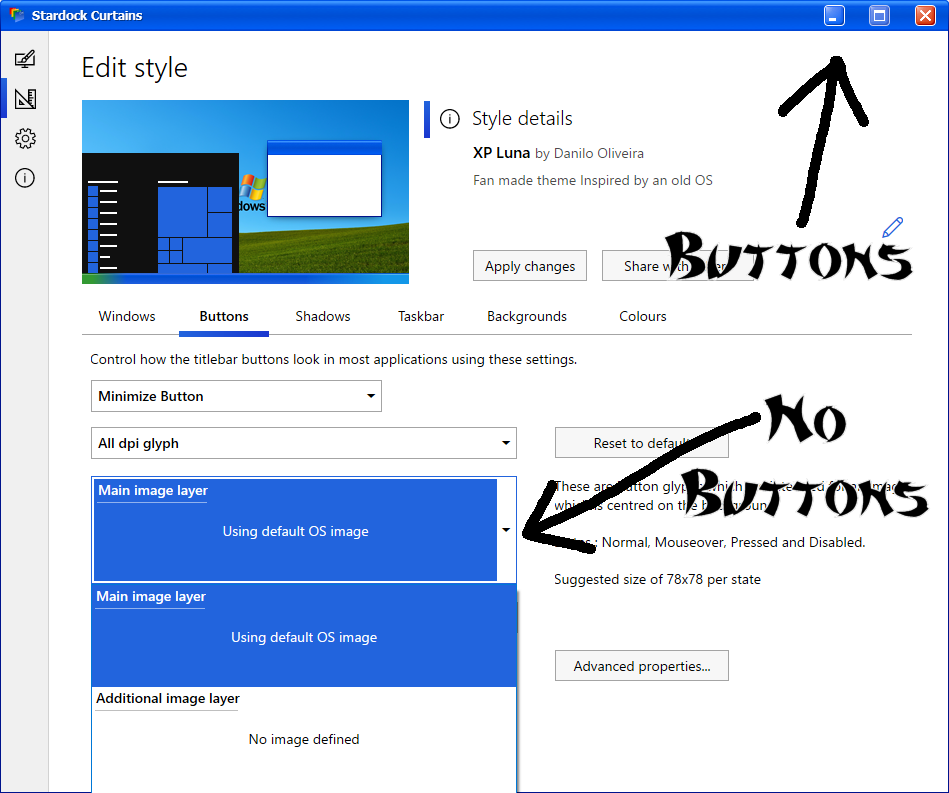
I don't know if I've simply forgotten how, but I can't seem to figure out how to do min/max buttons. I'd happily believe there's a bug in Curtains 1.19 if someone told me that. But when I go to edit an existing theme, the button images don't seem to be there at all. What am I missing?
Please login to comment and/or vote for this skin.
Welcome Guest! Please take the time to register with us.
There are many great features available to you once you register, including:
- Richer content, access to many features that are disabled for guests like commenting on the forums and downloading skins.
- Access to a great community, with a massive database of many, many areas of interest.
- Access to contests & subscription offers like exclusive emails.
- It's simple, and FREE!
Reply #1 Thursday, July 22, 2021 3:11 PM
There are a few ways to do buttons and that style uses a more complex way thats not exposed in the editor.
If you go to the cog page you can enable an option to show advanced editor sections and a new tab will appear in the editor and it will have a drop down of parts. The ones in bold are defined and you can manually edit if you wish.