





































Start10
Or Not?
Monday, March 16, 2020 by RedneckDude | Discussion: Stardock Support General
Guys, for some reason, the Stardock folder is no longer in my all programs list in Start10.
Anyone else? Any idea how to fix it?

Reply #2 Monday, March 16, 2020 6:36 PM
I still have it too. What I see is, if I right-click on the Stardock folder in Start10, it is referencing an empty folder located in
C:\Users\[UserName]\AppData\Roaming\Microsoft\Windows\Start Menu\Programs
Again, that's just an empty folder. You might look in that path and see if you still have an empty folder named Stardock there, and if it's not, create one. Don't know that would fix it, but maybe?
The Start10 Stardock program items themselves are individual shortcuts located elsewhere, you could probably recreate them, but seems like that would be a pain in the neck and hopefully there's a better way. Those are in
C:\ProgramData\Microsoft\Windows\Start Menu\Programs\Stardock
if you want to see if they're still there.

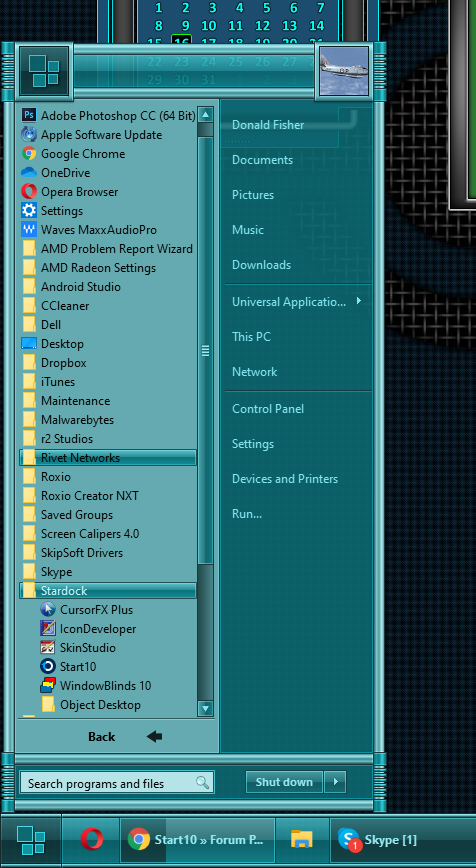
Reply #5 Monday, March 16, 2020 9:20 PM
Don, you sly dog, you....
What hack made the skin you're running? 
Reply #6 Monday, March 16, 2020 9:33 PM
C:\Users\[UserName]\AppData\Roaming\Microsoft\Windows\Start Menu\Programs
Reply #7 Monday, March 16, 2020 11:00 PM
Do you have the Stardock folder here, with all the program shortcuts in it?:
C:\ProgramData\Microsoft\Windows\Start Menu\Programs\Stardock
If not, maybe see if it/they are in your recycle bin.
Reply #9 Tuesday, March 17, 2020 1:04 PM
Thanks Dave. I gave up on backups ( as for system backup ) when MS added the reset button. I do keep all important things on separate storage drives, and redundancies as well.
C:\ProgramData\Microsoft\Windows\Start Menu\Programs\Stardock

Reply #10 Tuesday, March 17, 2020 1:41 PM
Jim what if you reinstall the programs again over top the one’s that are already there.
Reply #11 Tuesday, March 17, 2020 2:07 PM
That may work, Al. But I just made shortcuts and remade the folder.
On another note, could someone nudge a dev and see why the user image control in Start10 isn't working?
Reply #13 Tuesday, March 17, 2020 7:36 PM
I ran a duplicate cleaner not too long ago, hhmmmmmm.....
Either that or AdvancedSystemCare.

Reply #14 Tuesday, March 17, 2020 10:43 PM
Jim, unless I misunderstood the whole thing, I think, you can create a shortcut on each Stardock software you have installed. And just drag that shortcuts into that folder. C:\ProgramData\Microsoft\Windows\Start Menu\Programs\Stardock. That should bring it back in your Start10 All Programs.
Thank you,
Basj
Stardock Community Assistant.
Reply #15 Tuesday, March 17, 2020 11:15 PM
Jaz, I did that already.
That may work, Al. But I just made shortcuts and remade the folder.
Please login to comment and/or vote for this skin.
Welcome Guest! Please take the time to register with us.
There are many great features available to you once you register, including:
- Richer content, access to many features that are disabled for guests like commenting on the forums and downloading skins.
- Access to a great community, with a massive database of many, many areas of interest.
- Access to contests & subscription offers like exclusive emails.
- It's simple, and FREE!
Reply #1 Monday, March 16, 2020 6:07 PM
All here on my end.