





































Big Beastie MkII
the threadRipper rebuild
Tuesday, January 28, 2020 by starkers | Discussion: Personal Computing
After moving interstate from Queensland to Tasmania, it came to pass that my primary PC wouldn't start. I tried all sorts of things and no go, it was dead in the water.... or so I thought. Upon removing some of the components to make way for a new build, I inadvertently touched the Start button on the motherboard and the machine started. Turns out it was a faulty hard-drive, that once removed the machine started without issue. Thing is, I had already set my heart on an AMD Ryzen ThreadRipper rebuild and I'd already begun to order the components; hence, this new thread.
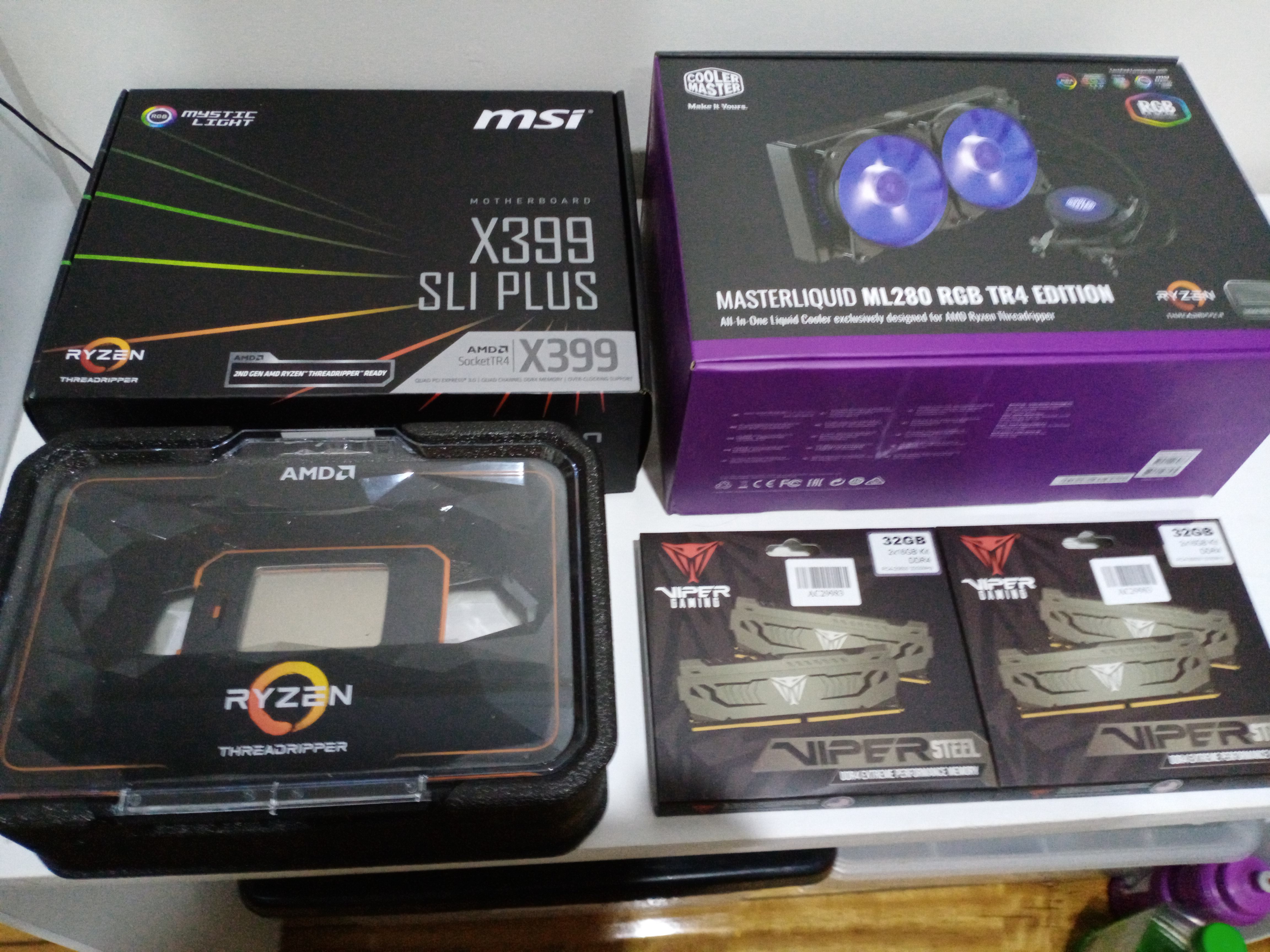
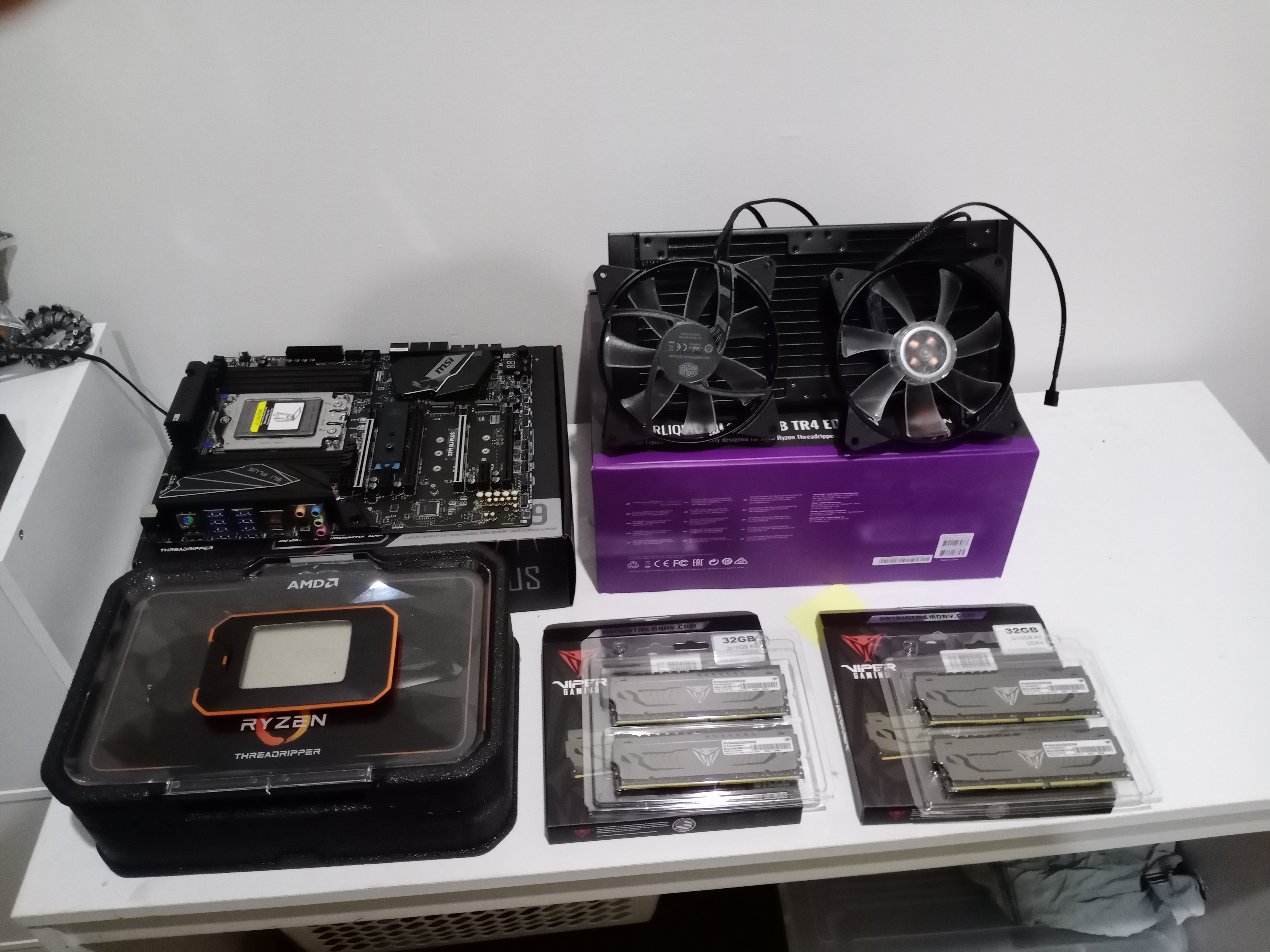
Anyway, here's a rundown of the components going into this rebuild of the CoolerMaster Cosmos II case, some from the previous build and those that I recently ordered:
Motherboard: MSI X399 SLI PLUS.
CPU: AMD Ryzen ThreadRipper 2920X.
CPU Cooler: CoolerMaster MasterLiquid ML280 RGB TR4 Edition.
PSU: Corsair HX1200i Platinum.
RAM: 64GB Patriot Viper Gaming DDR4 3200Ghz.
GPU: AMD Radeon RX570.
SoundCard: Creative Soundblaster ZxR.
OS SSD: Intel 760p 512GB M.2 SSD.
SSD: x 2 500GB Crucial P1 M.2 PCIe SSD.
HDD: x 4 WD 4TB Greens;
That's all the main stuff but there's various bits 'n pieces going in to expand the PCIe slots; the SATA3 ports; the rear USB3.1 slots. I may also up the 64GB [4 x 16] RAM with another 64GB some time down the track... it would come in handy for music and video editing.
Some would say that this thread is useless without piccies, so here's some to start with:

WWell that's it for now... more later when I've made some progress.
 |
|
Page 2 of 3 | |
|
|---|

Reply #22 Monday, February 3, 2020 10:08 PM
And if I also do my machine it'll need to be 3 out of 5 ....and I don't like them odds...

Reply #23 Tuesday, February 4, 2020 12:16 AM
Well the new Beastie starts up okay. That's one good thing. I'm not on it yet as I had to power it down and unplug to make some internal adjustments.... nothing serious, just swapping some RAM around and rewiring the front panel because the on/off button isn't active. The diagram in the user manual is a bit confusing, but I know where I went wrong and it's easily fixed.
The other thing is that I cant get it to boot from disc. There isn't a DVD drive with the new build so I'm using a portable with Win 8 in it, but the system doesn't seem to recognise it yet. The system is saying it can't find an OS and to unplug drives without an OS to start again. Hopefully when I've made the adjustments and disconnected any unnecessary drives, tinkered in the BIOS to enable the portable DVD drive, it'll be business at full speed.
Fingers crossed!
Reply #24 Tuesday, February 4, 2020 7:18 AM
Well I'm finally on the ThreadRipper Beastie, but what a flamin' performance to get thus far. Today was a good and bad day. The good was the build starting up without a hiccup, but when I weigh up the pros and cons, today was an absolute 'expletive' of a day. I got Win 8 to install okay, but from there it went downhill from there.
The motherboard disc wouldn't load any of the drivers because MSI skipped Win 8 and went straight to 10 from 7. That meant I couldn't connect to the internet to activate it because there was no network drivers installed. I had to search for compatible drivers using my HP 2-in-1. I finally found some and was able to connect to the internet and activate Win 8. That was another good thing, being I needed 8 to be activated to activate 10, but that's about where it stopped. Win 10 started to install but twice stopped at 73%.
I then remembered something about updating Win 8 to be the most recent before trying to install 10. Well that's what I'm doing now, all 129 of them, and then I think there's more to update to Win 8.1 once the prerequisite files are installed. Thing is, it's going as slow as a wet week and I was hoping to get 10 installed tonight. It's now 10,57pm and I don't know if I'll be able to last it out 'til then.
Effin' computers, who the fech put me onto them? Before that I was happy drinking and chasing wild women, now any satisfaction comes with a lot of pain and frustration. All I can say is that whoever it was, they're lucky that my memory is up the shit.
Wow, the updates are up to 78 of 129. Maybe, just maybe, I'll get 10 done yet... depending on whether there's another round of updates or not. Hmmph, there's more updates, so I'm going to let them run their course and call it a night. I will leave 10 'til tomorrow as I have a damned headache coming on.... effing computers.
Reply #25 Tuesday, February 4, 2020 10:58 AM
So much for going to bed. I took a couple of painkillers for the headache and went to bed; however, I couldn't sleep because there was unfinished business with this machine and I needed to complete what I'd begun. Anyhow, Win 10 is now installed and activated. Oh, and a word to the wise, if you're on standard Win 8 and want to upgrade to Win 10, you'll need to fully update 8 first then go to the MS Store to update to 8.1. If you don't do this the Win 10 installation will fail at around 73% - 74%.... as I discovered... twice.
Anyhow, like WOW, this is the fastest, most powerful I've ever used, not that I've had much of a chance to test it out properly as yet. Once Win 10 was fully installed and updated, it boots up in around 15 - 16 seconds... and that's without fast boot enabled. Put it this way, if I need to get into the BIOS I'm going to have to be quick... real quick. I was told there's an app from MSI that will allow the user to boot directly into the BIOS after a restart or shutdown. I've not come across it as yet, but I will certainly track it down, given the my reflexes aren't that quick anymore.
Well I'm really done for the night now... hooroo.

Reply #26 Tuesday, February 4, 2020 11:14 AM
Yeah, for you Mark, glad it's running like a BEAST! LOL 
Now for some much needed rest Mate! 
Reply #27 Tuesday, February 4, 2020 8:48 PM
Yeah, for you Mark, glad it's running like a BEAST! LOL
Now for some much needed rest Mate!
Thanks, mate, it has sometimes been an arduous and frustrating journey, but I'm so glad the effort was very much worth it. I thought my Ryzen 1700X was quick, but this ThreadRipper is so much faster. Moving and copying files and folders is faster; opening programs is faster, and the general startup is really quick. There's faster ThreadRippers available but I'm totally happy with this one. Besides, the higher versions are not within my affordabilty anyway, so I was probably always going with the 2920X to save coughing up big bucks for a slightly faster CPU. As it is I've spent in the vicinity of 2000 grand on this build as is, and there may be other bits n' pieces I'll add later on, but for now I'm all spent out.
Reply #29 Tuesday, February 4, 2020 10:47 PM
Thanks, mate, it has sometimes been an arduous and frustrating journey, but I'm so glad the effort was very much worth it. I thought my Ryzen 1700X was quick, but this ThreadRipper is so much faster. Moving and copying files and folders is faster; opening programs is faster, and the general startup is really quick. There's faster ThreadRippers available but I'm totally happy with this one. Besides, the higher versions are not within my affordabilty anyway, so I was probably always going with the 2920X to save coughing up big bucks for a slightly faster CPU. As it is I've spent in the vicinity of 2000 grand on this build as is, and there may be other bits n' pieces I'll add later on, but for now I'm all spent out.
Mark, you make me want to build an AMD system, been reading up on the ThreadRipper, and I have to say, I like what I've been reading, so my future build will be a ThreadRipper, thanks Mate!


Reply #31 Tuesday, February 4, 2020 11:30 PM
Yeah, dead set tired and I effed up. It was supposed to be either $2000 or 2 grand, not a bit of both. Oh well, that'll teach me to stay up 'til gone 3.00am working on it, then getting up around six. I tried going back to bed for a bit of kip around 10 but no luck there. I still have so much to set up on this beastie and I just laid there with all that going through my mind, unable to switch off.
As I recall, your limited edition Level 10 case was around 3 grand on its own, and your mobo and CPU were high end [price-wise as well], and you'd spent the best part of 6 grand on those 3 items alone. Add to that the PSU; the GPU; the CPU cooler; HDDs and SSDs, other knick knacks, yeah, 10 grand don't go far.
My cost was kept down because I already had the PSU; GPU; HDDs and SSDs; Sound card and other bits n' pieces to go into this build. Had I not had those components I reckon the total cost would have been closer to 4 - 4 1/2 grand.
Reply #32 Tuesday, February 4, 2020 11:47 PM
Anyhow, here's the final pics of the finished product:


Again, not the best pics but they're not that bad you can't see what's what.
Reply #34 Wednesday, February 5, 2020 12:10 AM
As I recall, your limited edition Level 10 case was around 3 grand on its own, and your mobo and CPU were high end [price-wise as well], and you'd spent the best part of 6 grand on those 3 items alone.
At the time they were the 'best you could get'...the case was 1299, the mobo was 529 and the cpu was 1279...so about 3k for all 3...
Reply #35 Wednesday, February 5, 2020 5:53 AM
the case was 1299
I recently saw a Level 10 Titanium like/similar to yours and it was going for $2899, which is why I said around 3 grand earlier. I was going to link to it for you to see, but by the time I went back to the site the page was gone, apparently all sold out. They had 10 and were all gone in the under an hour or so. Would have liked one [before they sold out, that is] but then I would not have been able to get all the components as well.
Still, I quite like this case and what I've put into it.... overall cost [including the components I already had] a tad under 5 grand. I have 3 Crucial 500gb M.2s [one I had before] and I counted all 3 at $99 each, but when I looked back at the invoice for the original 1 that went into the Cosmos II case, it was $375. My how they have come down in price.
Reply #36 Wednesday, February 5, 2020 7:51 AM
I wouldn't have thought there were any left in captivity...it's been 3 or 4 years....and there were only 500 of them.
BTW....my M.2 cost me 611 [512 Samsung] ...
Then again....
Reply #37 Wednesday, February 5, 2020 11:27 AM
I wouldn't have thought there were any left in captivity...it's been 3 or 4 years....and there were only 500 of them.
Aha, but there was another release with a few more than that. I believe a 1000. As I said, they had 10 of them, but soon disappeared. I think it was Computer Alliance in Qld as I was doing a bit of business with them since they held that MSI X399 mobo for me. Anyway, I was there around 9.00 one morning to place an order, and by 10.00am when I went back to check on something, there they were, gone.
Anyhow, I just cloned my OS drive over to an M.2. When I was setting up initially, I had to install Win 8 on a regular 120gb SSD because I couldn't access the M.2s until all the chipset drivers were installed, and none would install due to being incompatible with Win 8.
Everything got sorted out once I'd upgraded to 10, but the 120gb was filling up fast, what with all of my programs, skins and stuff. I used the free version of Macrium Reflect, but I was so impressed with its great interface, ease of use and operational qualities that I will purchase it when funds are again a bit more fluent.
It has been a task of ups and downs, pitfalls and frustration [it's a wonder you didn't hear me cussing in Balaarat], but it has all been worth it. This machine is excellent and definitely the best I've ever used. I'm near the end of setting everything up, with just a few more programs and drivers to load, and then I can just sit back and enjoy it.
Reply #38 Sunday, February 23, 2020 6:48 AM
My main desk is way too big for my room so I had to improvise and come up with a make-do solution to accomodate my PC, monitors and printer the way I wanted. Some of the stuff I already had here but I still needed to purchase some shelving to create a desktop situation to suit my needs.
So here's what I came up with....


Reply #39 Saturday, April 4, 2020 10:52 PM
After deliberating for a while [in other words procrastinating] I have decided to swap the Threadripper setup into the Cosmos II case where it will get better air circulation. While the new case is great looking and has a great cabling setup, it does not have great circulation and can get a bit warm inside. Now Coolermaster makes mesh top and front covers to replace the plastic ones, which would greatly improve internal airflow, but everywhere I've tried thus far to purchase them has no stock and Coolermaster don't sell direct to the public..... hence the swapping of cases.
My AMD Ryzen 1700X setup doesn't generate as much heat as the Threadripper and will go into the new case. It's a bit of work, but I just want to be able to run the Threadripper setup at full throttle and not experience overheating issues. Yes, the Threadripper has water cooling, and it's reasonably effective, but it's still drawing warmer air and I'm more concerned about the other components like mobo, SSDs and soundcard, etc.
Besides, the Threadripper setup deserves to be housed in a grand case, and the Cosmos II certainly is that. Moreover, there is better accommodation for HDDs and various front panel items the new case had no space for. I should have done this the first time around, but I was so enamoured by the classy appearance of the new case and just went with it.
Oh, and about the graphic card, I purchased an ASrock Radeon RX 5700XT Taichi X 8GB OC X ARGB card to boost graphics processing when I'm editing or converting videos, etc. Not sure about when it will arrive due to Covid 19 and various restrictions, but my order has been processed, so hopefully it's not long.
Anyhow, stay safe everyone and avoid the nasties going around. 
Reply #40 Saturday, April 4, 2020 11:15 PM
I wouldn't have thought there were any left in captivity...it's been 3 or 4 years....and there were only 500 of them.
BTW....my M.2 cost me 611 [512 Samsung] ...
Then again....
https://www.scorptec.com.au/product/Cases/ATX/56720-VL300A9N1N?gclid=Cj0KCQiA7OnxBRCNARIsAIW53B8-48LjQ8cIRlVTOJw2gHec0Ru8mt1qrtKGViyqq_bSDAHAt0neUg8aApINEALw_wcB
Please login to comment and/or vote for this skin.
Welcome Guest! Please take the time to register with us.
There are many great features available to you once you register, including:
- Richer content, access to many features that are disabled for guests like commenting on the forums and downloading skins.
- Access to a great community, with a massive database of many, many areas of interest.
- Access to contests & subscription offers like exclusive emails.
- It's simple, and FREE!
|
|
Page 2 of 3 | |
|
|---|
Reply #21 Monday, February 3, 2020 9:50 PM
With 10 already on the machine, you can simply download an up-to-date copy using the media creation tool from MS.
Yes, already got that...did the update already on several machines...but only one as an actual 'update' keeping all proggies/info/settings...from 7 to 10 ...and it only worked once out of 3....this time it will need to be 2 out of 4...