








































Unable to restore original cell pattern color in Excel 2016 after WB 10 skin Dark mode
Wednesday, September 19, 2018 by marco_optrgm | Discussion: WindowBlinds
I am on my 30 days trial period and went into WB 10 Settings/Per application. I first rendered the style Dark Mode by Vad_M but didn't like the visual effect on the grid area of MS Excel 2016 so, I added an exclusion for EXCEL.exe. This, unfortunately, didn't manage to restore the original worksheet background to the standard 'transparent white' color.
Other Office apps have the standard white background even when using the official MS Office 'Dark Mode' (see printscreen 3-4) while, it seems that the Excel grid area had been "skinned" with the main color of the Dark theme and can't be rolled back or excluded.
Can you help me troubleshooting the issue? I can't even see the WB 10 icon in the Windows toolbar anymore so, I'm not able to unload the entire Dark mode theme from my Windows 10 OS.
# snapshot 1:

# snapshot 2 - Excel grid area

# snapshot 3:

# snapshot 4:

Reply #2 Wednesday, September 19, 2018 6:51 AM
Hi Basj, thanks for the quick reply. What if I want to unload the dark theme and restore the standard factory theme in MS Windows 10?

Reply #3 Wednesday, September 19, 2018 6:58 AM
You can apply the default theme.
1. Select Default Theme.
2. Apply style to desktop.
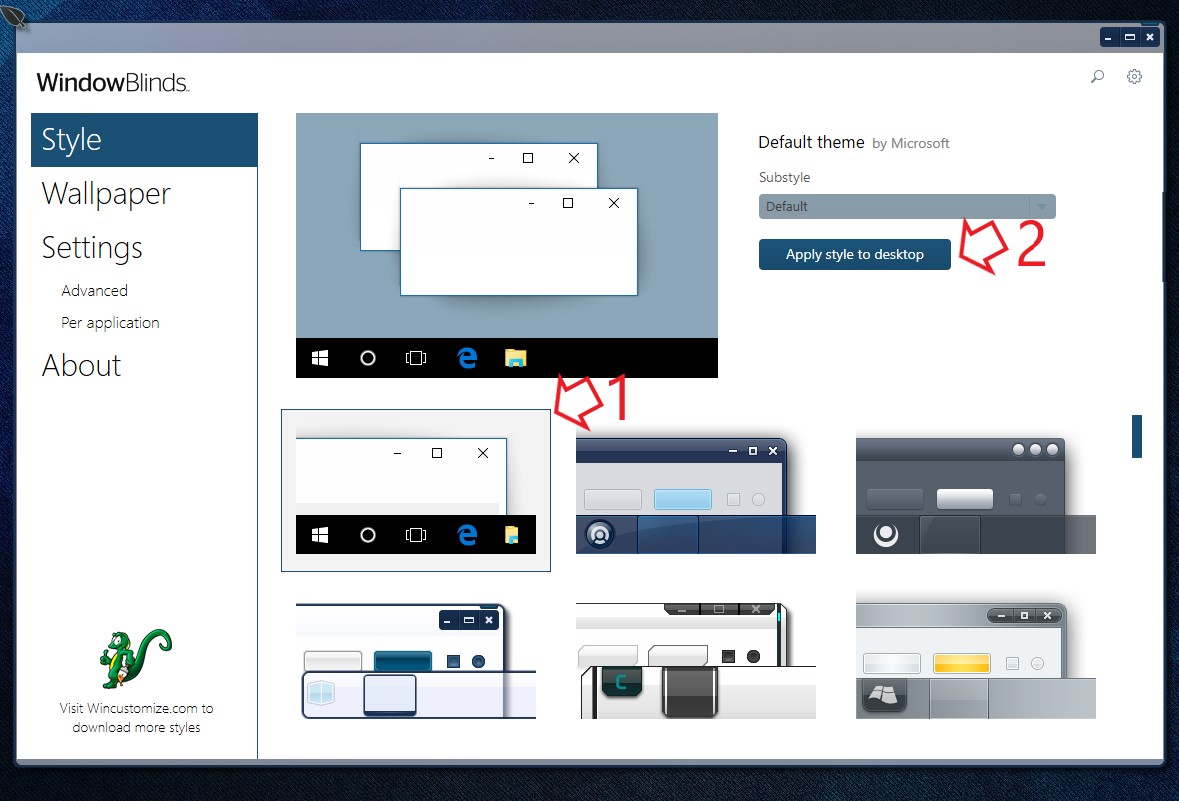
Note : This will unload Windowblinds. If you do not want to unload WB. Just apply others light theme such as corporate etc etc.
Thank you,
Basj,
Stardock Community Assistant
Please login to comment and/or vote for this skin.
Welcome Guest! Please take the time to register with us.
There are many great features available to you once you register, including:
- Richer content, access to many features that are disabled for guests like commenting on the forums and downloading skins.
- Access to a great community, with a massive database of many, many areas of interest.
- Access to contests & subscription offers like exclusive emails.
- It's simple, and FREE!
Reply #1 Wednesday, September 19, 2018 6:01 AM
Hello,
Sorry to hear you are having issues. Unfortunately, if you applied a dark theme. It usually change the system color. Which include dark windows background. Even if you exclude Excel.exe from being skin. It will still carry the system color. The only way to change it to white again is applying light theme (Corporate,Acrylic etc etc), which has white/light windows background.
Hope that answer your question. Please let us know if you need more information.
Basj,
Stardock Community Assistant.