































Winstep Nexus Dock v15.9 Released!
Thursday, October 1, 2015 by JcRabbit | Discussion: OS Customization

 The Winstep Nexus dock is a FREE dock for Windows. Every feature you’d expect from a dock, including widgets, mouse-over effects, skins, drag-and-drop, and many others not available in most other docks, such as live icon reflections, in-dock system tray, blur-behind effects, and much more. Completely customizable, with thousands of different backgrounds freely available online, Nexus is fully compatible with skins for all 3rd party docks.
Supported Languages: Bulgarian, Catalan, Chinese (Traditional), Chinese (Simplified), Croatian, Czech, Dutch, English, Farsi (Persian), Finnish, French, German, Hungarian, Indonesian, Italian, Japanese, Korean, Norwegian, Polish, Portuguese, Portuguese (Brasil), Russian, Serbian, Slovak, Spanish, Swedish.
Nexus runs on the 32 and 64 bit versions of Windows 2000, XP, 2003, Vista, 7, 8.x and Windows 10.
v15.9 is a monster release, with hundreds of changes and additions. Focus was on adding missing key functionality as well as, of course, some new eye-candy.
What's New? Highlighted Features:
- Speed! Due to new and improved activation and hide delay timings, Nexus simply feels a lot more responsive. Rendering performance when shifting icons in a fully expanded Shelf to make room for a new shortcut is now also an order of magnitude faster (Nexus Ultimate only).

- Improved Windows 10 integration.
- Now fully high-DPI aware. Throw anything at it from 100% to 200% scaling and everything will still work and look as it should. New settings added to control the scaling of menus and the Shelf on high DPI systems.
- Added support for systems with multiple input languages: new 'Language Bar' internal command can be placed anywhere and emulates the functionality of the Windows language bar.

- New optional Edge Swipe activation mechanism.
- Shortcuts in the dock now double up as running application icons, so there is no duplication of icons when running applications are being displayed in the dock.

- Shelf now smoothly resizes when double clicking a tab header to fully expand the Shelf in order to show all the contents of that tab at once (Nexus Ultimate only).
- Weather module now automatically retrieves the user's location when running for the first time. Also added new 'Get My Location' button in the Weather settings panel.

- New Smoke mouseover/launch/attention effect. Not too intrusive and makes the dock look like it's on fire! My new personal favorite when combined with the magnify effect.

- Added support for RKLauncher dock skins.
- New option to colorize themes based on the dominant color of the current desktop background.

- Explosion animation shown when an item is deleted or removed is now user-customizable.
- New optional Windows 10 style for some UI elements, specifically designed so the application blends in with the new Windows version. Automatically enabled on Windows 10 systems.

- Added new 'Action Center' internal command (Windows 10 only).
- Clicking the clock module now shows the Windows calendar instead of the Regional Settings dialog (Windows 7 onwards).
- Font size in the User Interface is now automatically decreased when a non-English language is selected to better accomodate the (usually) longer translations.
- ... many other performance and stability improvements!
More Information:
Winstep Web Site:
http://www.winstep.net
More information about Winstep Xtreme:
http://www.winstep.net/xtreme.asp
More information about the Winstep Nexus dock:
http://www.winstep.net/nexus.asp

 |
|
Page 1 of 8 | |
|
|---|

Reply #2 Thursday, October 1, 2015 5:08 PM
Thanks! Unfortunately there is no way to set the post background to black and I don't have time to re-do the teaser screenshots. Ah well. 



Reply #4 Thursday, October 1, 2015 7:51 PM
Dang....can't use it....no support for Australian ....
Well done, Jorge ...
Reply #5 Thursday, October 1, 2015 8:07 PM
loool! Thanks, Jafo!
I'll look into that Australian translation. Guess it's a simple question of translating all occurrences of the word 'woman' in the language file to 'Sheila' and add 'You call that a knife?! That's not a knife, this is!!!' to the end of every sentence.

Reply #6 Thursday, October 1, 2015 8:09 PM
You *could* have released this yesterday, you know.
Then it would have been a happy birthday dock for Doc.
Meanie! 
Nice work, my friend!

Reply #7 Thursday, October 1, 2015 8:17 PM
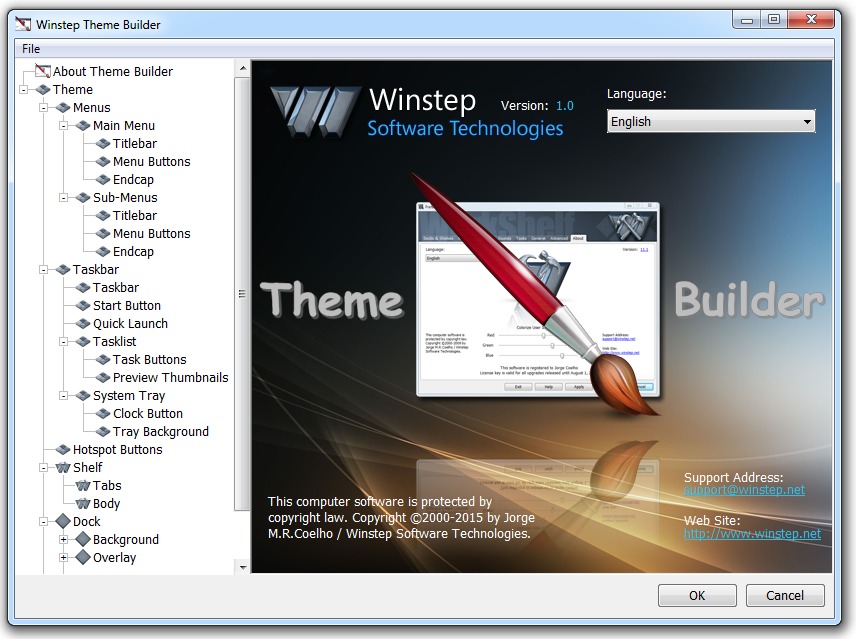
Now.. any progress on that ever elusive Theme Creation mechanism?
Reply #8 Thursday, October 1, 2015 8:18 PM
I'll look into that Australian translation. Guess it's a simple question of translating all occurrences of the word 'woman' in the language file to 'Sheila' and add 'You call that a knife?! That's not a knife, this is!!!' to the end of every sentence.
Almost...except that's one of THE MOST misquoted quotes of all time...
It's "that's not a knife.....THAT's a knife..." ...
Reply #9 Thursday, October 1, 2015 8:20 PM
Reply #10 Thursday, October 1, 2015 10:17 PM
Actually yes. It will be in the next release.
You, sir, are the King of Awesome!!!!!


Reply #13 Friday, October 2, 2015 11:07 AM
Now.. any progress on that ever elusive Theme Creation mechanism?
Actually yes. It will be in the next release.
I had purchased an older version. As soon as the Theme creator is included I will purchase the Winstep Xtreme full version again. 
Great work Jorge.

Reply #17 Thursday, October 15, 2015 8:47 AM
Ahah, nah, just began working on it.
But if you know me even a bit, you also know that once I start I don't stop until it's finished. And I'm usually very fast.
Actually spent a great part of the night working on that About screen lol... the thing is animated too: when you open it both the Theme Builder logo and the 'Theme Builder' text literally 'pounce' (and bounce) in your direction. It's like you've been punched in the face.
The Theme Builder's window besides being scrollable, is resizable too, so you can take advantage of larger screen resolutions when making themes. Like this I also have lots of space available to keep the UI clean and add tons of explanatory text.
Reply #18 Thursday, October 15, 2015 9:16 AM
Sounds excellent!!
I'm all weepy eyed now... thanks Jorge!!!
Please login to comment and/or vote for this skin.
Welcome Guest! Please take the time to register with us.
There are many great features available to you once you register, including:
- Richer content, access to many features that are disabled for guests like commenting on the forums and downloading skins.
- Access to a great community, with a massive database of many, many areas of interest.
- Access to contests & subscription offers like exclusive emails.
- It's simple, and FREE!
|
|
Page 1 of 8 | |
|
|---|
Reply #1 Thursday, October 1, 2015 4:59 PM
Thanks!!! Great job Jorge!!