





































Winstep Nexus Dock v15.9 Released!
Thursday, October 1, 2015 by JcRabbit | Discussion: OS Customization

 The Winstep Nexus dock is a FREE dock for Windows. Every feature you’d expect from a dock, including widgets, mouse-over effects, skins, drag-and-drop, and many others not available in most other docks, such as live icon reflections, in-dock system tray, blur-behind effects, and much more. Completely customizable, with thousands of different backgrounds freely available online, Nexus is fully compatible with skins for all 3rd party docks.
Supported Languages: Bulgarian, Catalan, Chinese (Traditional), Chinese (Simplified), Croatian, Czech, Dutch, English, Farsi (Persian), Finnish, French, German, Hungarian, Indonesian, Italian, Japanese, Korean, Norwegian, Polish, Portuguese, Portuguese (Brasil), Russian, Serbian, Slovak, Spanish, Swedish.
Nexus runs on the 32 and 64 bit versions of Windows 2000, XP, 2003, Vista, 7, 8.x and Windows 10.
v15.9 is a monster release, with hundreds of changes and additions. Focus was on adding missing key functionality as well as, of course, some new eye-candy.
What's New? Highlighted Features:
- Speed! Due to new and improved activation and hide delay timings, Nexus simply feels a lot more responsive. Rendering performance when shifting icons in a fully expanded Shelf to make room for a new shortcut is now also an order of magnitude faster (Nexus Ultimate only).

- Improved Windows 10 integration.
- Now fully high-DPI aware. Throw anything at it from 100% to 200% scaling and everything will still work and look as it should. New settings added to control the scaling of menus and the Shelf on high DPI systems.
- Added support for systems with multiple input languages: new 'Language Bar' internal command can be placed anywhere and emulates the functionality of the Windows language bar.

- New optional Edge Swipe activation mechanism.
- Shortcuts in the dock now double up as running application icons, so there is no duplication of icons when running applications are being displayed in the dock.

- Shelf now smoothly resizes when double clicking a tab header to fully expand the Shelf in order to show all the contents of that tab at once (Nexus Ultimate only).
- Weather module now automatically retrieves the user's location when running for the first time. Also added new 'Get My Location' button in the Weather settings panel.

- New Smoke mouseover/launch/attention effect. Not too intrusive and makes the dock look like it's on fire! My new personal favorite when combined with the magnify effect.

- Added support for RKLauncher dock skins.
- New option to colorize themes based on the dominant color of the current desktop background.

- Explosion animation shown when an item is deleted or removed is now user-customizable.
- New optional Windows 10 style for some UI elements, specifically designed so the application blends in with the new Windows version. Automatically enabled on Windows 10 systems.

- Added new 'Action Center' internal command (Windows 10 only).
- Clicking the clock module now shows the Windows calendar instead of the Regional Settings dialog (Windows 7 onwards).
- Font size in the User Interface is now automatically decreased when a non-English language is selected to better accomodate the (usually) longer translations.
- ... many other performance and stability improvements!
More Information:
Winstep Web Site:
http://www.winstep.net
More information about Winstep Xtreme:
http://www.winstep.net/xtreme.asp
More information about the Winstep Nexus dock:
http://www.winstep.net/nexus.asp

 |
|
Page 7 of 8 | |
|
|---|

Reply #123 Saturday, November 14, 2015 8:27 PM
Simple, eh?
Yeah, clear as mud.
Copied to a notepad for future use, or at least my alibi for my temporary insanity, in the murder case after I kill you...... 


Reply #125 Saturday, November 14, 2015 9:45 PM
Seriously? lol
Look:



See? Menu endcap and titlebar are (apparently) wider than the menu buttons. But the actual bitmaps are not, they are all 180 pixel wide.
Get them all together and you get something like this:
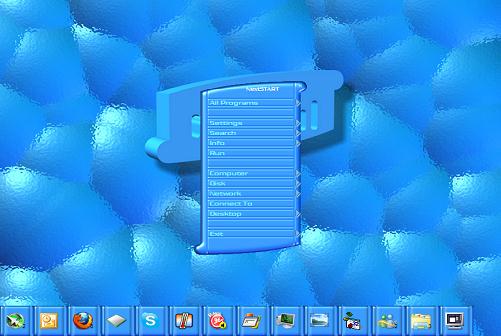
Clear as mud! Skinning 101! Tsk tsk. 

Reply #127 Saturday, November 14, 2015 11:21 PM
OK, apparently, you used bitmaps. Are pngs ok?

Reply #131 Monday, November 16, 2015 7:22 PM
Dang....can't use it....no support for Australian ....
Well done, Jorge ...
turn your monitor upside down?
Reply #132 Monday, November 16, 2015 7:39 PM
So, where's my feedback?

I'll get there. Haven't been skinning much lately.
Any chance with Windows10 in mind, that we can set multiple NextStart taskbars to support multiple monitors?
Best thing I can think of, until WindowBlinds 10 is released.
Reply #133 Tuesday, November 17, 2015 3:15 AM
Just to let you guys know that there is a 24 hour Black Friday, 50% off, promotion of Winstep Xtreme over at BitsDuJour.
Reply #134 Tuesday, November 17, 2015 6:05 AM
BitsDuJour a 'bit' slow on the uptake.
But its a good thing for those who haven't got Winstep Streme yet. 
Reply #135 Tuesday, November 17, 2015 12:28 PM
Just to let you guys know that there is a 24 hour Black Friday, 50% off, promotion of Winstep Xtreme over at BitsDuJour.
Guessing it doesn't apply to renewals?
Reply #136 Tuesday, November 17, 2015 12:39 PM
Jorge, what is Winstep Xtreme Home Network?
Reply #137 Tuesday, November 17, 2015 5:18 PM
It's for those who have up to 5 computers at home and/or want to use Winstep Xtreme at work as well as on several computers at home. Basically a 'family pack license' for up to 5 users.

Reply #138 Tuesday, November 17, 2015 5:39 PM
I was going to buy WinStep Xtreme at the BitsDujour 50% off sale today Jorge, but when you go to the checkout it shows full price, so I did not. Might wan t to look into that. Sale will be over before it can be fixed I would imagine though. 
Reply #139 Tuesday, November 17, 2015 7:01 PM
I was going to buy WinStep Xtreme at the BitsDujour 50% off sale today Jorge, but when you go to the checkout it shows full price, so I did not. Might wan t to look into that. Sale will be over before it can be fixed I would imagine though.
Lightstar, pardon for asking this, but are you sure? All the sales I see coming through here are with the 50% discount. Are you using a credit card or Paypal? Do you see the discount before the Checkout?
BDJ told me there was an issue with Paypal not assuming the discount but they said they had already taken care of that with BMT Micro. I don't have Paypal so I can not test this.
Also, try making the purchase directly in the Winstep site instead of going through BDJ, see if the problem persists.
Please let me know either way.
Please login to comment and/or vote for this skin.
Welcome Guest! Please take the time to register with us.
There are many great features available to you once you register, including:
- Richer content, access to many features that are disabled for guests like commenting on the forums and downloading skins.
- Access to a great community, with a massive database of many, many areas of interest.
- Access to contests & subscription offers like exclusive emails.
- It's simple, and FREE!
|
|
Page 7 of 8 | |
|
|---|
Reply #121 Saturday, November 14, 2015 12:19 PM
Adding transparency to the button ends is the way to go. You have to think out of the box, it's not the endcaps that are wider, it's the *menu buttons* that are narrower!
So, imagine you want to make a menu endcap 200 pixels wide, but the menu buttons are only supposed to be 150 pixels wide. You make the actual bitmaps for the menu buttons and endcaps have the same width (i.e.; 200 pixels) but, for the menu buttons, the first and last 25 pixels (25+150+25 = 200) are completely transparent.
Now, imagine the first and last 8 pixels of the endcap and menu buttons are NOT to be horizontally stretched. For the endcaps you define the Left and Right sections as 8 pixels, for the menu buttons you define the Left and Right sections as 33 pixels (the 25 transparent pixels + 8 pixels margin). You then add 25 pixels to all the horizontal offsets for the menu button text, icons, etc, to make up for those 25 transparent pixels.
Simple, eh?