





































Winstep Nexus Dock v15.9 Released!
Thursday, October 1, 2015 by JcRabbit | Discussion: OS Customization

 The Winstep Nexus dock is a FREE dock for Windows. Every feature you’d expect from a dock, including widgets, mouse-over effects, skins, drag-and-drop, and many others not available in most other docks, such as live icon reflections, in-dock system tray, blur-behind effects, and much more. Completely customizable, with thousands of different backgrounds freely available online, Nexus is fully compatible with skins for all 3rd party docks.
Supported Languages: Bulgarian, Catalan, Chinese (Traditional), Chinese (Simplified), Croatian, Czech, Dutch, English, Farsi (Persian), Finnish, French, German, Hungarian, Indonesian, Italian, Japanese, Korean, Norwegian, Polish, Portuguese, Portuguese (Brasil), Russian, Serbian, Slovak, Spanish, Swedish.
Nexus runs on the 32 and 64 bit versions of Windows 2000, XP, 2003, Vista, 7, 8.x and Windows 10.
v15.9 is a monster release, with hundreds of changes and additions. Focus was on adding missing key functionality as well as, of course, some new eye-candy.
What's New? Highlighted Features:
- Speed! Due to new and improved activation and hide delay timings, Nexus simply feels a lot more responsive. Rendering performance when shifting icons in a fully expanded Shelf to make room for a new shortcut is now also an order of magnitude faster (Nexus Ultimate only).

- Improved Windows 10 integration.
- Now fully high-DPI aware. Throw anything at it from 100% to 200% scaling and everything will still work and look as it should. New settings added to control the scaling of menus and the Shelf on high DPI systems.
- Added support for systems with multiple input languages: new 'Language Bar' internal command can be placed anywhere and emulates the functionality of the Windows language bar.

- New optional Edge Swipe activation mechanism.
- Shortcuts in the dock now double up as running application icons, so there is no duplication of icons when running applications are being displayed in the dock.

- Shelf now smoothly resizes when double clicking a tab header to fully expand the Shelf in order to show all the contents of that tab at once (Nexus Ultimate only).
- Weather module now automatically retrieves the user's location when running for the first time. Also added new 'Get My Location' button in the Weather settings panel.

- New Smoke mouseover/launch/attention effect. Not too intrusive and makes the dock look like it's on fire! My new personal favorite when combined with the magnify effect.

- Added support for RKLauncher dock skins.
- New option to colorize themes based on the dominant color of the current desktop background.

- Explosion animation shown when an item is deleted or removed is now user-customizable.
- New optional Windows 10 style for some UI elements, specifically designed so the application blends in with the new Windows version. Automatically enabled on Windows 10 systems.

- Added new 'Action Center' internal command (Windows 10 only).
- Clicking the clock module now shows the Windows calendar instead of the Regional Settings dialog (Windows 7 onwards).
- Font size in the User Interface is now automatically decreased when a non-English language is selected to better accomodate the (usually) longer translations.
- ... many other performance and stability improvements!
More Information:
Winstep Web Site:
http://www.winstep.net
More information about Winstep Xtreme:
http://www.winstep.net/xtreme.asp
More information about the Winstep Nexus dock:
http://www.winstep.net/nexus.asp

 |
|
Page 3 of 8 | |
|
|---|

Reply #42 Saturday, October 17, 2015 6:02 AM
promise to buy me a burger if I'm ever close to where you are hehe.
Best place I know is Wendys. They have one called the Baconator. Messy but good.
Apparently, I got it confused when I typed Winstep Ultimate.
I want the one with the theme builder. Gotta have somethin' to play with. 

Reply #43 Saturday, October 17, 2015 6:38 AM
You won't lose anything and both docks can co-exist on your system without interfering with each other, so give it a try and let us know what you think, especially if you see anything you don't like - that's how things get improved. 
Nexus has more options than OD, so the UI is a bit more complicated too.
The Theme Builder will be available for/in all the different products, i.e.; Nexus, Nexus Ultimate and Winstep Xtreme, it's not like I'm going to charge for it or whatever, lol
The only difference is that it will only show skinning settings for the dock if you are running Nexus, dock and Shelf skinning settings in Nexus Ultimate, and the whole she-bang in Winstep Xtreme. And this only because it depends on the actual applications to show the results of whatever you are working on.
Again,not much different than how it was before. To skin Winstep Xtreme you needed Winstep Xtreme installed on your system.


Reply #45 Saturday, October 17, 2015 11:21 AM
Jorge, are you going to do anything with Start Menu Organizer for Windows 10?
Reply #47 Saturday, October 17, 2015 6:05 PM
Unfortunately there is nothing I can do, MS is now using an internal database for the contents of the All Programs section in the Windows Start Menu.
This said, since applications still use the normal folder-based program groups to install their shortcuts, under Windows 10 the Start Menu Organizer is still useful if you're running an application like Winstep Xtreme's NextSTART, for instance.

Reply #48 Saturday, October 17, 2015 6:29 PM
Absolutely awesome updates/upgrade. Once again, you've come out with software superior to anything else available. 
Reply #49 Saturday, October 24, 2015 11:30 AM
When will we see a new theme from Jorge? He is the most creative.


Reply #50 Saturday, October 24, 2015 7:15 PM
I started to reproduce my existing OD+ docks with Nexus. It looks very powerful. Is there anything important I will lose if I switch programs?
Reply #52 Sunday, October 25, 2015 6:52 AM
Actually you don't need to switch. OD+ and Nexus do play nice together. On my old machine I ran both with no problems.
Reply #53 Sunday, October 25, 2015 10:40 AM
I tried out the new winstep. I am going to renew my expired winstep subscription. Great work here!!!!
Reply #54 Monday, October 26, 2015 4:07 AM
Thanks...
As for the Theme Builder, it's nicely limping along eheh.
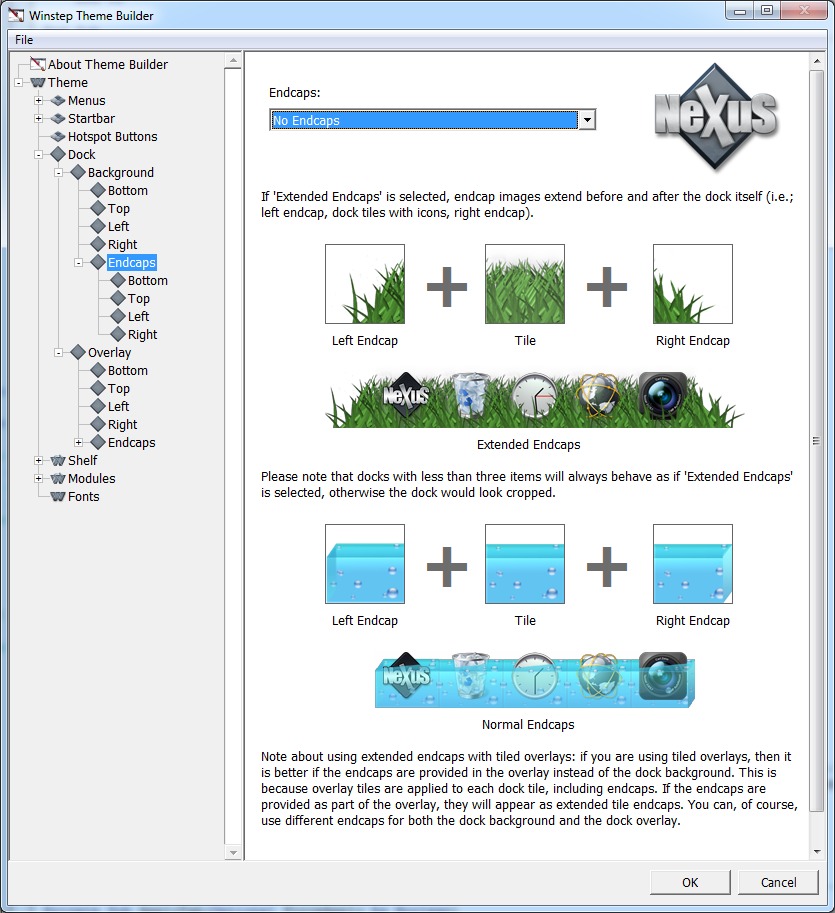
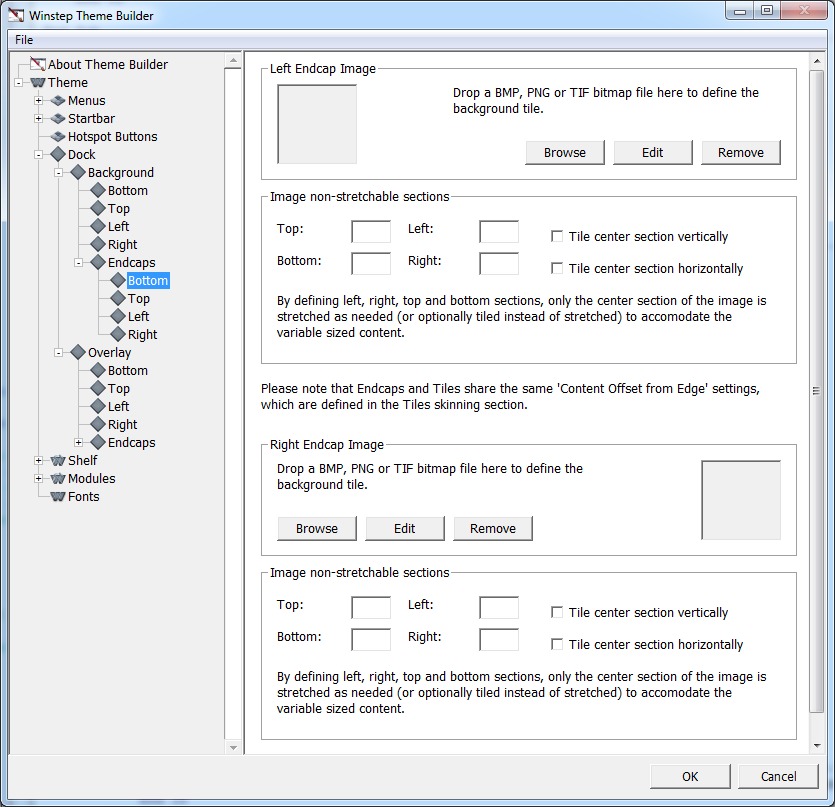
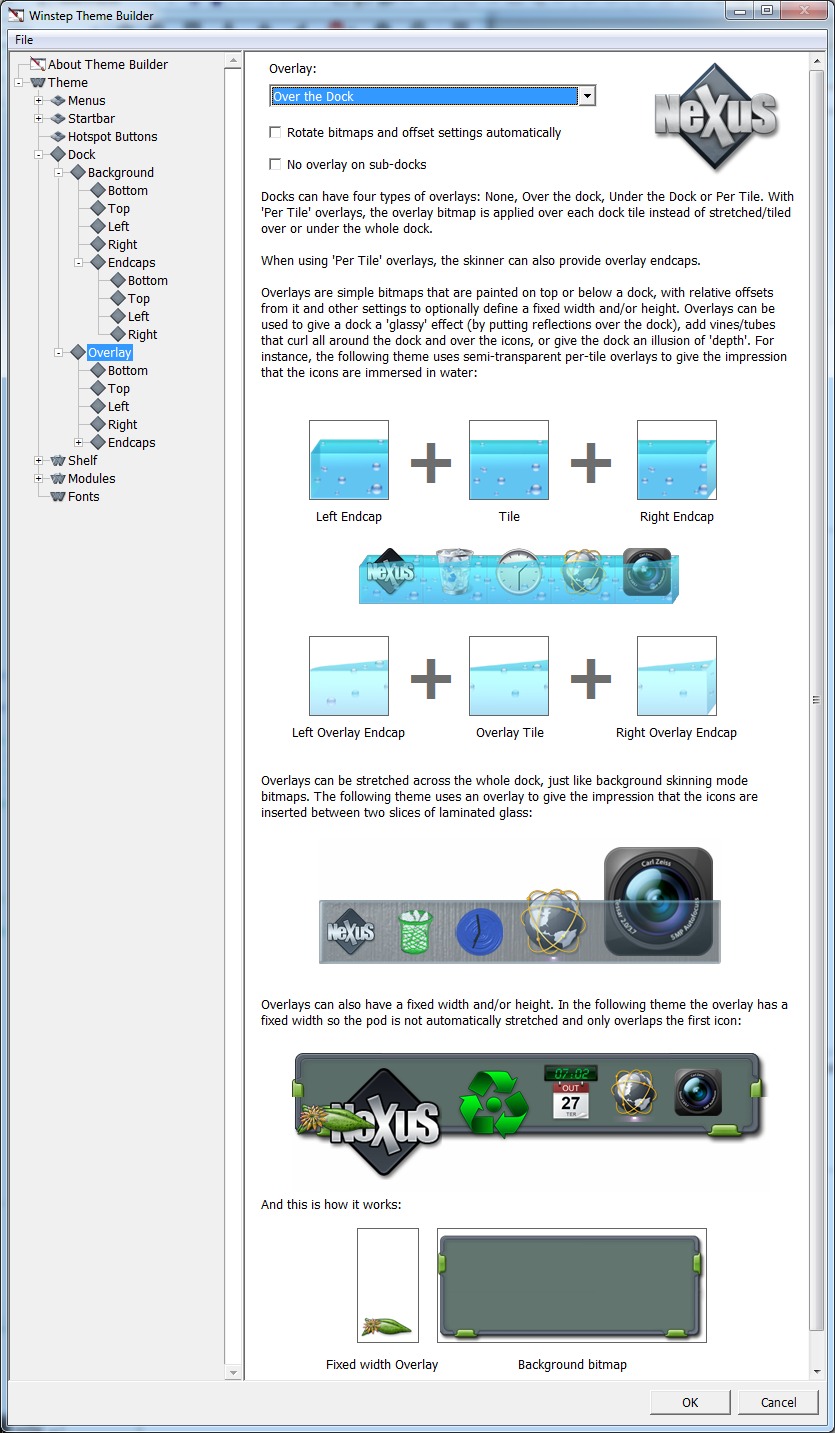
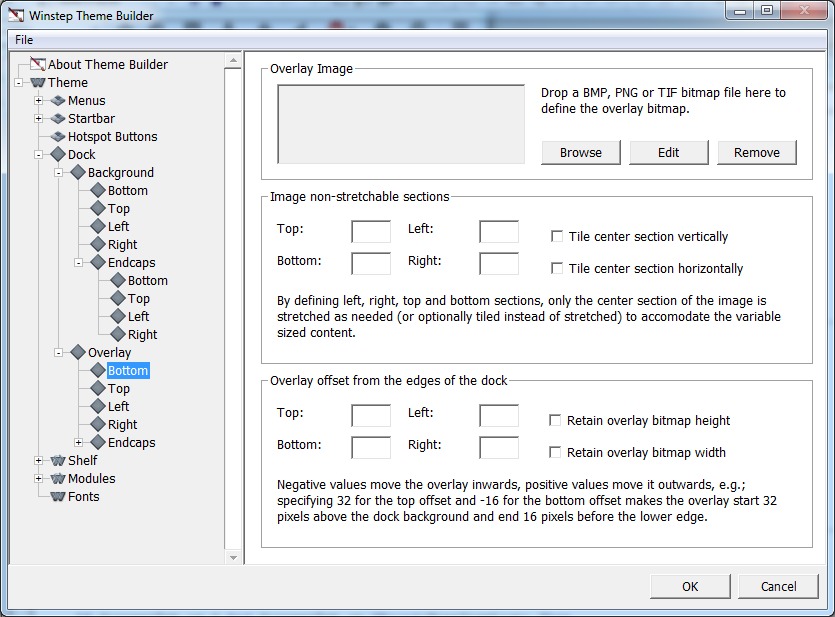
I'm still trying to 'get a feel' for how it will all tie together, although I'm slowly getting there. As you can see below, I'm trying to merge the Theme Builder with an illustrated Skinning Tutorial, so newbie skinners know what every setting does (and even advanced skinners, since Winstep allows some stuff no other application of its kind does, such as multiple types of dock overlays, reflection masks, etc...). Might as well teach all the skinning basics in the Tutorial.
Something that still impresses me is how after all these years there are still no skinning tutorials out there (at least none that I could find). It's like an arcane art transmitted by word of mouth lol
Winstep skinning is heavily based on knowing the correct bitmap filenames (e.g.; nxbackground.png, nxtile.png, etc...) but with the Builder I'm trying to completely isolate the skinner from all that by allowing simple drag & drop of the bitmaps into the Builder: the Builder itself will then correctly rename the dropped bitmap(s) as appropriate.
The navigation section at the left is also dynamic, i.e.; it will change based on the skinner choices. For instance, if the skinner chooses to have Nexus rotate dock bitmaps and settings automatically, there is no need for the different 'left, right, top and bottom' dock orientations skinning panels.


Reply #55 Monday, October 26, 2015 7:15 AM
Wow! I am so gonna love this when it comes out. Great work Jorge.
Reply #56 Tuesday, October 27, 2015 2:05 PM
Been adding a few more panels.
I will need you guys opinion on some stuff (for instance, should I add spin controls to the offset, etc, text boxes or is directly typing in the numbers more than enough?), Anyway, I think we should continue this discussion on the Winstep Forums.
Reply #57 Wednesday, November 4, 2015 1:22 PM
Ok, I have all the skinning panels for Nexus done, as well as the Theme Builder panels, plus the Theme Browser.
I was having some difficulty figuring out how to tie everything together, e.g.; as you know even though WorkShelf is a single application, it has multiple skinnable objects that can be skinned independently and have independent configuration files: the docks, the Shelf, each of the desktop modules, etc... Add NextSTART themes to this, etc...
For instance, even if you have Winstep Xtreme, you might want to just make a quick Nexus-only theme instead of skinning the whole she-bang...
So, when you select New Theme from the menu, a Theme node gets added to the navigation panel at the left (at first you only have the Theme Builder node visible, consisting of various configuration panels related to the builder itself, nothing else).
In the Theme root panel you can define the theme's name, author, add a wallpaper specific to that theme, and here is the important part, you can also define which 'part' of Winstep Xtreme you want to skin. By default you have the whole thing, but if you want you can change a combo box in that panel from 'Winstep Themes' to just 'Nexus'.
If you do this, only the nodes related to the Nexus skinning panels are visible on the left navigation panel. When you Save the theme, only the Nexus configuration files are saved. When you Apply the theme to preview it in the applications themselves, only the Nexus related settings are applied to Winstep Xtreme (so only the docks will change).
Likewise, when you Open an existing theme, you have a combo box that allows you to select which part of an existing theme you want to skin/see themes for. If you select 'Clock', only the available Clock themes are shown (as it happens in the Themes panel of Nexus/WorkShelf Preferences now). If you press Ok at this point, only the nodes related to the clock module are shown in the navigation tree.
Once I have all this actually working (as I'm starting with Nexus, all other panels will be/are blank/haven't been made yet) I will release an alpha so you guys can 'feel' where this is going (plus you will at least be able to churn out Nexus dock skins using the Builder itself). I guess it will then be easier to give some sort of feedback.
Reply #58 Wednesday, November 4, 2015 1:34 PM
Brilliant!!!
I'm not a skinner but as a Winstep Xtreme user, I can see this Theme Builder will be a real boost to content creators, so I win as well.

Reply #59 Wednesday, November 4, 2015 1:47 PM
Might be nice to have a "fail safe" checklist type of arrangement...to make sure a vital element hasn't been missed.
Also, another thought...workflow. Perhaps a suggested work flow could be offered as sort of a skeleton...so the skinner works efficiently...of course, that should probably come about from Winstep Forums from actual skinners...and it'll probably be pretty variable.
Reply #60 Wednesday, November 4, 2015 2:13 PM
Might be nice to have a "fail safe" checklist type of arrangement...to make sure a vital element hasn't been missed.
Also, another thought...workflow. Perhaps a suggested work flow could be offered as sort of a skeleton...so the skinner works efficiently...of course, that should probably come about from Winstep Forums from actual skinners...and it'll probably be pretty variable.
Both nice ideas, although for now I just want to get a working Theme Builder out the door... there's always version 1.x, of course.
Doing the Builder is very difficult for me since it's mostly boring work, and the added tutorial approach I chose for it (the 'skinning wiki' is actually already a part of the builder itself, which I think will be of great help to newbie and professional skinners alike) doesn't help either (who likes writing user guides? lol). But I know it's importance and I've been persevering, one panel at a time. Little by little it's getting there.
In the mean time, when I get too bored, I do some work on the applications themselves hehe. Or, worse, on the About tab of the Theme Builder... my God, you are all going to hate me for it! lol
Please login to comment and/or vote for this skin.
Welcome Guest! Please take the time to register with us.
There are many great features available to you once you register, including:
- Richer content, access to many features that are disabled for guests like commenting on the forums and downloading skins.
- Access to a great community, with a massive database of many, many areas of interest.
- Access to contests & subscription offers like exclusive emails.
- It's simple, and FREE!
|
|
Page 3 of 8 | |
|
|---|
Reply #41 Friday, October 16, 2015 10:46 PM
What you're missing is in your quote of Uvah.
"Went to winstep.net looking to see if purchasing Winstep Ultimate can be done by money order"
Apparently, Ross got it confused when he typed Winstep Ultimate.
It's Winstep Xtreme or Nexus Ultimate.