





































Cannot find Skinning item in SS 8.0
Sunday, August 2, 2015 by JPB05 | Discussion: Skinning
Hi Guys,
Can someone please help me find where it is in skin studio where i can change the color of the menu on the left hand side in an explorer window in win7?
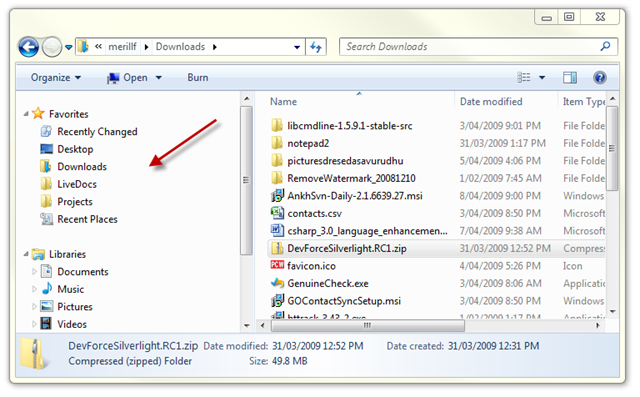
The background where the red arrow is.
Many thanks in advance.
JPB05.

Reply #2 Sunday, August 2, 2015 9:29 AM
That is found in Theme Part Details, Command Bars, Folders Bar. Just add a 20 x 20 pixel .bmp image there, then go to the Extra Settings area in Folders bar and set the color there to to be the exact same color as what is in your image. 



Reply #5 Sunday, August 2, 2015 10:12 AM
create a solid graphic for the "favorite links background" within the "edit vista/7 explorer parts. Probably the same graphic that Tom's mentioned but a different location??
Selection image is on the same page down towards the bottom, but doesn't work for this.

Reply #7 Sunday, August 2, 2015 11:00 AM
create a solid graphic for the "favorite links background" within the "edit vista/7 explorer parts. Probably the same graphic that Tom's mentioned but a different location??
Selection image is on the same page down towards the bottom, but doesn't work for this.
Are you using SKS 7 or 8?

Reply #11 Sunday, August 2, 2015 11:18 AM
Is it also possible to do the background on the right side as well? the main section background.
JPB05
Reply #12 Sunday, August 2, 2015 11:36 AM
I'm using SKS v8.0.
Creating a 20px x 20px image and importing it as the folder bar image, and changing the the color in the extra settings tab did the trick perfectly.
Is it possible to change the color of the background on the right also?
JPB05
Reply #13 Sunday, August 2, 2015 11:37 AM
well, just kidding. there is in 7 so I'd imaging it may still be with 8, but I don't know.
Reply #14 Sunday, August 2, 2015 11:48 AM
I'm using SKS v8.0.
Creating a 20px x 20px image and importing it as the folder bar image, and changing the the color in the extra settings tab did the trick perfectly.
Is it possible to change the color of the background on the right also?
JPB05
Yes, just use that same image in the Backgrounds, Edit Explorer Background Bitmaps, Explorer Backgrounds and Sorted Columns areas. I just apply the Active and Inactive window images, I don't bother with the (Glass) ones.
Just so you know though, this will not change the color of the background in the Preview Pane area in explorer, it cannot be changed and will always be white.


Reply #17 Sunday, August 2, 2015 3:28 PM
I think the selection image is used in several places. It's a general/generic mouseover graphic.


Please login to comment and/or vote for this skin.
Welcome Guest! Please take the time to register with us.
There are many great features available to you once you register, including:
- Richer content, access to many features that are disabled for guests like commenting on the forums and downloading skins.
- Access to a great community, with a massive database of many, many areas of interest.
- Access to contests & subscription offers like exclusive emails.
- It's simple, and FREE!
Reply #1 Sunday, August 2, 2015 9:11 AM
I think it may be known as the folder tree??..