




































So I've Started On a New Build
that's not only sexy but kicks major ass
Friday, February 7, 2014 by starkers | Discussion: Personal Computing
Yup, it's that time of year again, but this time it's not a PC upgrade but rather a complete new build... starting with a real sexy case...

Now this is a full tower and has oodles of room inside for lots of fantastic shit... accommodating extra big graphics cards, enormous CPU coolers and even a magical leprechaun who can fix stuff when it's broken. Orright, maybe not the leprechaun, but it is fechin' huge inside. And what's more, to make it even more fancy, it has keys to get into it... so nobody's stealing my graphics card in a hurry... the innards of the beasty are quite secure.
Orright, so maybe it's not that secure, but there are lots of things to like about this case. For example, the 'hot swap' hard drive bays and the 'daisy chained' power connecters so that only one SATA plug from the PSU is required. Then there's the great ventilation, easy access to everything and the sexiest appearance ever.
Anyhow, enough of all that, let's talk about the innards...
PSU.... Silverstone 1200w 80 Gold
Mobo.... Gigabyte GA-Z87X-UD5H [has 10 SATA 3 ports and 10 USB3 ports]
CPU.... Intel i7 4770K @ 3.5ghz [but highly overclockable]
Cooler... Corsair H60 Liquid CPU Cooler.
RAM... G-Skill Trident DDR3 2400mhz x 32GB
SSD... Samsung 840 Evo series 512Gb
GPU... Gigabyte Radeon 7970 GV-R797WF3- 3GD.
Well that's all I got in it for now, but it has been a long, hard day and I've had enough, it's bedtime and the rest will have to wait 'til tomorrow.
 |
|
Page 9 of 14 | |
|
|---|

Reply #162 Wednesday, December 17, 2014 12:39 AM
Now I have the CPU mounted to the X99 MoBo...and the brackets for the Noctua cooler [it's a big lump of a thing].
Told you the cooler would be a big lump of at thing... mine is. I'll bet that CPU and mobo look great... and I've got 8 - 9 months before I can cop an optic of mine in situ. Oh well!
I have the box!!!! YAY.....
It's huge ....probably affects planetary orbits.
Yeah, they are quite large, aren't they! Mine is also huge, and with all the components in it [includes 10 HDDs], it likely weighs in the vicinity of 90 - 100lbs. Having done removals alot of my life I'm no weakling - even at 61 - but I have to brace myself and bend my poor aching knees before picking it up off the floor. And yeah, I'll bet it's impressive up close and personal. I saw the black version in person and instantly wanted one, but alas, it doesn't look like that's meant to be.
the box was about 1000x1000x500
Sure there wasn't half a dozen illegal immigrants hiding in there? 

Reply #163 Wednesday, December 17, 2014 6:15 AM
Not long after getting back with the box the M.2 turned up....certainly speedy and efficient delivery.
Mounted it in its bracket [doesn't use a PCIe slot and card] ....tiny little thing...looks about the size of a Wrigley's stick of gum.... kinda makes SSDs seem 'archaic', huge as they are....
Board's in... but still waiting for the last delivery....the ram and the PSU. Can't do a lot more until they're here. Need to put the ram in...and finish cabling before the monster of a CPU fan/cooler goes in.
It's a done deal that any macines I build from now on will have that wider recess behind the MoBo tray to hide all the wiring....cos looking at my old machine is just plain 'sad'....
Reply #164 Wednesday, December 17, 2014 8:15 AM
Not long after getting back with the box the M.2 turned up....certainly speedy and efficient delivery.
Mounted it in its bracket [doesn't use a PCIe slot and card]
Okay, if it doesn't use a PCIE slot, how does it draw power, transfer data, etc? The SSD cards I've seen are PCIE mountable, so yeah, I'm curious.
Board's in... but still waiting for the last delivery....the ram and the PSU. Can't do a lot more until they're here. Need to put the ram in...and finish cabling before the monster of a CPU fan/cooler goes in.
I found with my Thermaltake cooler, which is very similar to yours, that it's easier to fit/install with the mobo out of the case... as in you need both hands: one to hold the cooler in place, and the other to put on the nuts and tighten them. If you wait until the after the mobo is installed you'll find it's not so easy to install... so if I were you I'd take the mobo out again, place the cooler on the table/bench, then place to mobo over it, position properly and place/tighten nuts to hold in place.
That is so much easier than trying to do it the other way... believe me. True, once the cooler is in it doesn't leave alot of room to work in, but I've got big hands and managed it. Thing is to have as much of the preliminary work done beforehand... such as installing the RAM and PSU, feeding the cables through the tray before installing the cooler and replacing the mobo... again, so much easier.
It's a done deal that any macines I build from now on will have that wider recess behind the MoBo tray to hide all the wiring
My level 10 doesn't have a huge space between the mobo tray and side cover, either, but I found the trick was to feed ALL the PSU cables through the back... except maybe the one that connects to the top ATX socket if not long enough to be fed up the outside and back in. Once they're fed through you can feed them back tidily through their designated cable ports to connect to their corresponding components. Once you have done that there are tie loops to hold the cables in place. If done properly the side cover will fit without issue and your cables are hidden. Yeah, it is a time consuming, tedious job, but it can be done if you want a tidy, neat looking component compartment.
Oh and my arm is much better today... thanks for asking. 
Nah, it's all good. I have a partially fractured ulna [not broken all the way across] and some local bruising, but it's not as painful as yesterday and I've not needed any pain relief thus far. I may take something before bed, however, just to make dozing off that bit easier. Sadly, I can't look back in hindsight and rewind the tape, otherwise I'd job the bastard with a viscious left hand [thus saving myself the injuries] before taking the laptop off him. That didn't escape unscathed, either. It hit a mosaic tiled floor heavily when I was pushed off balance and through a door...now doesn't start up fully, but we're hoping the local techie can get it goung again for her.
Reply #165 Wednesday, December 17, 2014 8:39 AM
I feel like I've broken a few bones....just man-handling the case....
Re the M.2 .... The ASUS board comes with a PCIe add-on card for one...but also has an onboard connector...which is where I hooked mine in....sticks up perpendicular to the board in its own metal bracket.....and when used pinches the channel of the PCIe 5 slot. Certainly neater than filling up a PCIe.
I won't use the card unless I get eager and buy a second M.2 ....
Re the cooler... Noctua are clever enough to have the center fan pop out easily allowing straight access to the two locking 'screws' which are spring-loaded [captive]. It'll be simple 2 handed job to fit.....nothing like the V8 cooler in the old case...where I had to hacksaw a bigger hole in the mobo panel to access the brackets...yet again the Lian Li case was a slide-in tray...and the V8 was too big to slide...so it HAD to be done after the tray went in.
This time it's a drop-in tray...so no issues re size anyway....

Reply #167 Wednesday, December 17, 2014 10:35 AM
Re the M.2 .... The ASUS board comes with a PCIe add-on card for one...but also has an onboard connector...which is where I hooked mine in....sticks up perpendicular to the board in its own metal bracket.....and when used pinches the channel of the PCIe 5 slot. Certainly neater than filling up a PCIe.
Okay, that's interesting, will look at that when I get around to building/upgrading mine around July - August 2015. It seems like a great idea, though. So, cos I'm not visualising it right now, would these addons/connectors make available those PCI/PCIE slots that are often made inaccesssible by large/multiple GPU cards?
Re the cooler... Noctua are clever enough to have the center fan pop out easily allowing straight access to the two locking 'screws' which are spring-loaded [captive]. It'll be simple 2 handed job to fit.
So the Noctua has a mounting bracket that's fitted to the mobo before it's installed... and then the cooler is fitted? With the Thermaltake in my AMD machine, the mounting pins are connected to the cooler and must be poked through the designated holes in the mobo. Once through, you need to hold the cooler in one hand while placing the nuts on the pins and tightening them... and with one pair of hands you need extra long arms or pretty near be a contortionist to be on both sides of the case at once.... hence I used the above method to make it easier on myself.
Oh well, it seems you have it under control... and the tidy [hardly seen] cabling is possible with a bit of Percy Verance. I met him in my early PC days when cases weren't at all cabling friendly. I managed to get some pretty decent results even back then, but these modern cases are so much easier to work with, and if you use the cable holes wisely you can pretty much hide the majority of cabling between the mobo tray and side cover, with just a few cables intruding inside for the mobo, GPU and any 3rd party cards requiring power.
Reply #168 Wednesday, December 17, 2014 2:28 PM
So, cos I'm not visualising it right now,

Reply #169 Wednesday, December 17, 2014 4:17 PM
So the Noctua has a mounting bracket that's fitted to the mobo before it's installed... and then the cooler is fitted?
Yes.
As I said earlier...Yrag put me on to their stuff ....and since using it I'll probably stick with them in preference. They don't go in for 'bling' ....just function...
Reply #170 Wednesday, December 17, 2014 4:27 PM
So, cos I'm not visualising it right now,
You're not visualizing it because a certain someone is spending all his time assembling and not photographing and posting pics.
Yeah, I know what you mean... it does leave too much to the imagination, and at my age I dunno if I have alot of that left.
Thing is, I also know what it's like to have a new case and a heap of super-duper stuff to put in it.
It's like: "Fech the photographs, let's get this baby together... NOW!!! 
With a bit of luck we may get to see some piccies of this beastie soon... hint, hint.
Reply #171 Wednesday, December 17, 2014 4:42 PM
So the Noctua has a mounting bracket that's fitted to the mobo before it's installed... and then the cooler is fitted?
Yes.
As I said earlier...Yrag put me on to their stuff ....and since using it I'll probably stick with them in preference. They don't go in for 'bling' ....just function...
Okay, that's handy to know for future reference... cos that Thermaltake cooler was a mongrel to install. One thing is assured! The bastard ain't coming out again. No siree, it's staying right where it is... permanently. Why Thermaltake didn't design it with a mounting bracket is beyond me. I mean, with their time and experience in the PC hardware industry, surely they could have seen it was the best way/solution to installing it.
Oh well, it's not something that will concern me again. The next build/upgrade will have either Corsair or Coolermaster liquid cooling, which is easy to fit and isn't so large and cumbersome, thus allowing for better airflow within the case in the absence of all that bulk.
Yup, the Thermaltake cooler is a BIG lump of a thing... like Avanda Manstone but much prettier.

Reply #172 Wednesday, December 17, 2014 8:14 PM
starkers, i have but one word for ya ........ thermaltake. you knew that was coming, didn't ya?

Reply #173 Wednesday, December 17, 2014 11:20 PM
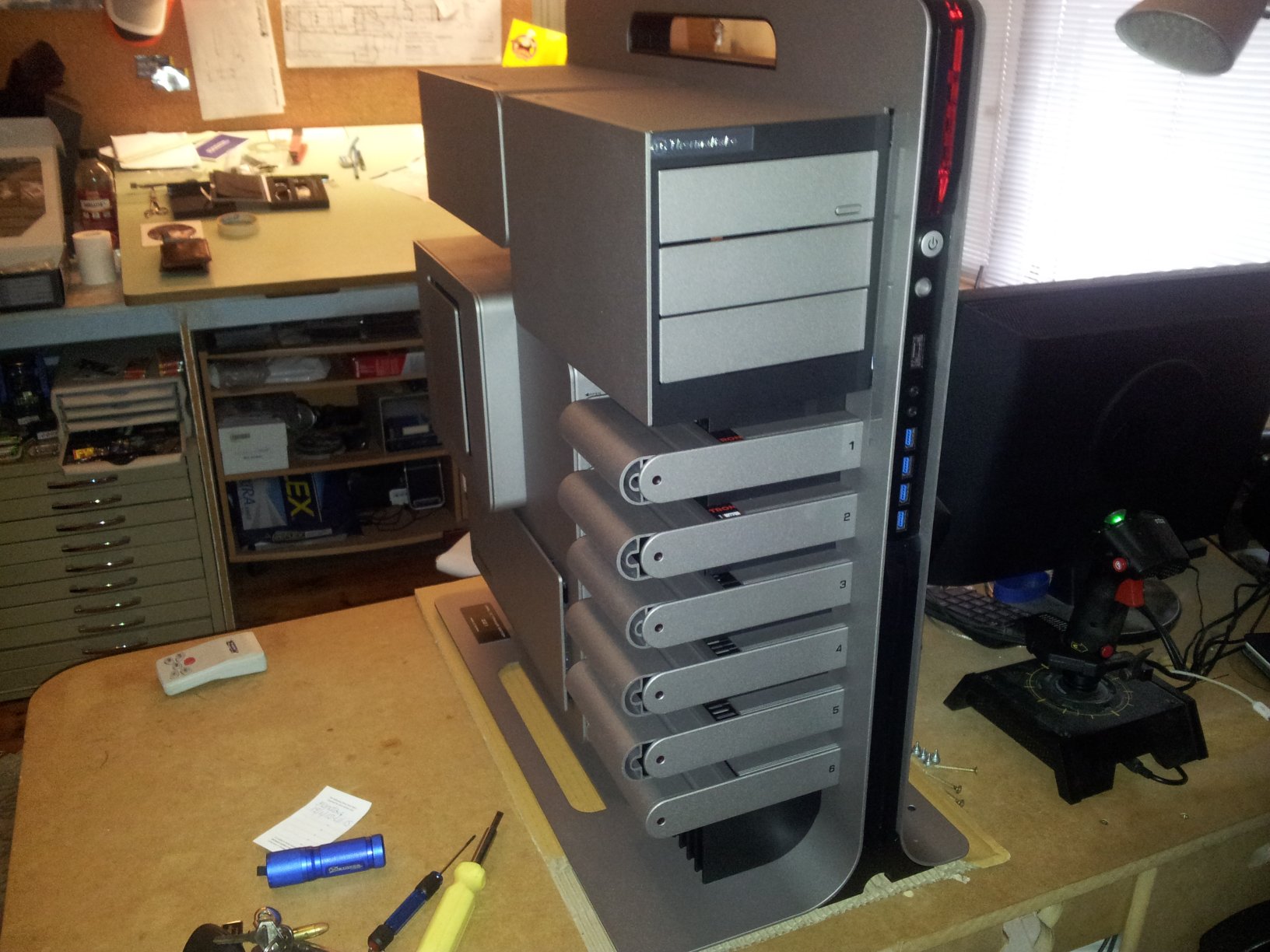
There it is....size of a small city....full of 'clever bits' and the number '221' onit...
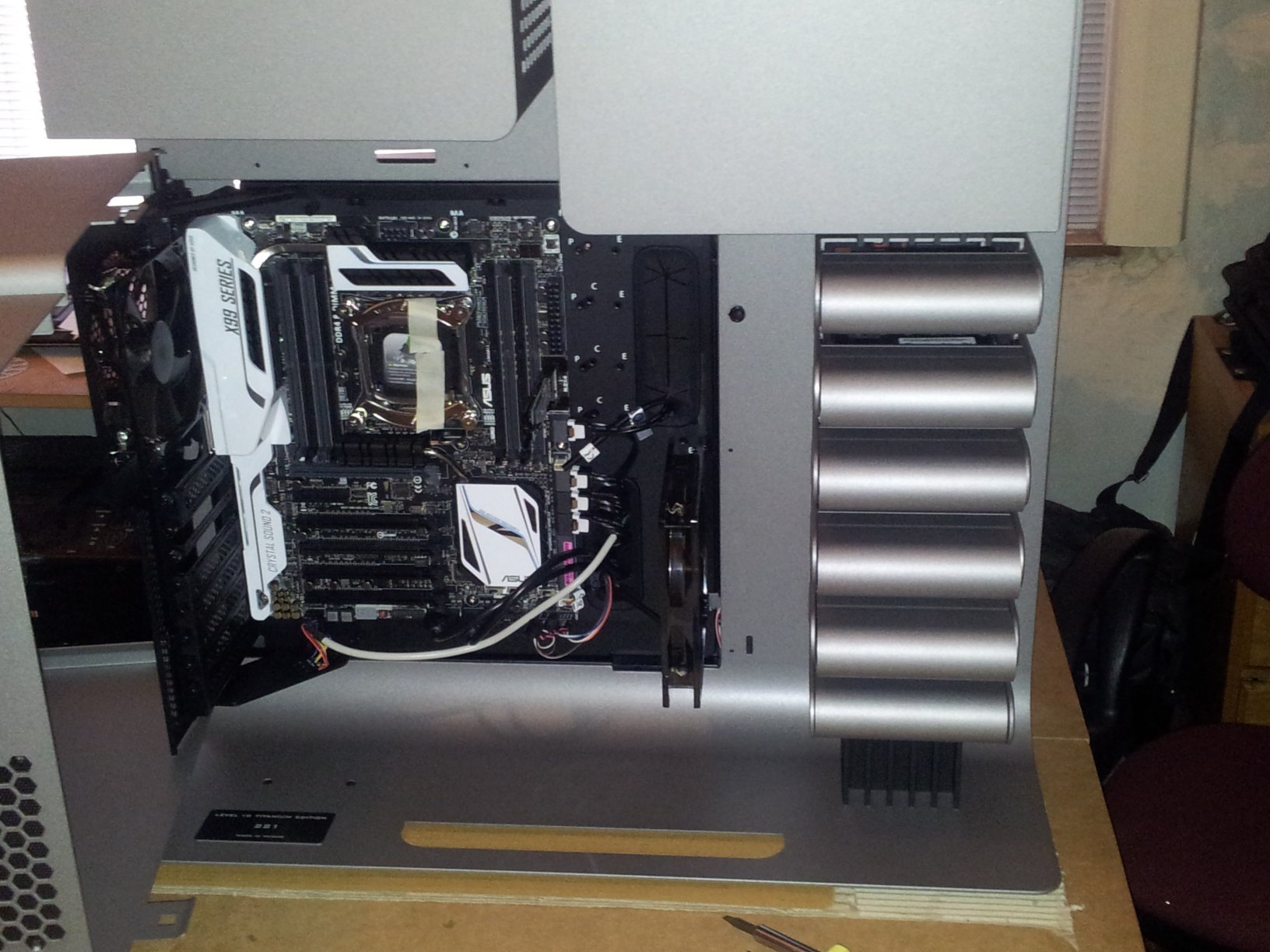
The 'innards'.
The masking tape holds the CPU cover in place so I don't inadvertently get grubby fingers on the back of the cpu .... it's in...as is the cooler bracket.... just waiting on the Ram so it can go in and then the Cooler.
That 'thing' just to the right of the 'A' in ASUS is the vertical M.2 hooked straight into the MoBo ...just 'above' the first pair of SATAs.
From the look of it, the only thing stopping an eATX from 'fitting' is lack of screw-hole layout for the standoffs to the right ...and the cable holes would be half covered. I reckon with a bit of DIY I could have used the Rampage Extreme afterall. Doesn't come anywhere near the inlet fan at all...
Reply #174 Wednesday, December 17, 2014 11:46 PM
That's big alright. Seeing it on your bench gives it a better sense of scale. I'd need to install additional floor supports under my trailer just to hold it up! 
Really nice, Paul. Congrats.
Reply #175 Thursday, December 18, 2014 1:42 AM
starkers, i have but one word for ya ........ thermaltake. you knew that was coming, didn't ya?
Yup, I knew it was coming. In fact I'm surprised it didn't come about 10 - 15 posts ago.
You're slacking off, John, you're slacking off.
Thing is, I've had a good run with Thermaltake products and have enjoyed using them.
Yes, they could have designed that cooler better, making it easier to install, but thus far that'd be my only complaint.
But on a scale of 1 to 10, my satisfaction level is 9.9999 and I'd have no hesitation using Thermaltake products again.
However, as much as I'd love to have a case like Paul's, preferably in black, my next one is likely to be a Coolermaster Cosmos II.
I very much like it's design, the cooling options and additional HDD space in the lower compartment.
Yessssss... the more I think about it.........
Reply #176 Thursday, December 18, 2014 2:04 AM
There it is....size of a small city..
Small city my arse.... there are smaller solar systems.
'Tis very impressive indeed... and I'm not jealous one little bit
However, I have upped my sedatives so the wait 'til July/Aug next year is somewhat doable.
That 'thing' just to the right of the 'A' in ASUS is the vertical M.2 hooked straight into the MoBo ...just 'above' the first pair of SATAs.
Yes, now I get it... a very good idea indeed, and it would allow the use of PCIE slots covered by large/multiple GPUs.
From the look of it, the only thing stopping an eATX from 'fitting' is lack of screw-hole layout for the standoffs to the right ...and the cable holes would be half covered. I reckon with a bit of DIY I could have used the Rampage Extreme afterall. Doesn't come anywhere near the inlet fan at all..
I had an idea it may have been something like that. Thing is, I've had cases in the past that didn't have the full compliment of 'standoffs' to the right for mobos I wanted to use, so I just screwed down the left and centre screws. The board still sat snugly and was well enough secured, despite couple of inches or so hanging over. As for the cable holes being covered, they're still usable... you just feed the cables through before tightening down the board, or feed them through on an angle towards the right... left from the back.
EDIT:
After seeing the pics and giving it more thought, the Delux mobo actually looks quite good with that case, and probably better than the Rampage Extreme... appearance and colour-wise, that is. The blacks and reds of the Rampage board I believe would look better in a black case, which fortunately for me the Coolermaster Cosmos II is. Thing is, if extreme performance is what you're after and appearance isn't that important, I don't suppose it matters that much... especially if you don't have a see-through side cover.
I will go with the Rampage Extreme board when the time comes... cos red and black really suit my mood/personality... though not in a somre way. I just like black and red, even more when they're bright, shiny black and red.
Reply #177 Thursday, December 18, 2014 5:38 AM
With all the 'high end' gear you get all sorts of stickers...you know....'powered by ASUS' etc.... but I wont be putting any of them on this thing....
On my current one the only one I used was one I pulled of my original IBM XT ....about an inch square...says 'IBM XT'.
Pretending it's a sleeper...
None of my cases has windows .... which is a good thing....cos all of them [apart from this new one] are wired by a madman who can tangle a one inch lead...
Once this one is up and running...and replacing the current....that's going to get a full rebuild....100% restoration, as they say. It's dusty AND untidy.
Reply #178 Thursday, December 18, 2014 9:08 AM
With all the 'high end' gear you get all sorts of stickers...you know....'powered by ASUS' etc.... but I wont be putting any of them on this thing....
I put a Gigabyte and Soundblaster X-FI sticker on an El cheapie case a few years back, but there was no such thought with my Level 10 or previous Thermaltake case. And I'm pleased you decided to opt out also... would have been an extreme case of sacrilege, had you defaced it with stickers.
None of my cases has windows .... which is a good thing....cos all of them [apart from this new one] are wired by a madman who can tangle a one inch lead..
That's sad, really, really sad... no windows to inspect the work you've done... but then if you're a madman who could garrote a CPU fan and stop it from running, maybe it is best there's no windows. I am pleased to see the "apart from this new one", tho.... that case demands absolute respect, cpmpete reverence.
Me, I just have to have the cabling and case interior as tidy as it can be... and each time I get better at it, too. I'm pretty suire I will go with the Coolermaster Cosmo II, and looking at the pics of the interior it looks like a fantastic case to work with... lots of cabling and cooling options... oodles of room for the Rampage board and a couple of large GPUs should I decide to SLI x2 GTX770s at my disposal.
Reply #179 Saturday, December 20, 2014 6:07 AM
Well...it's Saturday here....and tomorrow I get the last pieces of the puzzle...the ram....the PSU and one more platter HD....
Maybe tomorrow night I can get it all 'together'.
I've since upgraded my True Image from 2013 to 2015 ....as the 'plan' is now to transfer this OS complete to the new machine...in order [hopefully] to NOT need to reinstall the [currently] 160 gig of FSX [not to mention everything else].
If it's successful it'll save literally weeks of playing catch-up,
This box is just on 5.5 years old, as is the OS install... so there's a lot of 'stuff' that's been added and tweaked over that time.
Maybe a little will need revision/refreshing due to processor/GPU improvements...but Drive addresses will mostly be the same...so registrations will still...er...register. The OS and Office might whinge .... not sure if True Image provides the solution to that too... or whether I'll be calling India instead.....
...ah...bit more research....
Reply #180 Saturday, December 20, 2014 11:20 AM
I've since upgraded my True Image from 2013 to 2015 ....as the 'plan' is now to transfer this OS complete to the new machine...in order [hopefully] to NOT need to reinstall the [currently] 160 gig of FSX [not to mention everything else].
If you have the Ultimate version of True Image, you should have no problem with transfering the OS and installed programs to the new machine. In the ultimate version there is a section to relocate to 'Dissimilar Hardware'. Now I'm not too sure about your FSX, given it is on a different drive to the OS, but as I recall [haven't used/seen it for a while] you should be able to designate which drives/partitions you want to move over using this function.
Anyway, all the best and I hope it all goes smoothly. 
Please login to comment and/or vote for this skin.
Welcome Guest! Please take the time to register with us.
There are many great features available to you once you register, including:
- Richer content, access to many features that are disabled for guests like commenting on the forums and downloading skins.
- Access to a great community, with a massive database of many, many areas of interest.
- Access to contests & subscription offers like exclusive emails.
- It's simple, and FREE!
|
|
Page 9 of 14 | |
|
|---|
Reply #161 Tuesday, December 16, 2014 10:32 PM
I have the box!!!! YAY.....
It's huge ....probably affects planetary orbits.
'Unboxed' was more blood-sweat-and-tears.... probably needs to be assisted by several beers....
It's darn impressive in the flesh.
I had to pick it up from the Parcel Depot....it was too heavy for The Aussie Post delivery [they'd have to get a bigger truck]. Pays to have a SAAB 9000 that's essentially a station wagon. the box was about 1000x1000x500 and weighs in at 50 pounds.
Now the 'fun' can begin....