





































Need Weather Widget Updated to Work
Friday, October 25, 2013 by RedBuzzard | Discussion: OS Customization
I have a Weather Widget that I made for personal use a while back that no longer works. I don't know how to fix it since I'm not to great with scripts. Is there anybody out there that can get it to work for me?? Thanks
 |
|
Page 3 of 4 | |
|
|---|

Reply #42 Sunday, October 27, 2013 2:46 PM
Making some headway with the other but I still can't figure out how to abbreviate the weekdays and get rid of the annoying US at the end of the city, state
Reply #43 Sunday, October 27, 2013 3:31 PM
Nikos, I can't get yours to take my city, Greeneville, Tn. Bummer, nice work other than that.
Since both Nikos' weather feed/script and the one I'm using both seem to have a few small problems, I'll keep using what I'm using, so we'll have two choices for weather feeds. Until maybe something that works for everyone comes along. 

Reply #44 Sunday, October 27, 2013 6:27 PM
I clicked on adni18's link and it takes me to RnD's Weather Widget page. Even entering /2343/ at the end of the url doesn't work as it does the same thing. I'm running the on RedBuzzard mentions in reply 26 and was able to change the weather to my zipcode. I wanted to see if it would work with adni18's.

Reply #46 Sunday, October 27, 2013 7:52 PM
Actually, Ross, it's a link to the widget gallery, not mine. Nikos' weather widget was there earlier, but he updated it, so it's in moderation. 
It looks like my gallery because I uploaded the last several widgets. 
Reply #47 Sunday, October 27, 2013 8:35 PM
RedBuzzard, here is the answer to your OP.
https://www.wincustomize.com/explore/desktopx_widgets/2344/
https://www.wincustomize.com/explore/desktop_gadgets/518/
Reply #49 Monday, October 28, 2013 12:36 PM
Anyway I can get the weekday hi and low to stay above each weekday and not disappear with mouse over? Been playing with it but can't quite figure it out.
Reply #50 Monday, October 28, 2013 12:48 PM
RedBuzzard, it won't. It is supposed to only show on mouseover. Sorry.
Reply #51 Monday, October 28, 2013 12:56 PM
Nikos, Still can't get yours to load. All I get is the temp and if I click on it it disappears. I looked at it in Desktopx and all the images are marked as not visible. When I try to make any of them visible I get a directgui.dll error and DesktopX crashes :/
Reply #52 Monday, October 28, 2013 2:06 PM
By the way guys, this one still works great! But, it's a gadget and can't be made into a widget.
https://www.wincustomize.com/explore/desktop_gadgets/45/
Reply #53 Monday, October 28, 2013 5:07 PM
Adni18's weather won't accept location. It says search unsuccessful. I entered my city and state...nothing.
Reply #54 Monday, November 4, 2013 3:26 AM
I know RedBuzzard and Uvah that the widget is not supported by a good script, it was a quick solution that doesn't work for all the people
Though, I have good news, it took me some time, but a really good Weather gadget with great script is ready to be uploaded to Wincustomize, so stay tuned 
Here is a preview of it:
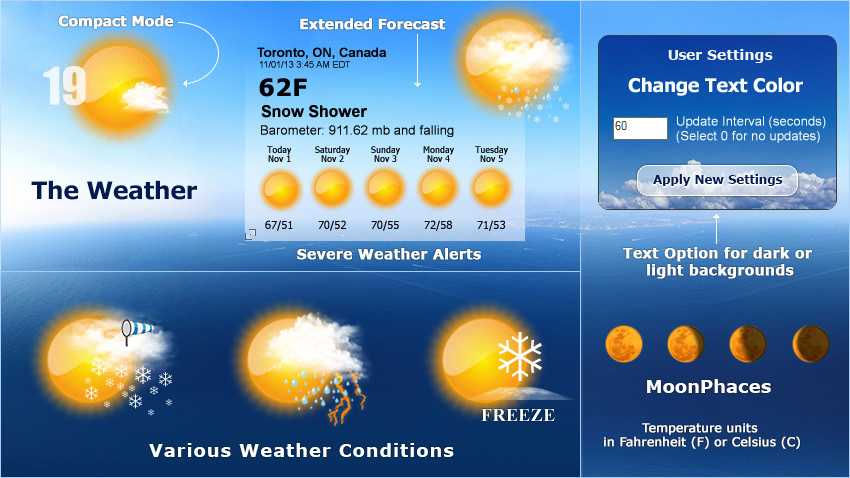
Meanwhile you can download it from my site: http://www.adni18.com/gallery/search.php?search_new_images=1
Reply #55 Monday, November 4, 2013 4:59 AM
It looks a bit like AccuWeather. Probably better. lol Gonna check it out. Thanks Adni18
Just got back......picked up a couple of wallpapers while there. Beautiful site. 


Reply #59 Monday, November 4, 2013 12:42 PM
Since it's a gadget, it can't be modified. Where did you get the template, Nikos? Clue us in. 
Reply #60 Tuesday, November 5, 2013 11:56 AM
Hi Richard and Jim, I got it from here: https://www.wincustomize.com/users/47869/Will%20Rose
You can play with it 
Please login to comment and/or vote for this skin.
Welcome Guest! Please take the time to register with us.
There are many great features available to you once you register, including:
- Richer content, access to many features that are disabled for guests like commenting on the forums and downloading skins.
- Access to a great community, with a massive database of many, many areas of interest.
- Access to contests & subscription offers like exclusive emails.
- It's simple, and FREE!
|
|
Page 3 of 4 | |
|
|---|
Reply #41 Sunday, October 27, 2013 2:44 PM
All I see when I run it is the temp text and if I click on it it disappears LOL