






































Atomic Alarm Clock 6
alarm clock and skinnable tray clock
Tuesday, May 28, 2013 by Falkon7 | Discussion: OS Customization
Your Windows system tray clock does its job, right? But that’s all it does, really, and you’ve spent years looking at the same, old boring interface.
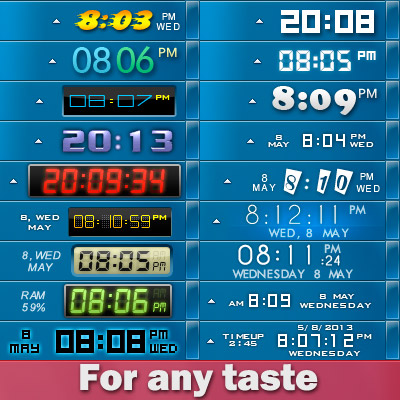
When you launch the application, your default Windows clock will be replaced. If you are not satisfied with the looks of your new clock, you can select a different skin, on its main settings panel.
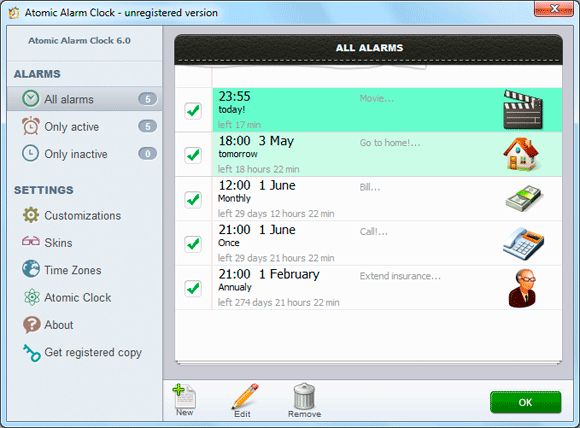
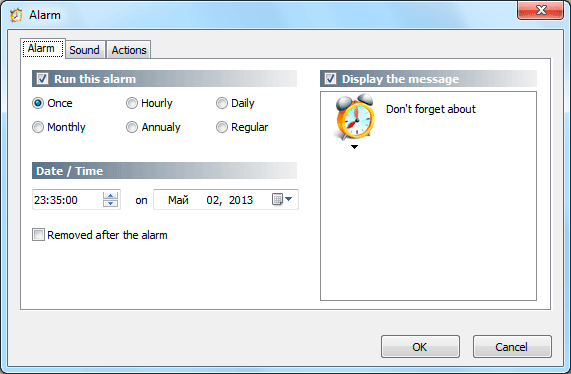
The utility also allows you to set up alarms and can also schedule various actions to be performed at the user defined time, such as wakeup, rebooting, shutting down or hibernating the computer. Atomic Alarm Clock enables you to set up alarms to occur once, hourly, daily, weekly, monthly or even annually, with a wide array of actions to be performed.
All in all, Atomic Alarm Clock is a nice tool and it's one of the apps to be installed on every machine out there.
Home page: http://drive-software.com/atomicalarmclock.html
Download: http://drive-software.com/download/ataclock.exe
I lowered the price from $29.95 to $4.99 for WC users  Order page.
p.s.I am the author of this program, I will be glad to hear your suggestions and recommendations.

 |
|
Page 2 of 4 | |
|
|---|

Reply #22 Tuesday, May 28, 2013 3:29 PM
Falkon7 I see I posted above without looking very well. See from your screen shot you have "Enable Clock" So I guess if I want to not use it for a time for whatever reason I can just uncheck it.

Reply #23 Tuesday, May 28, 2013 3:31 PM
Exactly , if you want use reminders without clock.
or you can uncheck item "Run Atomic Alarm Clock on Windows startup" and close program.

Reply #25 Tuesday, May 28, 2013 4:20 PM
Quoting DrJBHL, reply 18
I'll be picking it up as well.
As for the price? "You have chose wisely."
When is the key sent?
Usually the key to be sent immediately. Please, let me know your e-mail, I'll send you the key manually.
Hasn't appeared yet, so I pm'd you just now.
Edit:
Received. Thanks.
A suggestion: Allow the calendar to be customizable as to where weekend days appear (lt, rt, or as it is now), and customizable arrows to change the months. Also, customizable colors for the circle around the dates and different colored "events" as to importance/type.
Just some thoughts.
Bug:
On a few of the skins, the time appears as 06:20 PM. You should have a 12 hr (with AM/PM) and a 24 hr choice. However, the time should show as 6:20 PM or 18:20 hrs. Never 0630 PM, as this just causes confusion.
Reply #26 Wednesday, May 29, 2013 6:42 AM
DrJBHL
the location of the weekend depends on the regional settings of Windows, you can change this through the control panel, then need to restart the program.
In future versions I plan to make a selection of events on the calendar.
bug: You mean the leading zero? it's not a bug, it's made for design, but you can change it, every skin have settings.ini file, open folder with skin and open settings.ini, find parametr leadingzero=1 and change value to leadingzero=0
Thanks )
Reply #28 Wednesday, May 29, 2013 7:26 AM
Please, run Notepad from Start menu with Administrator privileges (right click "Run as Administrator"), then open settings.ini through File > Open
Let me know result )



Reply #31 Wednesday, May 29, 2013 8:49 AM
Did you unload Atomic Alarm Clock first Doc? It might be it's not letting you save because the file is open.
Reply #32 Wednesday, May 29, 2013 9:06 AM
It is not necessary.
DrJBHL, if you want, i can make for you new setup file, for fix it. )

Reply #33 Wednesday, May 29, 2013 9:31 AM
Question. to get the trial version. I looked at the order page and there doesn't seem to be link for that.
Never mind. Wrong link. 
Reply #34 Wednesday, May 29, 2013 9:34 AM
Question. to get the trial version. I looked at the order page and there doesn't seem to be link for that.
Please, download here: http://drive-software.com/atomicalarmclock.html
Reply #35 Wednesday, May 29, 2013 9:34 AM
I'd appreciate it, Falkon. That would be kind of you.
Reply #37 Wednesday, May 29, 2013 11:39 AM
Lookin' good so far. Methinks you got a winner here.

Reply #39 Saturday, June 1, 2013 5:59 AM
Just dropped into this thread again - congratulations to your decision to drop the price to 4,99USD 
Reply #40 Saturday, June 1, 2013 6:43 AM
Thanks
Atomic Alarm Clock 6.11 has been released today.
What's new?
- New settings for skins, transparent background and background color.

Please login to comment and/or vote for this skin.
Welcome Guest! Please take the time to register with us.
There are many great features available to you once you register, including:
- Richer content, access to many features that are disabled for guests like commenting on the forums and downloading skins.
- Access to a great community, with a massive database of many, many areas of interest.
- Access to contests & subscription offers like exclusive emails.
- It's simple, and FREE!
|
|
Page 2 of 4 | |
|
|---|
Reply #21 Tuesday, May 28, 2013 3:25 PM
Falkon7 question please. If one wishes to turn it off and use the windows clock and time for whatever reason, can that be done? Or do you have to uninstall the clock.?