






































Default Media Player
Saturday, May 5, 2012 by gevansmd | Discussion: Docks
Starting today, when I click on the Media Player icon in my dock it launches VLC Media Player rather than Windows Media Player. I checked and the default player for mp3 files is WMP, not VLC and yet it keeps launching VLC. I even set WMP under Default Programs to be the default player for all media it supports but still no change.
If I double-click an mp3 it launches WMP. How do I change the doc icon (which simply says mp3) to launch WMP again?



Reply #3 Sunday, May 6, 2012 2:52 AM
The icon doesn't work that way. I used settings->add->shortcut->music player shortcut to create the icon so there's no target path. It simply lists mp3 as the target file type to launch when you click the icon. There's no place to set the target and anyway, why did it change?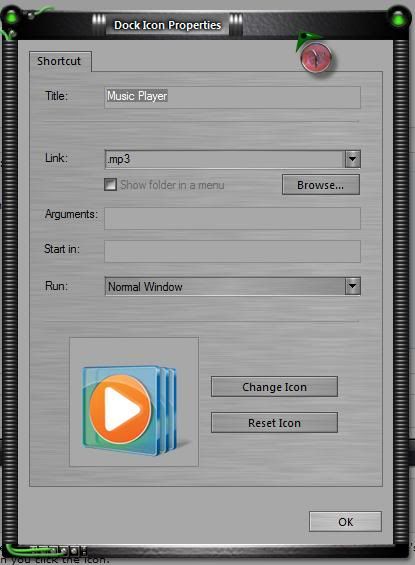
As you can see, the shortcut shows the correct WMP icon but somehow still runs VLC.

Reply #4 Sunday, May 6, 2012 5:34 AM
I created a shortcut for my dock then right clicked on it. This is what I got. Little bit different. Could be the link needs to be changed?

Reply #5 Sunday, May 6, 2012 6:09 AM
That was my workaround but it's strange that Windows knows WMP is my mp3 launcher but somehow OD+ thinks it's VLC.
Please login to comment and/or vote for this skin.
Welcome Guest! Please take the time to register with us.
There are many great features available to you once you register, including:
- Richer content, access to many features that are disabled for guests like commenting on the forums and downloading skins.
- Access to a great community, with a massive database of many, many areas of interest.
- Access to contests & subscription offers like exclusive emails.
- It's simple, and FREE!
Reply #1 Saturday, May 5, 2012 10:41 PM
Set the target of the dock icon to WMP.