





































SDC Problem
Odd stuff Hapnin'
Thursday, March 15, 2012 by RedneckDude | Discussion: Object Desktop
I know, there is a thread for this. I couldn't find it, ok.
OK, SDC shows me Object Dock Plus 2 as an available update.
I have both plus 2 and plus 1.9 installed.
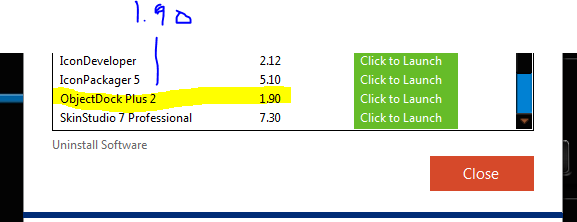
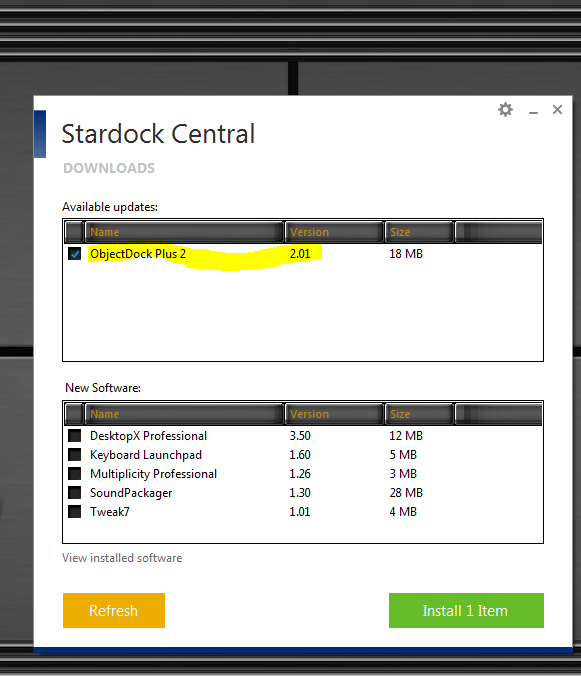
I would like to point out that if I install this "update" I lose 1.9. We used to be able to have both installed, and I do. I had to install 1.9 from the store. SDC lists them both as Object Dock Plus 2.
 |
|
Page 1 of 2 | |
|
|---|

Reply #2 Thursday, March 15, 2012 3:28 PM
Uh, Jim......ObjectDock is NOT part of ObjectDesktop.
Reply #3 Thursday, March 15, 2012 3:28 PM
Yes, Doc. I uninstalled everything from Impulse before I reinstalled my entire system to an SSD.



Reply #6 Thursday, March 15, 2012 3:35 PM
I "think" the problem, as per my screenies, is that SDC sees them both as Object Dock Plus 2.



Reply #8 Thursday, March 15, 2012 3:36 PM
Yes, the way SDC works, ObjectDock is one unified program, and you're being upgraded to v2. ObjectDock wasn't really made to have both installed at the same time, so you're kind of going outside of what was intended.
Reply #9 Thursday, March 15, 2012 3:38 PM
OK, is there, or can there be, a way to tell SDC to ignore certain updates?


Reply #11 Thursday, March 15, 2012 3:50 PM
Perhaps a reminder that this is a "Support Forum" post and comments should be kept to assistance only.

Reply #13 Thursday, March 15, 2012 3:55 PM
OD 1.9 is much better than 2.0, IMO. But all I do is skin it, I rarely use it. I guess I'm like some people still clinging to XP....it just feels better.

Reply #14 Thursday, March 15, 2012 4:00 PM
While Stardock Central does not allow you to do this on it's own, you can get around it by doing this:
1. Go to settings and uncheck this box:

2. Install ObjectDock 1.90 to a specific folder (after download it will bring up the installer where you can select where to install it).
3. Install ObjectDock 2 to a different folder.
4. ???
5. Profit.
That's the only provided way to do this, and I doubt that will change in the future.
Bara

Reply #15 Thursday, March 15, 2012 4:07 PM
You're dang tootin' on that one! OD 1.9 is far superior to 2.0, and a heck of a lot easier to use and configure. I use 1.9 on XP, Vista and Win 7.

Reply #16 Thursday, March 15, 2012 4:43 PM


Reply #18 Thursday, March 15, 2012 7:06 PM
A few days ago. https://forums.wincustomize.com/419935/page/2


Reply #20 Thursday, March 15, 2012 7:58 PM
RedneckDude and WebGizmos you two have a much better memory than most but I seem to remember when Object Dock Plus Version 2 came out originally there was a reason for keeping the older version on the computer. For the life of me I can't remember why.
I had both versions also and uninstalled them with the other programs using Impulse and reinstalled with SDC. Seems to be working, but it would the newer version.
Please login to comment and/or vote for this skin.
Welcome Guest! Please take the time to register with us.
There are many great features available to you once you register, including:
- Richer content, access to many features that are disabled for guests like commenting on the forums and downloading skins.
- Access to a great community, with a massive database of many, many areas of interest.
- Access to contests & subscription offers like exclusive emails.
- It's simple, and FREE!
|
|
Page 1 of 2 | |
|
|---|
Reply #1 Thursday, March 15, 2012 3:27 PM
Jim, did you uninstall the ones you had installed with Impulse?
I ask because I had a similar problem with Deskscapes3 which I installed via Impulse. Uninstalling it (with Impulse), rebooting and then reinstalling with SDC solved that problem. SDC doesn't 'recognize' the Impulse installs in all cases, I believe.