








































February 2012 Desktop Screenshots
Tuesday, January 31, 2012 by Snowman | Discussion: WinCustomize Talk
Kicking off this months desktop thread.
WB: Sirus by Mike Bryant
Wall: Pixel8
IP: Exhitbit by Bryan Cook
Tiles: Sirus by me
RightClick Sirus by me

 |
|
Page 3 of 7 | |
|
|---|



Reply #44 Wednesday, February 8, 2012 3:04 PM
I totally forgot about it. Thanks for reminding me. There's some good stuff there. Yum. 




Reply #48 Saturday, February 11, 2012 9:01 PM
Keep returning to the Dominion setup. Going to start working on a Rainmeter theme for Parisienne soon, so I can change to something else. Oh, and yes, I freakin' love Batman/The Dark Knight. So looking forward to the third movie. Bane is going to be awesome! 


Reply #49 Saturday, February 11, 2012 11:23 PM
Guys, sorry to butt in... I noticed your vertical Nexus docks are usually pretty wide, so this is just a small reminder that you can decrease the spacing between icons in the dock if you want (Dock Properties -> Appearance -> Icon Spacing button), with separate settings for horizontal and vertical icon spacings.
The default is 16 pixels between each icon (8 pixels each side of an icon). Reducing this all the way down to 1 pixel makes for thinner docks and possibly fitting an extra icon or two into the available space.
If you already knew this, well, nothing lost. 

Reply #52 Sunday, February 12, 2012 4:47 AM
The default is 16 pixels between each icon (8 pixels each side of an icon). Reducing this all the way down to 1 pixel makes for thinner docks and possibly fitting an extra icon or two into the available space.
If you already knew this, well, nothing lost.
Well I didn't know it. Now i do. thanks for the tip Jorge. 
Reply #54 Sunday, February 12, 2012 4:52 AM
the dock had all the icons I wanted on it hence the width to fill right side, normally I have the dock on bottom as not keen on dock at side.
Reply #55 Sunday, February 12, 2012 4:52 AM
I knew, Jorge, but I like my docks a little on the chunky side. 
Reply #57 Sunday, February 12, 2012 5:32 AM
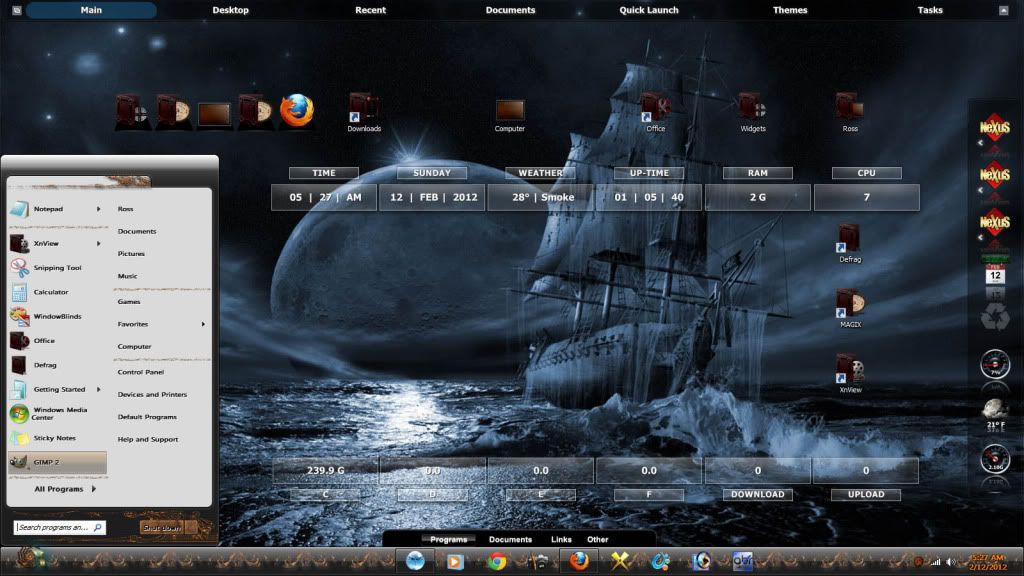
Spooky Pirateship from the web. Parallax WB, Naked Noir Nexus, Glare Rainmeter and Dominion icons .....
Reply #58 Sunday, February 12, 2012 7:37 AM
And by the way, Uvah, the Shelf doesn't need to span the full screen width (even though it's set to do that by default) unless you want it to: you can always turn off the 'Span full screen width when docked' setting in the Position tab of the Shelf Properties dialog and then manually re-size and position the Shelf horizontally (it must be open for you to be able to re-size and move it, though).
This would enable you to put the Shelf and ObjectDock's tabbed dock side-by-side on the same screen edge, for instance.
Again, apologies if I'm saying something obvious, hard for me to evaluate what is obvious and what isn't.

Please login to comment and/or vote for this skin.
Welcome Guest! Please take the time to register with us.
There are many great features available to you once you register, including:
- Richer content, access to many features that are disabled for guests like commenting on the forums and downloading skins.
- Access to a great community, with a massive database of many, many areas of interest.
- Access to contests & subscription offers like exclusive emails.
- It's simple, and FREE!
|
|
Page 3 of 7 | |
|
|---|
Reply #41 Wednesday, February 8, 2012 2:11 PM
Why not make use of this thread, Uvah? Link
The purpose of this thread is to show your desktops, not to use it as a WIP thread.