































December 2011 Desktop Screenshots
time to deck the halls... not the relatives..
Thursday, December 1, 2011 by sydneysiders | Discussion: WinCustomize Talk
How did it get to December so fast....the year has flown...
the time of year we love the most... more excuses to decorate and customize...
this is my favourite of Ton's beautiful Christmas walls... with Sakura coloured & textured... Christmas colours with a twist....
A happy and safe Christmas to all Wincustomizers/Stardockians and their families... and hopefully, a peaceful & prosperous New Year... 

 |
|
Page 3 of 6 | |
|
|---|

Reply #42 Thursday, December 8, 2011 4:31 PM
"Note the border around it. How do I get rid of that?"
Uvah there are easier ways to do it probably but what I do is open the main graphic in PS and fill it with magic pink. Then I take the graphic and paste it on the MP background and save it as BMP. That will be your background image. Make sure you have copy desktop background for pseudo transparency checked and set your main graphic before everything else in the settings. I do it this way and don't have a issue with those transparent borders. So in other words your main graphic image is both your background and the graphic you use on top of the background. The only difference is the background image uses magic pink and the graphic png file has a transparent background. They are the same image so the size is the same. If the size was different it would also cause a border issue. I think I done a crappy job explaining that but I know you will figure it out.

Reply #43 Thursday, December 8, 2011 7:40 PM
Thanks JC. Only reason I don't use magic pink is because I've had issues with it before. I use a solid color background and set the config for pseudo transparency. With the corners as they are the background is necessarily larger than the image.
Reply #44 Friday, December 9, 2011 11:39 PM
I hate to tell you but that is why your seeing those borders. If you use any color but MP it will some times cause a conflict because the setting is not enough to make it 100% transparent. For some reason I have notice it more on some wallpapers then others. Only MP works for me if I want it to be 100% transparent. The only time it does not work all that great is when there are drop shadows involved. Anyway that has been my experience but maybe someone like kitty could help you better because she makes a lot of sysmetrix skins and is better with graphics than I am.
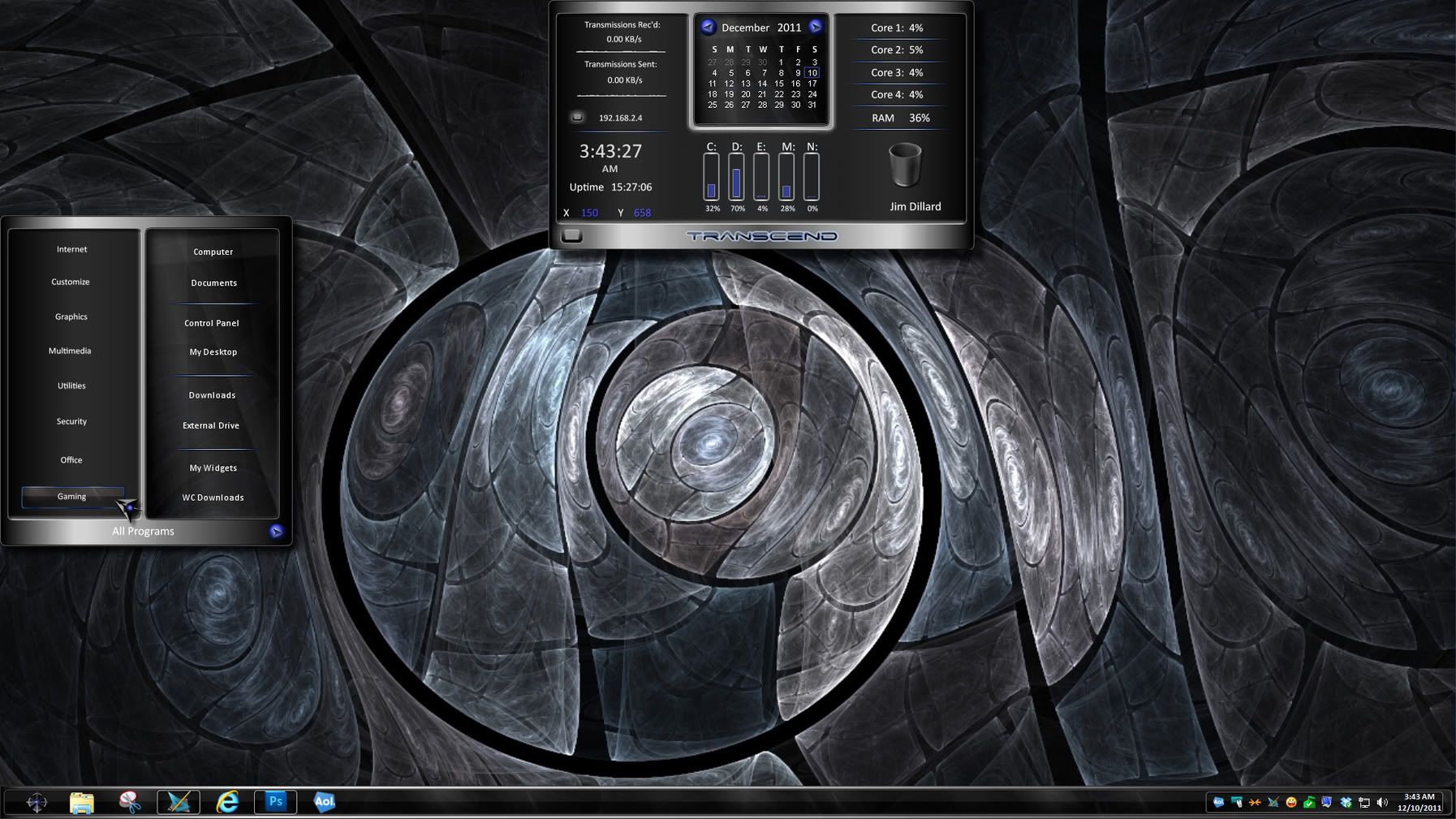

Reply #46 Saturday, December 10, 2011 10:12 AM
That's very interesting RedneckDude, what are we looking at? Yes I know a DX Theme, the name of the skin.


Reply #49 Saturday, December 10, 2011 12:12 PM
Transcend
Yeah, I actually knew what the skin was Doc, just making sure others did. 
Reply #50 Saturday, December 10, 2011 12:33 PM
Hanukkah and Friends wba (k10w3), and dream (CG1):


Reply #51 Saturday, December 10, 2011 12:34 PM
Very Professional RedneckDude!  I like it.
  What is the windowblind?
Reply #52 Saturday, December 10, 2011 12:39 PM
Transcend, by theAVMAN. Master skin, in mod.

Reply #54 Saturday, December 10, 2011 9:41 PM
 MUSIC TO My EARS
future sound2 windowblind
by madcat21
I treaked the Start Menu to make things fit better on Windows 7.
ONE OF THE TOP BEST 10 SKINS EVER MADE 
FULL VIEW ADVISED

A SECOND ONE





 Bump
Bump
Reply #58 Wednesday, December 14, 2011 6:14 AM
Just for "General Knowledge" -
"Visual Styles" alters a Windows System file and will cause problems with Windowblinds skin rendering necessitating an "sfc /scannow" to fix.
Reply #60 Wednesday, December 14, 2011 5:47 PM
thanks still cant believe that this is a photo very good find
Please login to comment and/or vote for this skin.
Welcome Guest! Please take the time to register with us.
There are many great features available to you once you register, including:
- Richer content, access to many features that are disabled for guests like commenting on the forums and downloading skins.
- Access to a great community, with a massive database of many, many areas of interest.
- Access to contests & subscription offers like exclusive emails.
- It's simple, and FREE!
|
|
Page 3 of 6 | |
|
|---|
Reply #41 Thursday, December 8, 2011 3:01 PM