






































Shutdown & Restart link
Saturday, April 16, 2011 by aceuk | Discussion: DesktopX Tutorials
Hi
I'm trying to get the correct shortcut path for Shutdown and Restart.
I have the 2 icon and from a search on google found info that said this was the path.
For Shutdown - C:\Windows\System32\shutdown.exe -s -t 00
For Restart - C:\Windows\System32\shutdown.exe -r -t 00
In properties I have the object type as - shortcut / file shortcut
When I click on the icon I get no response.
I should add that I have tried these commands on a shortcut outside of desktopX and they work.
Reply #2 Saturday, April 16, 2011 5:54 PM
sViz
You come to my rescue again.
The command works but there is something wrong with my icons. As you can see the red & green buttons (black & white parts showing).
I have made about 20 of these icons now and are working fine .I even did these again in case I went wrong somewhere.
So what do you think the problem is? I have left the properties windows open so you can see the settings.
Also I have a problem with the icons where the white line is - they do not sit central on the bar
http://i199.photobucket.com/albums/aa191/aceuk007/desktop.jpg
http://i199.photobucket.com/albums/aa191/aceuk007/desktop1.jpg
Really enjoying modding this theme to my requirements and learning about DX on the way
Thanx


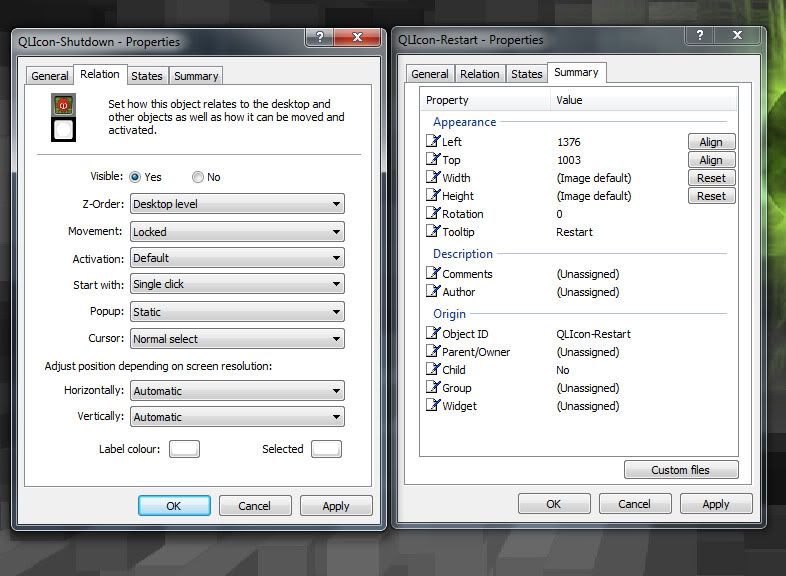
Reply #3 Saturday, April 16, 2011 7:04 PM
Can you move them up (the ones on the left) so they're aligned? If their movement is locked, hold CTRL while dragging. For the ones on the right, check Properties > States > Transparency. Make sure the 'per-pixel alpha blending' box is checked (for the mouse away, mouse over, and hide states.)
Reply #4 Saturday, April 16, 2011 7:44 PM
I just sorted the ones on the left.
I went into desktop builder and then List Objects to adjust there position.
Thanx for the info on the transparency that did the trick.
Another thing I know.
Cheers for yor help
Please login to comment and/or vote for this skin.
Welcome Guest! Please take the time to register with us.
There are many great features available to you once you register, including:
- Richer content, access to many features that are disabled for guests like commenting on the forums and downloading skins.
- Access to a great community, with a massive database of many, many areas of interest.
- Access to contests & subscription offers like exclusive emails.
- It's simple, and FREE!
Reply #1 Saturday, April 16, 2011 12:09 PM
Why not use the presets in the Object Type window? Propeties > General > Change Object Type > System; you'll find Windows restart and Windows shutdown there.