






































What file opens
Thursday, April 7, 2011 by aceuk | Discussion: DesktopX Tutorials
Hi
I want to modify my DX theme by replacing an icon with one that will open the window that shows you all your drives.
You get to it by click on Start then Computer (just so you know what I mean).
What I want is the file (path) for the Computer button so when I click on the icon it will give me that window.
I am running Win7 pro(64)
Thanx
Reply #2 Thursday, April 7, 2011 1:04 PM
OK..... follow these instructions......
First, choose an icon that you want to use to open "My Computer". Make sure it is a Desktop X object.
Right click the icon and choose "Properties" from the menu.
A new window will open, and it will already be on the "General" tab.
Where it says "Object Type", click the "change" button.
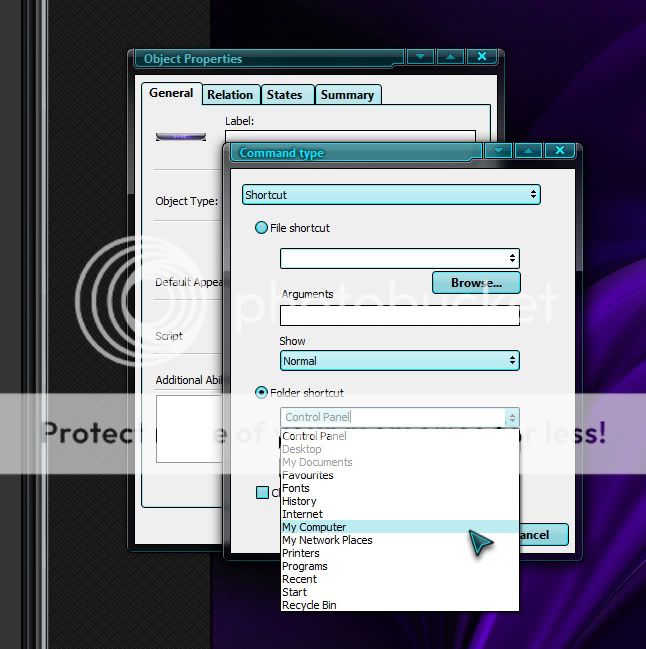
Another window will open. In the dropdown box, choose "Shortcut". Check the box that says "Folder Shortcut", and then, from the dropdown menu at the side of that, look for My Computer. (Do NOT check the box that says "open as pop up menu).
You are done, and your object/icon should now open your My Computer window.
Have Fun!! 
Reply #3 Thursday, April 7, 2011 1:05 PM
Unexplained double post....... stupid fat hobbitses........ we hates them.
Reply #4 Thursday, April 7, 2011 2:14 PM
Boxxi - plenty of options but My Computer is not one of them.
Any other ideas .
Reply #5 Thursday, April 7, 2011 2:18 PM
I have just noticed that it has My Documents twice.
I tried using both of them thinking there might have been a typo but they are both linked to My Docs.
Reply #6 Thursday, April 7, 2011 3:13 PM
Reply #7 Thursday, April 7, 2011 4:11 PM
Hmmmm.... it shows in MY options. Don't know why it doesn't in yours.
Oh well, as long as you found it in the end. 

Reply #8 Thursday, April 7, 2011 5:31 PM
Boxxi,
What version of DX and OS are you running??
Win7 x64 here and DX 3.5 - same results as OP. I have 2 My Documents, no My Computer or Computer.
Reply #11 Friday, April 8, 2011 10:43 AM
Ahh.. I have DX4 on my work PC which is Win7 64 bit and it does work properly. So it looks like it is an issue with DX 3.5 on 7 64 bit.
Reply #12 Friday, April 8, 2011 1:42 PM
I have just paid for the Object Desktop package and installed the DX via impulse.
Does this mean I should be able to get an update to the new version as I have 3.5
Reply #13 Monday, April 11, 2011 5:39 PM
open impulse and click the little Tab with the down arrow symbol on it. Check the box that says Show Pre-Release versions. You should be able to see DesktopX 4 on the updates tab then.
Reply #14 Tuesday, April 12, 2011 12:29 PM
Are there any problems with DX 4 , then again I am having a few problems with 3.5 Won't load on start up , error message DX has stopped working etc..
Reply #16 Tuesday, April 12, 2011 1:25 PM
Do I have to uninstall 3.5 first.
What is the best way to do it.
Reply #17 Tuesday, April 12, 2011 1:31 PM
I don't THINK you have to remove the old.
Try the update method first though.
Please login to comment and/or vote for this skin.
Welcome Guest! Please take the time to register with us.
There are many great features available to you once you register, including:
- Richer content, access to many features that are disabled for guests like commenting on the forums and downloading skins.
- Access to a great community, with a massive database of many, many areas of interest.
- Access to contests & subscription offers like exclusive emails.
- It's simple, and FREE!
Reply #1 Thursday, April 7, 2011 1:02 PM
OK..... follow these instructions......
First, choose an icon that you want to use to open "My Computer". Make sure it is a Desktop X object.
Right click the icon and choose "Properties" from the menu.
A new window will open, and it will already be on the "General" tab.
Where it says "Object Type", click the "change" button.
Another window will open. In the dropdown box, choose "Shortcut". Check the box that says "Folder Shortcut", and then, from the dropdown menu at the side of that, look for My Computer. (Do NOT check the box that says "open as pop up menu).
You are done, and your object/icon should now open your My Computer window.
Have Fun!!