





































April Desktop Screenshots
Saturday, April 2, 2011 by Jafo | Discussion: WinCustomize Talk
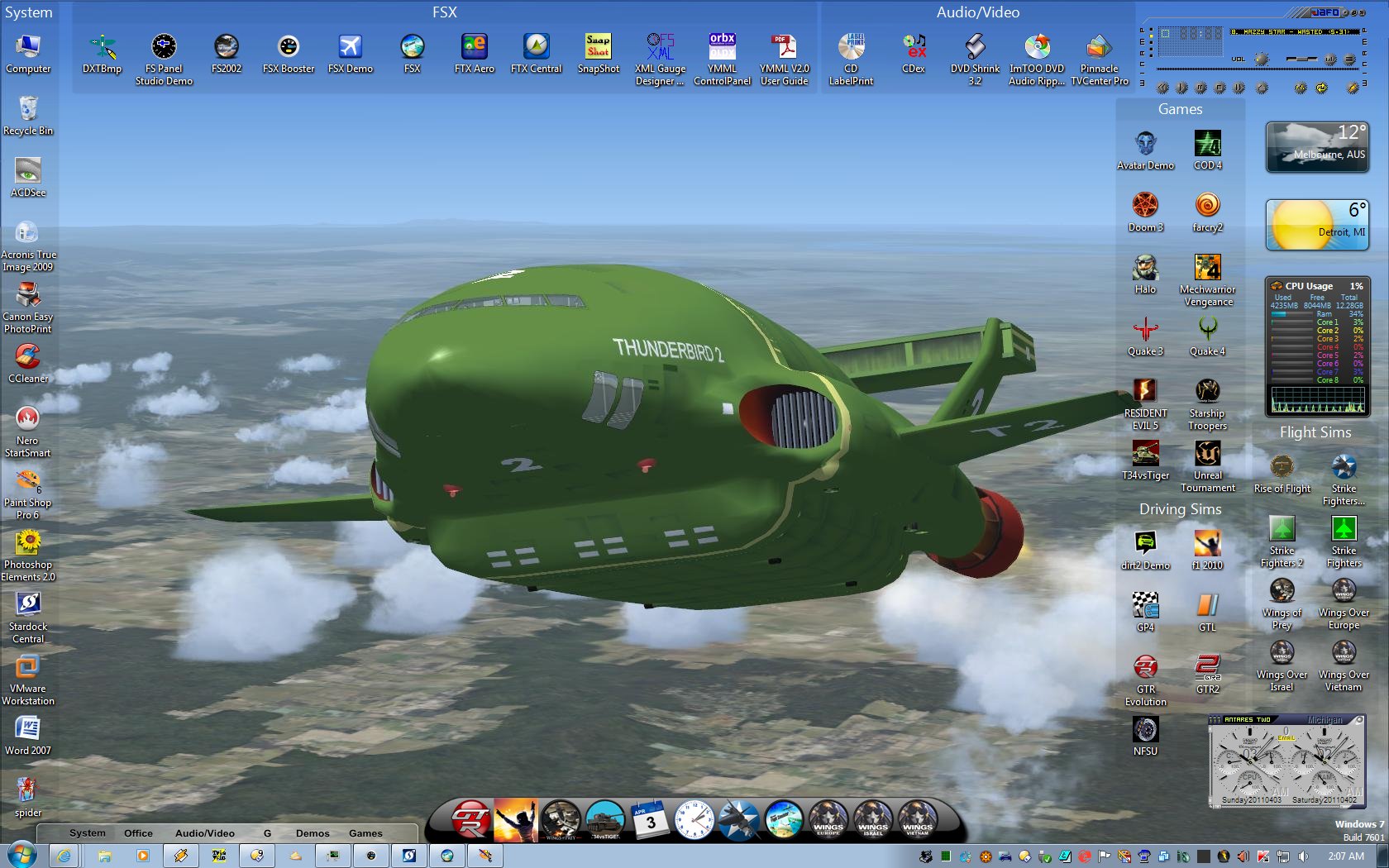
OK... so it's not much of a 'skin'....but it IS my current desktop.....
The wall is a screencap of TB2 in FSX.....a classic shape....
[I'm 'skinning' a fun/fantasy cockpit for it]...
 |
|
Page 3 of 10 | |
|
|---|

Reply #42 Tuesday, April 5, 2011 12:50 PM
Not a bad idea G3mpi3. Then I can pass it off as Wences or BWences or ......


Reply #43 Tuesday, April 5, 2011 2:54 PM
Those Nexus sub-dock indicator arrows are butt ugly (and so 90's, lol). You guys using Nexus might like to know I've changed them in the next release to something much better looking that goes well (or should) with all themes.

Reply #44 Tuesday, April 5, 2011 3:59 PM
Table Mountain is my new Logon. I didn't know Logon Studio could do that.


Reply #45 Tuesday, April 5, 2011 6:09 PM
 Looking forward to it.
Reply #46 Tuesday, April 5, 2011 6:26 PM
JCRabbit. Glad you're here. Question. If ObjectDock stuff can be used with Nexus then why did Nexus stop displaying skins after I added a background from ObjectDock. I remember reading in another thread some time ago that you can't include the ini file.

Reply #47 Tuesday, April 5, 2011 7:05 PM
Quoting Lantec, reply 28Reduced 18%Original 3200 x 1200
Those Nexus sub-dock indicator arrows are butt ugly (and so 90's, lol). You guys using Nexus might like to know I've changed them in the next release to something much better looking that goes well (or should) with all themes.
Good news. 
Reply #48 Tuesday, April 5, 2011 7:17 PM
Eh? You completely lost me there, sorry.
Exactly what do you mean by 'stopped displaying skins'? Also, what version are you using (check the top right corner of the About tab in Preferences)?
Reply #49 Tuesday, April 5, 2011 8:16 PM
A while ago, maybe six or seven months, I was told you can use skins from ObjectDock with Nexus, that the two are compatible. I was also told that you shouldn't include the ini file as Nexuse can't read it or some such. By displaying skins I mean when I go to change a skin the only ones that would apply are the ones that come with it, not ones made by others for it. All I'd get would be blank grey squares with a name attached. The version is the one before the latest update. Right now its not installed. I was busy with yrag trying to sort a browser problem. I've had no problems since the update but then again I didn't add any docks to it yet. Probably tomorrow when I can plug in both laptop and my external drive. Everythings on that. Backups.
Reply #50 Tuesday, April 5, 2011 8:37 PM
Well, Nexus is compatible with skins for ObjectDock v1.x skins (as well as most other docks). Not sure about v2.x skins, though.
As for only native Winstep skins appearing in the themes tab, that's because only native Winstep themes have bitmaps for the Shelf (tabbed dock) so only those are listed when the default 'Winstep Themes' filter is selected. To see all dock skins (including the 3rd party skins) you need to
a.) change the combo box at the top left of the Themes tab in Nexus Ultimate/WorkShelf Preferences from 'Winstep Themes' to 'Dock Themes'
or
b.) Open the Dock Properties dialog for a specific dock and go to that dock's Theme tab.
The first way of doing things changes themes for *all* currently open docks, the second only for that dock.
As for the INI files, still not sure what you mean, but just forget about it. 


Reply #54 Wednesday, April 6, 2011 4:10 PM
Clunky green hair dryer meets the crowded skies.











Please login to comment and/or vote for this skin.
Welcome Guest! Please take the time to register with us.
There are many great features available to you once you register, including:
- Richer content, access to many features that are disabled for guests like commenting on the forums and downloading skins.
- Access to a great community, with a massive database of many, many areas of interest.
- Access to contests & subscription offers like exclusive emails.
- It's simple, and FREE!
|
|
Page 3 of 10 | |
|
|---|
Reply #41 Tuesday, April 5, 2011 12:42 PM
Not a bad idea G3mpi3. Then I can pass it off as Wences or BWences or ......

