































All I wanted
Monday, December 13, 2010 by remmy123 | Discussion: Animated Wallpapers
All I wanted was the "Dream Machine" wallpaper. That is all I wanted. Here I am running Vista 32bit with more than marginal specs (see imbedded pic below) and I get nothing but Deskscapes crashing. Im now $40 in the whole over one freaking wallpaper. BUT ITS ALL I WANTED AND I CANT GET IT WITHOUT DESKSCAPES CRASHING AND ME HAVING TO UNINSTALL/REINSTALL THE SOFTWARE. Im not a typical computer moron. I have a decent idea what I am doing. Nevermind the fact that I had to jump through huge hoops just to get here after I figured out all of the scattered software Stardock throws at you. I have never met more expensive and unstable software. Never mind that I need to be somewhat computer literate, its just not worth it so far... especially for paying the kind of cash to use such a program.
I could use a little help if anybody has any ideas. But other than that at this point, I want my $40 back. 


 |
|
Page 1 of 2 | |
|
|---|
Reply #2 Monday, December 13, 2010 10:10 PM
Sure thing.  . Thank you for the quick reply!
Before I even bother to open the one wall paper I want (Dream Machine) the stock Descapes run flawlessly, same goes for the program. Infact, in its defense it runs way better on the paid version. Its not until I install the "Dream Machine" wallpaper and click on it... then everything goes wrong, including explorer crashing. I end up having to reboot/uninstall deskcapes/ and reinstall if I want it to function properly.
Any ideas? Or is the Dream Machine wallpaper simply not compatible for some reason?
Edit: My dirver version was updated a few days ago after completely wiping my hard drive. The last time they bothered to update was something like mid '09.

Reply #3 Monday, December 13, 2010 10:22 PM
Hi, remmy123....
First potential 'culprits' as to why a Dream in Deskcapes might fail are either the particular graphic driver and/or appropriate video codec required for a particular animation.
If the proggy runs flawlessly with the included dreams then it's a likely bet it's a codec issue.
Reply #4 Monday, December 13, 2010 10:26 PM
Codecs..eh? Im the jack of all trades but master of none. Any direction you can point me to?

Reply #5 Monday, December 13, 2010 10:31 PM
I had to purchase a MPEG2 DVD decoder for my Vista machine to get some Dreams to run. I went with Roxio Cineplayer, but I imagine there are lots available. Once that was installed, I had no trouble playing all Dreams on my Vista computer.
This is not intended to replace any info from CarGuy who would know a heck of a lot more about Dreams than I do.

Reply #6 Monday, December 13, 2010 10:59 PM
Vista Home Premium comes with a MPEG2 codec built in so I don't believe its a missing codec issue.
I know that the dream you mentioned is 150 or so megabytes so it may take a few seconds to load. Not sure how MasterBaron encoded it but I'm sure its up to standards.
Have you tried any dreams of mine? The reason I ask is I know what bitrate I use when encoding. Here's a small Christmas Dream. If it runs without a problem then you know you can play MPEG2 dreams.
Can you play a DVD without any problems?
Reply #7 Monday, December 13, 2010 11:51 PM
Of course, I can play Blu-rays without any problems. Im going try your Dreams now.
Reply #8 Monday, December 13, 2010 11:59 PM
As soon as I opened your dream explorer crashed. I rebooted, and explorer crashed again. Ive had nothing but ablack background this whole time. As I type, explorer isn functioning. All that is up is this window and behind it, blackness.
Reply #9 Tuesday, December 14, 2010 5:34 AM
How about standard DVDs?
What software / program are you using to play Blu-rays?
There's a chance you have a problem with conflicting codecs.
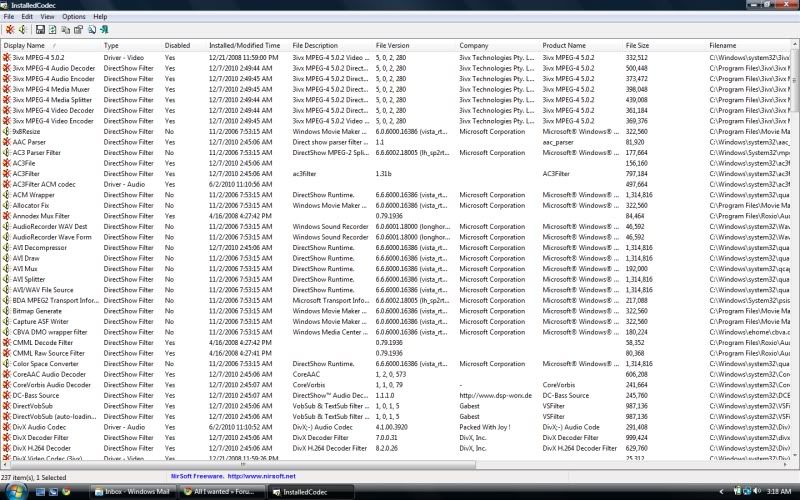
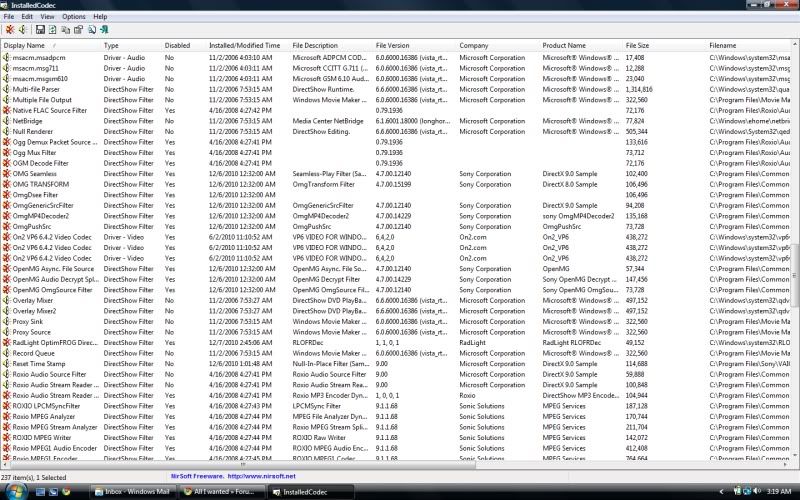
Download and install "InstalledCodec" from Nirsoft and take a screenshot of the codecs you have running and post it here.
This tool will allow you to turn codecs off and on until you figure out which one is conflicting with the Microsoft MPEG2 codec.
A good way to diagnose this is to turn off all of the non Microsoft codecs and see if the problem goes away. Then you can turn them back on one by one to see which one is causing the conflict.
Here's a troubleshooting guide that may help in sorting this out.
Reply #10 Thursday, December 16, 2010 3:09 AM
OMG! Carguy1 you are AWESOME! It worked! I disabled everything accept MS codecs and it friggin worked! Im not familiar with codecs whatsoever but I feel stupid at the same time.
I use intervideo for the DVD/Bluray applications. I wouldnt use it at all (it seems to suck up a lot of processing power even thought the Vaio specifically gives a solid gig to the application, if only I can figure out how to wield the power for games.) but there isnt any good freeware Bluray player to my knowledge and since Intervideo licensing came with the Vaio I use that but I havent watched or use the software since the wipe.
As for a screen shot, the list is HUGE... should I post them as I can? It would take about 3-4 screen shots...
Edit: Your fireplace is keeping me warm as well. Haha!




Reply #12 Thursday, December 16, 2010 4:22 AM
So far after toying with it a bit, I have a sneaky suspicion that Intervideo is the culprit... but why?

Reply #13 Thursday, December 16, 2010 6:07 AM
I used intervideo one time only. For some reason it didn't play nice with another media player I had. That was Winamp. I never did find out why but neither one would work. Maybe it was shared files or something but when I uninstalled intervideo winamp came back with a flourish. I know this isn't much help but other people I know tried intervideo and didn't like it. Could be conflicts involved somewhere. Stick with what carguy1 suggests. He knows more than I do about these things.
Reply #14 Thursday, December 16, 2010 7:22 AM
That's a boat load of codecs. It appears you've install a few codec packs for various video formats. When installing codecs, keep in mind it's best to keep them at a minimum since some of these don't play well together.
I've had problems with Ulead's codecs (intervideo) myself so it could be the cause. You should be able to turn those, the Sonic MPEG2 codecs, and the Roxio MPEG2 codecs off as well. With them turned off the programs that use them should use the default Microsoft codecs without any ill effects.
I would turn the others back on a few at a time to ensure there are no conflicts.
Glad to see that your on the right path to getting it worked out.
Codec problems can be a bit of a headache and while it looked like the DeskScapes program was the cause, it actually just made you aware that the problem existed.
Also, glad to see your enjoying the dream. There's a few more in my gallery for download as well, be sure to check them out.
CarGuy1 knows that's a shameless plug but what the heck, why not. 
Reply #15 Thursday, December 16, 2010 5:05 PM
Haha. Thank you once again. You helped breath new life in my computer. Call me a loser but last night I think at one point I was staring at dreamscapes for about 30 minutes solid

Reply #16 Thursday, December 16, 2010 5:35 PM
That's how CarsGuy1 hypnotizes his victims. Watch out if you get an uncontrollable urge to eat boiled peanuts and whistle Dixie.

Reply #17 Thursday, December 16, 2010 6:12 PM
But don't do it at the same time. You ever see a monitor speckled with boiled peanut leavins'?
Reply #18 Thursday, December 16, 2010 6:24 PM
Quoting remmy123,
reply 15
Haha. Thank you once again. You helped breath new life in my computer. Call me a loser but last night I think at one point I was staring at dreamscapes for about 30 minutes solid
That's how CarsGuy1 hypnotizes his victims. Watch out if you get an uncontrollable urge to eat boiled peanuts and whistle Dixie.
Excellent....My evil plan is working perfectly. 
Reply #19 Thursday, December 16, 2010 6:34 PM
Wow, that is quite the codec collection! Now we know what you absolutely don't need for Christmas!
Reply #20 Thursday, December 16, 2010 8:11 PM
Ever try cleaning it off. YUCK!!
Please login to comment and/or vote for this skin.
Welcome Guest! Please take the time to register with us.
There are many great features available to you once you register, including:
- Richer content, access to many features that are disabled for guests like commenting on the forums and downloading skins.
- Access to a great community, with a massive database of many, many areas of interest.
- Access to contests & subscription offers like exclusive emails.
- It's simple, and FREE!
|
|
Page 1 of 2 | |
|
|---|
Reply #1 Monday, December 13, 2010 9:52 PM
Deskscapes has actually been very stable for me since it's been released.
Can you describe what's actually happening? If DeskScapes opens, can you click on "About DeskScapes" and copy the info and paste it here?
Edit: Also, what is your Nvidia driver version?