





































Corsair Nova Series SSD
anyone have one?
Friday, August 13, 2010 by MadDeez | Discussion: Personal Computing
I'm seriously considering buying one of these. Anyone out there have one? If yes, what are your impressions and are you happy with it?
 |
|
Page 2 of 3 | |
|
|---|

Reply #22 Tuesday, September 7, 2010 1:22 AM


Now imagine if you had three of those in RAID 0. Would probably open even before you clicked the mouse button. 
And I didn't mean appear on the screen, but be fully operational and responsive.
Reply #23 Tuesday, September 7, 2010 1:25 AM
Here's a basic WinDirStat image of my SSD.
Dude, I have 15 GB of just programs in program files.

Reply #24 Tuesday, September 7, 2010 1:31 AM
12 seconds first time...[update]....6 seconds second time....single SSD.
All my proggies are installed on the SSD [C drive] along with the OS [Win7 64bit]...but my UPS wants a Hiberfile and 12gig of ram is a big page so a 60gig drive is pretty 'full'.
Games.....they're all on a stone-age drive [I'd never afford a SSD that could fit all them...not in this lifetime]...

Reply #25 Tuesday, September 7, 2010 1:38 AM

Reply #26 Tuesday, September 7, 2010 1:42 AM
RAID 0 is the way to go if you don't need redundancy.
Ideally you would use a RAID 0+1 to mirror the data, which could give even higher read performance.

Reply #27 Tuesday, September 7, 2010 4:20 PM
Honestly I would just go for either Raid 1+0 (no, its not same as 0+1), or 5. 5 is better imho.
Reply #28 Tuesday, September 7, 2010 8:04 PM
No, not by a long shot.
Windows 7 with a typical proggy load [no games though] and 12 gig of ram fills 56 gig [169,944 files].
The root alone is 22.5gig [pagefile.sys and hiberfil.sys].
There ain't no room for another OS, not in my 60gig.... [the VMs are on another drive]
Reply #29 Tuesday, September 7, 2010 8:36 PM
Seven and all that is installed is using 108 GB.
Vista and all that is installed (seperate drive) using 64 GB.
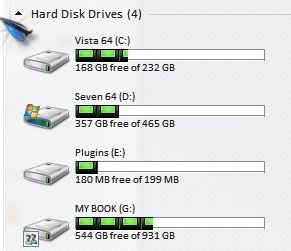

Reply #30 Tuesday, September 7, 2010 8:43 PM
Windows 7 is about 15Gb and Vista? I'm guessing another 15Gb. Sounds like at a minimum you need 45Gb. Sounds like you can get an SSD with room to grow pretty easily.
No, not by a long shot.
Windows 7 with a typical proggy load [no games though] and 12 gig of ram fills 56 gig [169,944 files].
The root alone is 22.5gig [pagefile.sys and hiberfil.sys].
There ain't no room for another OS, not in my 60gig.... [the VMs are on another drive]
The only thing to remember with a SSD is that writing to the drive will shorten the lifespan, and TRIM or garbage collection is a MUST.
I run just my OS and a few key apps and programs on my ssd the rest goes to one of my Data drives, disableing indexing, hibernate, pagefile.
IDK if I would move to a ssd unless I had windows7 or at least Vista.
RAID0 sucks when you throw a drive though, been there dont that with hdd's. I only RAID1 my Image hdd since there is to much to lose.
Anyway to the OP:
Here is a review of the 128gb Nova from HWC :
http://www.hardwarecanucks.com/forum/hardware-canucks-reviews/30146-corsair-nova-v128-solid-state-drive-review.html

Reply #31 Tuesday, September 7, 2010 10:02 PM
i got the drive but i don't have any use for the pagefile or hibernation bit. those two features of win7 are disabled. if i do decide to use a pagefile, i'll set it up on a wd black drive instead of the ssd. so far, i'm very happy with my ssd. so much so i may get a 128 or 256 ssd as an xmas gift to myself. if i do, it'll have a sandforce controller unless the 128 nova is available at a killer price.
Reply #32 Tuesday, September 7, 2010 10:25 PM
Looking into pagefile use and ideal location and you'll find no matter how much ram you have the OS will still 'want' a pagefile...and it's in the root of the OS drive because that's the proper/best place for it. Disabling and/or moving it won't help your system's function or 'speed'.
My UPS requires it so it can handle controlled shutdowns on blackout....
Reply #33 Tuesday, September 7, 2010 10:49 PM
Been dancing all around getting one of those for years now. Is it that much of a help?
Reply #34 Tuesday, September 7, 2010 11:01 PM
Protects you from spikes.....and WHEN you are in the midst of doing something 'important' and your power goes out....you have a few minutes to sort it out and save what you're doing.
Might not happen often....but once is enough to justify its use. [happened to me more than once]...
Reply #35 Tuesday, September 7, 2010 11:09 PM
Been googling and I just can't afford an SSD right now. I would need at least a 128GB minimum for 7, 256 gb preferable. Vista would be ok with it's old drive, since I mainly only test on it.
Also, it seems most SSDs are 2.5. Why is that? 3.5 is what fits my bays.
Reply #36 Tuesday, September 7, 2010 11:32 PM
but i don't have any use for the pagefile or hibernation bit. those two features of win7 are disabled. if i do decide to use a pagefile, i'll set it up on a wd black drive instead of the ssd.
Looking into pagefile use and ideal location and you'll find no matter how much ram you have the OS will still 'want' a pagefile...and it's in the root of the OS drive because that's the proper/best place for it. Disabling and/or moving it won't help your system's function or 'speed'.
but Jafo why the need to hibernate?
My UPS requires it so it can handle controlled shutdowns on blackout....
Yeah my UPS just shut's down my system rather than hibernates.
Reply #37 Wednesday, September 8, 2010 12:16 AM
My UPS requires it so it can handle controlled shutdowns on blackout....
Been dancing all around getting one of those for years now. Is it that much of a help?
Like Jafo, saved my bacon more than once! Imagine having a ton of projects open at the same time, which you haven't saved yet for some reason, and the power goes out... Or you are in the middle of a critical BIOS update and the power goes out... or the cleaning lady decides to plug one too many appliances and blows the fuse box. If you're in a rural area with lots of power spikes and brownouts, they're also great to protect your equipment and keep it running smoothly.
It's kind of like an insurance: most of the time an UPS sits there doing nothing, but then, if something happens, you are really glad you have one.
If you decide to get one, go APC, they're the best for UPSs.
Reply #38 Wednesday, September 8, 2010 12:23 AM
They're just a PCB with a bunch of chips, so minimum size is not really an issue. Also, laptops use 2.5 hard disks, therefore they can be used on both desktops and laptops.
As far as I know, they also come with 2.5 to 3.5 adapters. At least the Intels did.
Reply #39 Wednesday, September 8, 2010 12:32 AM
As if I had a cleaning lady.
Thanks, Jorge.
Reply #40 Wednesday, September 8, 2010 2:09 AM
Form-factor to suit laptop drives...
Please login to comment and/or vote for this skin.
Welcome Guest! Please take the time to register with us.
There are many great features available to you once you register, including:
- Richer content, access to many features that are disabled for guests like commenting on the forums and downloading skins.
- Access to a great community, with a massive database of many, many areas of interest.
- Access to contests & subscription offers like exclusive emails.
- It's simple, and FREE!
|
|
Page 2 of 3 | |
|
|---|
Reply #21 Tuesday, September 7, 2010 1:17 AM
I just timed Photoshop CS5 on my single SSD and it is under 5 seconds.