









































DesktopX Weather Widget Fixes
Wednesday, July 8, 2009 by sViz | Discussion: DesktopX
The purpose of this thread is to compile and post fixes for the recent weather widget problem for anyone who has the patience to implement them. I'll try to edit this post to keep it up-to-date.
Edit 7/10: Important information for DX authors.
Edit 7/12: Added clarification to 2a for DX users - ZubaZ
Edit 7/13 : Removed fixes due to legal ambiguity
Contents
1. The Problem
2. The Fixes
e. Disable the Weather
3. For Authors
a. Using The Weather Channel Feeds
b. Using Another Source
c. Weather & DX Themes
1. The Problem
If your weather widget has suddenly stopped working properly, it is likely because the source, Weather.com, has changed their site to prohibit unlicensed usage. The majority of weather widgets on this site were built with the same code which is now outdated.
Symptoms of this particular problem are:
-You get a message saying the location is invalid
-When you try to clear this message it keeps popping up
2. The Fixes (as far as we know)
*** UPDATE 7/13/09 ***
I have tried to find more information and understand the legalities of the TWC XOAP data feed services and due to ambiguity I have removed these fixes so as not to put anyone else at risk of violating known or unknown weather.com license agreements.
A very good read on the situation with weather.com and their feeds can be found here: http://www.rainmeter.net/forum/viewtopic.php?f=4&t=615
At the present time the only remaining option for end-users is to disable and/or discontinue using the weather widgets.
E. DISABLE THE WEATHER:
If you are using a combo widget or theme and would just like to disable the weather parts read below.
There are a few objects that need to be "turned off". To do this you will open the widget/theme in DX Builder (be sure to turn off internet connection first,) find the object, right-click and uncheck Script Enabled.
These objects may be several of the following. (You can ctrl + click to select more than one object in the object list, then r-click and uncheck Script Enabled.)
Version 1:
"weather_image"
"weather_temp"
"weather_location"
Version 2:
"kdockweatherimage" (and/or "kdockweatherimage2")
"Kdockweatherlocation" (and/or "kdockweatherlocation2")
"kdockweathertemp" (and/or "kdockweathertemp2")
"kdockforecastimage1" (through "kdockforecastimage5")
Version 3:
"Weather_Output"
"Weather_Script"
"WeatherFunction_ToggleUnits"
"CUI_SCripts"
"WeatherFunction_SetLocation"
3. For Authors
A Notice From the WC Staff:
Q: Can't I fix and reupload my widgets?
It's fairly certain that our widgets are not in compliance with The Weather Channel's license agreements. Among other things, a widget using TWC's feed now needs to include their logo and 5 advertisement links (to see the full details get registered and download the SDK file included in your confirmation email.)
This is aside from the fact that most of these fixes hard code YOUR license ID and KEY, and you CAN NOT allow others to use these; uploading a fixed widget with your ID and KEY is in violation of the license agreement.
The short answer is no. We can't use these fixes and then reupload our widgets.
Q: What CAN I do?
Right now you need to archive your skins before they are deleted from the galleries.
Q: So that's it? No more weather widgets?
Not necessarily. We have two options: A. Re-build our widgets in compliance with TWC's license agreement or B. find another data source.
A. USING THE WEATHER CHANNEL FEEDS
If you are looking to rebuild your widget in compliance with TWC's agreement you'll need to do the following:
- Register, download and thoroughly read the SDK file included in your confirmation email
- Comply
- Add a function to allow the user to input their license key and partner ID.
- Add a link to the registration page so users know where to get the key and ID.
- Be mindful of the fact that TWC could change their site again and consider putting contingencies in place to prevent further headaches. (i.e., Use and external script that can be copied onto the user's computer, and have as little code in the actual objects.)
To be clear, anyone looking to make a weather widget using weather.com services MUST be in compliance with their terms of service and license agreements.
B. USING ANOTHER SOURCE suggestions by Zubaz
If you decide to part ways with TWC, here are some alternative weather feed sources to consider (You will need to abide by their Terms of Service as well):
- Wunderground.com -- LINK
- Yahoo! -- LINK
- rssweather.com -- LINK
Again, I strongly advise using an external script to save yourself (and by extension your end-users) from any headaches in future.
C. WEATHER & DX THEMES
If you are a DesktopX theme author, the best advice for now is to exclude the weather widget from your theme and consider uploading weather as a separate widget in future.
That's all for now...
Leave questions, comments, and your experience reports below.
 |
|
Page 8 of 11 | |
|
|---|

Reply #142 Wednesday, July 15, 2009 11:08 AM
A good strategy for the vast majority of us all, me thinks.

Reply #143 Wednesday, July 15, 2009 11:43 AM
1. Host stuff that users want
2. Respect intelectual property rights of skinners/developers
3. Provide guidence to prevent something like this from happening again
4. Keep Wincustomize out of legal trouble
5. Keep skinners from getting into legal trouble
6. Stay out of the way
7. Display current Weather for a given location! 
...........and did anyone else hear that TWC was thinking of changing thier name to TWONC..........
The Weather or Not Channel 


Reply #144 Wednesday, July 15, 2009 12:14 PM


Reply #146 Thursday, July 16, 2009 1:40 AM
It has not been a good time for us.
I know what you mean, but it's turning into one. I don't agree with everything (who does), but I can tell that adults are in charge. Good luck.
Reply #147 Sunday, July 19, 2009 4:29 PM
lmao.. what a way to read something thats not there. Why not just have Stardock ASK? Tell them what you are going to be doing.. lol ask.. I get.. I dont see why not...

Reply #148 Thursday, July 23, 2009 8:28 AM
Can someone tell me what the latest news is about the weather widgets? Last I heard was that all the weather widgets would be taken off the gallery on the 20th of July.

Reply #149 Thursday, July 23, 2009 8:37 AM
I think latest news is something like "wait & see" 

Reply #151 Thursday, July 23, 2009 12:54 PM
While you're waiting, you might want to read an interesting post over at the Rainmeter forum: http://www.rainmeter.net/forum/viewtopic.php?f=13&t=453
I really don't understand SO much of what's involved in this weather widget fiasco. I don't make weather widgets myself, but I HAVE made a few Rainmeter weather widgets for personal use (I don't understand the creation DesktopX -- Rainmeter seems a little easier to me, because it's like Rainlendar -- some pngs and an .ini file).
From reading the Rainmeter forum, I see that AccuWeather (which Stardock uses in their own MyColors gadgets) seems to have just gifted Rainmeter skinners with the authority to use their weather information along with access to official icons and logo (which isn't as strict as what the readers of this thread are led to believe are the terms of service for TWC's).
Up until this point, I thought it would make sense if Stardock purchased a license to the the rights to use TWC, or extended their license with AccuWeather to be used as script for (their product) DesktopX...something that in my mind made fiscal sense -- Stardock could sell more DesktopX programs if they provided free access to weather feeds along with their product. I thought Stardock was just being very conservative in these tough financial times, by not extending this generosity of purchasing the rights to either TWC or extending AccuWeather access to those who own DesktopX. So you can imagine my surprise to read on Rainmeter that AccuWeather is providing this access to Rainmeter for free AND advertising Rainmeter at AccuWeather's site!
Why hasn't Stardock followed the same route as Rainmeter? This just doesn't make any sense to me.
Reply #152 Thursday, July 23, 2009 1:25 PM
I didn't see in the TWC licensing terms of use ANYTHING speaking about cost, which for me means licence is FREE 
Reply #153 Thursday, July 23, 2009 2:09 PM
I didn't see in the TWC licensing terms of use ANYTHING speaking about cost, which for me means licence is FREE
Right, I understand that, but what I'm referring to is the fact that Stardock uses AccuWeather for the MyColors gadgets, and when this whole thing started with TWC changing their code, and everyone's weather world went into hurricane mode, the mods implied that Stardock would have to purchase a license extension for DesktopX skinners if they wanted to use AccuWeather (which was still working for the MyColors gadgets since Stardock has a corporate license for AccuWeather), rather than saying "hey...why don't we talk to AccuWeather, since we already have a corporate association with them" -- and then discovered AccuWeather was willing to allow their data to be used for free AND would provide free advertising back here.


Reply #156 Sunday, July 26, 2009 2:24 PM
I'll be uploading the TWC widget later this week for everyone to try out.
Working on a NOAA/wunderground hybrid that's around 80%:
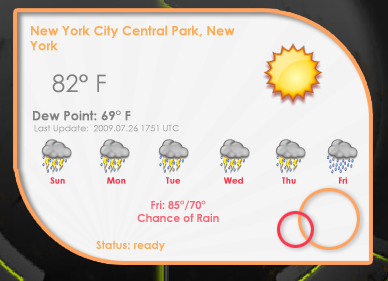



Reply #159 Monday, July 27, 2009 12:16 PM
Question: should we delete our weather widgets in the gallery or will stardock take them off?
Please login to comment and/or vote for this skin.
Welcome Guest! Please take the time to register with us.
There are many great features available to you once you register, including:
- Richer content, access to many features that are disabled for guests like commenting on the forums and downloading skins.
- Access to a great community, with a massive database of many, many areas of interest.
- Access to contests & subscription offers like exclusive emails.
- It's simple, and FREE!
|
|
Page 8 of 11 | |
|
|---|
Reply #141 Wednesday, July 15, 2009 9:36 AM
The WinCustomize mods have a number of goals to get through this debacle. We want to:
It has not been a good time for us.