









































DesktopX Weather Widget Fixes
Wednesday, July 8, 2009 by sViz | Discussion: DesktopX
The purpose of this thread is to compile and post fixes for the recent weather widget problem for anyone who has the patience to implement them. I'll try to edit this post to keep it up-to-date.
Edit 7/10: Important information for DX authors.
Edit 7/12: Added clarification to 2a for DX users - ZubaZ
Edit 7/13 : Removed fixes due to legal ambiguity
Contents
1. The Problem
2. The Fixes
e. Disable the Weather
3. For Authors
a. Using The Weather Channel Feeds
b. Using Another Source
c. Weather & DX Themes
1. The Problem
If your weather widget has suddenly stopped working properly, it is likely because the source, Weather.com, has changed their site to prohibit unlicensed usage. The majority of weather widgets on this site were built with the same code which is now outdated.
Symptoms of this particular problem are:
-You get a message saying the location is invalid
-When you try to clear this message it keeps popping up
2. The Fixes (as far as we know)
*** UPDATE 7/13/09 ***
I have tried to find more information and understand the legalities of the TWC XOAP data feed services and due to ambiguity I have removed these fixes so as not to put anyone else at risk of violating known or unknown weather.com license agreements.
A very good read on the situation with weather.com and their feeds can be found here: http://www.rainmeter.net/forum/viewtopic.php?f=4&t=615
At the present time the only remaining option for end-users is to disable and/or discontinue using the weather widgets.
E. DISABLE THE WEATHER:
If you are using a combo widget or theme and would just like to disable the weather parts read below.
There are a few objects that need to be "turned off". To do this you will open the widget/theme in DX Builder (be sure to turn off internet connection first,) find the object, right-click and uncheck Script Enabled.
These objects may be several of the following. (You can ctrl + click to select more than one object in the object list, then r-click and uncheck Script Enabled.)
Version 1:
"weather_image"
"weather_temp"
"weather_location"
Version 2:
"kdockweatherimage" (and/or "kdockweatherimage2")
"Kdockweatherlocation" (and/or "kdockweatherlocation2")
"kdockweathertemp" (and/or "kdockweathertemp2")
"kdockforecastimage1" (through "kdockforecastimage5")
Version 3:
"Weather_Output"
"Weather_Script"
"WeatherFunction_ToggleUnits"
"CUI_SCripts"
"WeatherFunction_SetLocation"
3. For Authors
A Notice From the WC Staff:
Q: Can't I fix and reupload my widgets?
It's fairly certain that our widgets are not in compliance with The Weather Channel's license agreements. Among other things, a widget using TWC's feed now needs to include their logo and 5 advertisement links (to see the full details get registered and download the SDK file included in your confirmation email.)
This is aside from the fact that most of these fixes hard code YOUR license ID and KEY, and you CAN NOT allow others to use these; uploading a fixed widget with your ID and KEY is in violation of the license agreement.
The short answer is no. We can't use these fixes and then reupload our widgets.
Q: What CAN I do?
Right now you need to archive your skins before they are deleted from the galleries.
Q: So that's it? No more weather widgets?
Not necessarily. We have two options: A. Re-build our widgets in compliance with TWC's license agreement or B. find another data source.
A. USING THE WEATHER CHANNEL FEEDS
If you are looking to rebuild your widget in compliance with TWC's agreement you'll need to do the following:
- Register, download and thoroughly read the SDK file included in your confirmation email
- Comply
- Add a function to allow the user to input their license key and partner ID.
- Add a link to the registration page so users know where to get the key and ID.
- Be mindful of the fact that TWC could change their site again and consider putting contingencies in place to prevent further headaches. (i.e., Use and external script that can be copied onto the user's computer, and have as little code in the actual objects.)
To be clear, anyone looking to make a weather widget using weather.com services MUST be in compliance with their terms of service and license agreements.
B. USING ANOTHER SOURCE suggestions by Zubaz
If you decide to part ways with TWC, here are some alternative weather feed sources to consider (You will need to abide by their Terms of Service as well):
- Wunderground.com -- LINK
- Yahoo! -- LINK
- rssweather.com -- LINK
Again, I strongly advise using an external script to save yourself (and by extension your end-users) from any headaches in future.
C. WEATHER & DX THEMES
If you are a DesktopX theme author, the best advice for now is to exclude the weather widget from your theme and consider uploading weather as a separate widget in future.
That's all for now...
Leave questions, comments, and your experience reports below.
 |
|
Page 10 of 11 | |
|
|---|

Reply #182 Thursday, August 6, 2009 8:36 PM
That might be through some specific commercial deal....or simply that the comparative popularity [widgets vs rainys] is such that they can 'afford' to carry Rainy's but not ours...

Reply #183 Saturday, August 8, 2009 9:36 PM
Working on a NOAA/wunderground hybrid that's around 80%:
This looks promising--no logos or links. Is registration necessary for this? I'm still of the mind that I'm not going to use any widget that requires me to register, or that has logos and links on it. I might get desperate enough if I want a widget that matches the skin I'm using, but I doubt it; I'll just keep using Weatherlab 7. I imagine that a lot of people are going to be put off by having to register. Thanks very much for pursuing this avenue. What about MSN?
Reply #184 Saturday, August 8, 2009 11:00 PM
Eve, isn't the external script for the TWC widget supposed to remember your info, so that you don't have to input into other widgets with the same scripts?

Reply #185 Sunday, August 9, 2009 9:33 AM
That one still requires a Weather Underground logo, but it's on the pop up information page. No registratation required, though. 
Nope. User information is saved to the individual widget (object.localstorage) not to the external file (where anyone with access to your computer might snag it and use it.)
Reply #186 Sunday, August 9, 2009 6:29 PM

Eve, isn't the external script for the TWC widget supposed to remember your info, so that you don't have to input into other widgets with the same scripts?
Nope. User information is saved to the individual widget (object.localstorage) not to the external file (where anyone with access to your computer might snag it and use it.)
Ah, thanks for quick response. I had a small problem with the first day showing NA, but I fixed it and reupped. Just a shameless plug....
Reply #187 Monday, August 10, 2009 12:45 AM
That one still requires a Weather Underground logo, but it's on the pop up information page. No registration required, though.
Thanks, and that's great news.
Reply #188 Thursday, August 13, 2009 8:58 PM
I have written these people. I got their name from a weather sidebar gadget. I wait for their reply.
Reply #189 Friday, August 14, 2009 10:11 AM
http://www.wdtinc.com/
Interesting. It looks like every major weather outlet is a client of theirs (weather.com, accuweather, weatherbug, cnn, msn, fox, abc, etc.)
I'm amazed at how many different weather providers there are online, but how few of them have seriously tapped into desktop applications (save for accuweather.) I'd have thought it'd be a gold mine for anyone who managed to corner the market.
Reply #190 Thursday, August 20, 2009 6:43 PM
99%  Thanks to those who've tested it.
Added all the extra information you might want to work into your project and a second temp and weather icon. Anything you don't need you can just delete thanks to the IsObject propert.
sViz loves the IsObject property
Most importantly, everything will be decentralized and unlocked, meaning zero parent/child relations to be mindful of. Objects can go wherever you want to put them.
I'll probably release the left one as a widget, and then both together as a DXPACK. Skinners/authors might want to use the DXPACK.
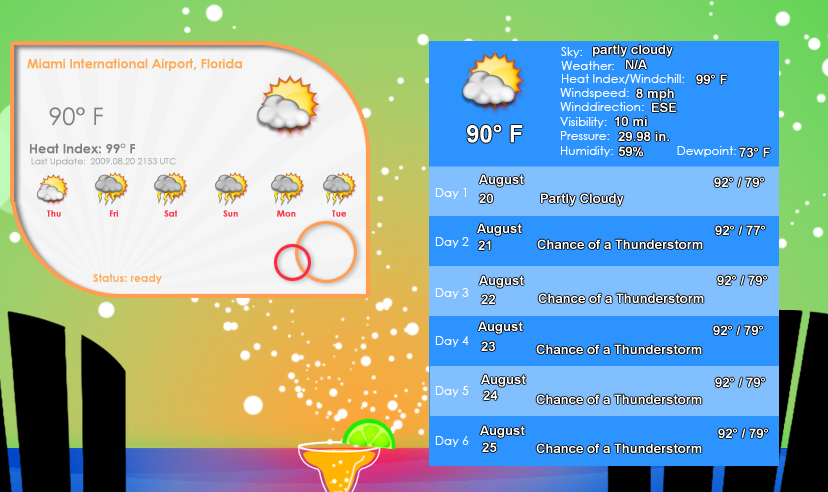
The TWC dxpack is looking like 60% due to the sheer amount of extra information to be included, plus some other scripting things to be done. So, I'm mostly concentrating on the NOAA/wunderground one and trying to write a tutorial for it.
Reply #191 Thursday, August 20, 2009 10:22 PM
[quote]I have written these people. I got their name from a weather sidebar gadget. I wait for their reply.
http://www.wdtinc.com/[/quote]
I got a reply from this guy, we spoke on the phone for a few minutes. He said he'd email me some stuff, nothing yet.


Reply #193 Thursday, August 20, 2009 10:27 PM
sViz loves the IsObject property
Without script errors? 
Reply #194 Thursday, August 20, 2009 11:38 PM
Yes, indeed! The IsObject property will check if an object exists. So the script will only do something to an object if it exists, and it will do nothing if it doesn't. Never had a real use for that property until now.
Reply #195 Friday, August 21, 2009 8:47 PM
Added all the extra information you might want to work into your project and a second temp and weather icon. Anything you don't need you can just delete thanks to the IsObject propert.
sViz loves the IsObject property
Most importantly, everything will be decentralized and unlocked, meaning zero parent/child relations to be mindful of. Objects can go wherever you want to put them.
I'll probably release the left one as a widget, and then both together as a DXPACK. Skinners/authors might want to use the DXPACK.
Reduced 98%
Original 612 x 375
The TWC dxpack is looking like 60% due to the sheer amount of extra information to be included, plus some other scripting things to be done. So, I'm mostly concentrating on the NOAA/wunderground one and trying to write a tutorial for it.
Beautiful work, Master Eve.
Reply #196 Friday, August 21, 2009 8:50 PM
http://www.wdtinc.com/
And more beautiful work by you, Jim. I hope something works out that doesn't require registration and logos. The DX weather widget world is pretty lonely right now.
Reply #197 Saturday, August 22, 2009 4:40 PM
http://www.wdtinc.com/
I got a reply from this guy, we spoke on the phone for a few minutes. He said he'd email me some stuff, nothing yet.
Update:
This is our most recent message.
Hey Jim.
Sorry for the delay….feeds guys is swamped with several deadlines. Haven’t forgotten about you….will get it to you ASAP.
Thanks for the patience.
JT
Reply #198 Saturday, August 22, 2009 4:41 PM
Eve, when I get this, can you help me with it? 

Reply #199 Saturday, August 22, 2009 7:31 PM
Sure. If they deliver the raw data in XML feed format, it should be the same basic procedure as with the other sources. Just have to know their requirements, etc.
Reply #200 Monday, August 31, 2009 7:29 AM
Don't hate me but I have to point out that none of the existing widgets comply the Weather.com's XOAP terms of use regarding advertising links and logo display. I'm not a lawyer and I don't want to be, just don't want Weather.com coming after WC/Stardock with a hammer.
**** spam removed ****
Please login to comment and/or vote for this skin.
Welcome Guest! Please take the time to register with us.
There are many great features available to you once you register, including:
- Richer content, access to many features that are disabled for guests like commenting on the forums and downloading skins.
- Access to a great community, with a massive database of many, many areas of interest.
- Access to contests & subscription offers like exclusive emails.
- It's simple, and FREE!
|
|
Page 10 of 11 | |
|
|---|
Reply #181 Thursday, August 6, 2009 1:33 PM
I wonder why AccuWeather won't let skinners here use their feeds, but they're letting Rainmeter develop skins with their feeds.