



































More Programs Image won't work
Thursday, February 19, 2009 by Imzadi | Discussion: SkinStudio
I've downloaded Skinstudio 6.4 and have been working on a skin. I see that you can now use an image for the More Programs mouseover? Does this not work in XP? I've created an image for the mouseover, and it shows in SKS, but doesn't apply. Just wondering if I'm doing something wrong.
Reply #2 Friday, February 20, 2009 2:50 AM
well it works for XP in SKS 6.3
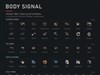
but it requires an image that is half transparent, half with your mouseover image. you can either make an image like mine below that contains both in a single image or make one image completely transparent and one image with your mouse over and import them with the frame builder. I find it easier to include both in a single .png.
normal mouseover

for the purpose of showing you I have made the transparent parts of my image blue. so really the image is 120px wide with the green mouseover being centered in the right 60px and the left 60px are transparent.
this will show your menu background as normal when it opens and then render the mouseover when you mouseover an item.
Tip...as well if you get this problem with your mouseover on menus being cut off on one side, the solution is in the text margins and maybe you may have to reduce the width of your mouseover image a few of pixels to solve it. I had to play with both.
if this doesn't solve your problem then it might be a bug in 6.4


Reply #3 Friday, February 20, 2009 4:01 AM
What you're suggesting doesn't work in 6.4 at least not in the way you're describing it. It doesn't seem to want to recognize a two image (normal/mouseover) image even if I set it for two images in the Image Count. I've tried playing with the margins, reducing the size of the image, moving the text margins in the More Programs image area. It's quite frustrating.

Reply #4 Friday, February 20, 2009 5:35 AM
I think blackcurtian is talking about the start panel item mouseover. the feature you are talking about, Pat is a Vista only feature (notice the vista icon next to the item in sks) 

Reply #5 Friday, February 20, 2009 6:28 AM
The mouseover image for the All Programs panel ONLY works in Vista. So, you are still stuck with the old mouseover color on XP.
Reply #6 Friday, February 20, 2009 2:00 PM
No, I don't see a Vista Icon. But then I have it in tree mode, so maybe it doesn't show?
Thanks jazzymjr, that's helpful. Too bad, but helpful.
Reply #7 Friday, February 20, 2009 3:45 PM
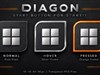
I have mouseovers for the More Programs Button (more programs arrow)
Normal Mouseover Pressed

This was my first thought actually of what you were asking about, but for some reason I decided you were talking about the pop up menu mouseover (maybe because it was like 3am and up with insomnia)
if I was correct and your actually having problems with the more programs button, mine works fine with an image like the above. as you can see it is a 3 place image. the Normal image is the exact same as the more programs background image, the mouseover and pressed images are the same image just as you can see the blue is change to green with another layer overlay in PS. the above 3 place image is placed in More Programs Arrow.
I made it simply by taking my More Program Background image, creating a canvas 3x wider, pasting the background image in 3x, aligning them, and then placing a green button image over the blue with another layer in PS. There are no transparent areas in the image.
If this is not what your talking about could you please post a screen shot of just what area your asking about. Cus if this is not it I am COMLETELY lost as to what your asking (may due to being new to skinning) so a screen shot may help me learn something too.
I would be lost if not this because ALL of my mouseovers concerning the start menu work just fine in XP. My more programs button/arrow, places list and program list, and pop up menus all have mouseover images.
in this thread you can see images of both my normal and mouseover more programs button. However, vStyler suggests NOT using an image like the above for the more programs button. He said it can cause compatiblity issues.

Reply #8 Friday, February 20, 2009 3:58 PM
They are talking about the same area. You are suggesting the old 'workaround' which still works using the arrow as a background image.
Vista now has a section for a mousover image without using the arrow. XP.. does not.
Using the arrow to make an image causes problems on systems not using English lang. OS.
Reply #9 Friday, February 20, 2009 4:08 PM
thanks for clearing that up vStyler. thought I was losing my mind
and I did mention that you had said it can cause compatibility issues.
but that is odd, why does language cause problems with it??? Hmm I will keep that in mind when I actually get good enough at this to release and upload a skin. for now though I am just going to finish mine and make one for my sister to learn a little about what the hell I'm doing....lol
Reply #10 Friday, February 20, 2009 4:37 PM
Most languages have words comprising of more, or less letters in their translation of 'All programs' which pushes the image futher over or back, horizontally, than it would be on an english OS.
Reply #11 Friday, February 20, 2009 5:00 PM
Vista now has a section for a mousover image without using the arrow. XP.. does not.
Personally, I could never get the old workaround to work for me...and, it was a pain in the butt! I found out that it wouldn't work if the All Programs panel had any transparency in it.
I really like the single image now for the mouseover on Vista...that was so easy to do! The blind I just released this week has that feature on it....really cool! 
Reply #13 Friday, February 20, 2009 8:16 PM
Most languages have words comprising of more, or less letters in their translation of 'All programs' which pushes the image futher over or back, horizontally, than it would be on an english OS.
ya that does make a lot of sence, hadn't thought of that.
Reply #14 Wednesday, February 25, 2009 2:44 AM
Well, I tried the skin I'm working on with the More Programs image on my Vista machine, and the image still won't show. Weird.
Reply #15 Wednesday, February 25, 2009 4:37 AM
Check if you have:
WindowBlinds 6.4 (build 123 x86 - Vista Edition)
That's the latest build 
Reply #16 Wednesday, February 25, 2009 6:13 AM
Ditto what 2of3 said about needing WB 6.4. A couple of other suggestions if you do, and the image still won''t show:
The mouseover image has to be a single image. What I did, was use the same graphic as I used for the start menu item, without the transparent area before it.
Make sure you set the text margins for the image and the All Programs panel, so they sync ok.
If it still won't work, you can send me the skin, and I can take a look-see at it. Email me at mjr45rn at aol dot com.

Reply #17 Tuesday, March 10, 2009 12:39 PM

Reply #18 Tuesday, March 10, 2009 6:29 PM
I don't know about why it showed up in XP (it shouldn't), but, the mouseover in Vista only works if the author of the blind added the mouseover image for the More Programs panel.

Please login to comment and/or vote for this skin.
Welcome Guest! Please take the time to register with us.
There are many great features available to you once you register, including:
- Richer content, access to many features that are disabled for guests like commenting on the forums and downloading skins.
- Access to a great community, with a massive database of many, many areas of interest.
- Access to contests & subscription offers like exclusive emails.
- It's simple, and FREE!
Reply #1 Thursday, February 19, 2009 11:14 PM
I see the same thing. The image works fine in Vista, and not in XP.